

Personalized Outbound Strategy
Get The Right Outbound Strategy In Minutes
Enter your email to get a custom plan & stack recommendation for your business
It's being carefully crafted by AI
Please check your mailbox in 5 minutes
Most B2B teams already have thousands of contacts in their CRM. The real challenge is knowing who is actually worth contacting.
Which companies are actively researching solutions? Which accounts are visiting your website? Which prospects match your ICP? Which opportunities should sales prioritize first?
Answering these questions often requires jumping between enrichment tools, intent data providers, website visitor tracking platforms, and CRM reports. GTM intelligence platforms bring these signals together.
They help teams identify target accounts, uncover buying intent, enrich prospect data, and focus outreach on the opportunities most likely to convert.
In this guide, I'll review 10 of the best GTM intelligence platforms for B2B teams, including Forge Stack, Clay, ZoomInfo, 6sense, Apollo, Common Room, Factors.ai, Leadfeeder, Demandbase, and Cognism, so you can find the right platform for your GTM motion.
A GTM intelligence platform is only valuable if it helps teams identify the right accounts and take action on that information. For this guide, I evaluated each platform based on the following criteria:
The platforms in this guide are not ranked by database size or feature count. They are ranked by how effectively they help B2B teams identify, prioritize, and engage the right accounts.
A GTM intelligence platform helps B2B teams figure out which accounts deserve attention before time and budget are wasted on the wrong prospects. Most companies already have access to contact data.
The problem is knowing which accounts are showing buying intent, visiting your website, engaging with your product, researching solutions, or matching your ideal customer profile.
A GTM intelligence platform pulls these signals together and turns them into something sales and marketing teams can actually act on.
For example, instead of giving a sales rep a list of 10,000 contacts, a GTM intelligence platform can highlight the 100 accounts that recently visited your website, match your ICP, and are actively researching solutions in your category.
In my view, that is the biggest difference between a GTM intelligence platform and a traditional data provider. A data provider gives you records. A GTM intelligence platform helps you decide who to prioritize.
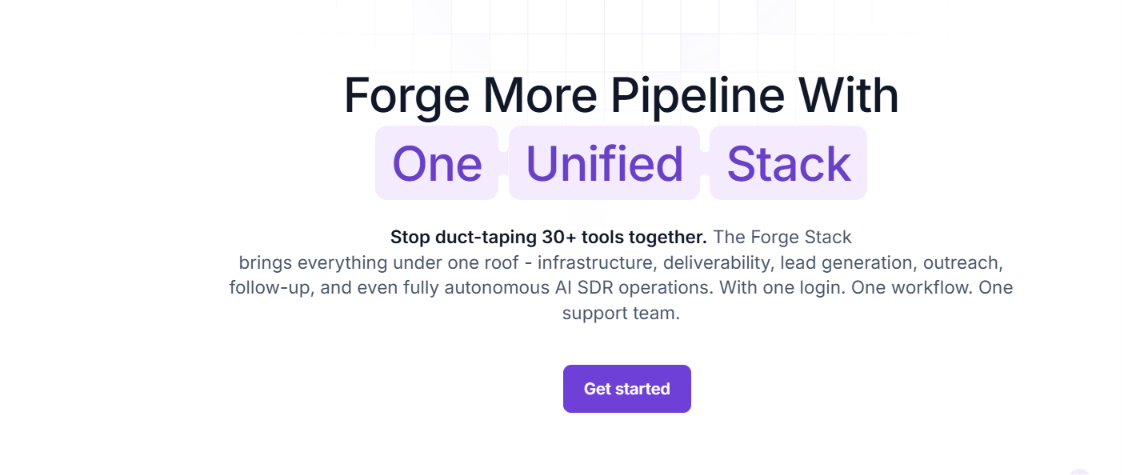
Most GTM intelligence platforms help you find accounts. Forge Stack is one of the few platforms that helps you find accounts and then gives you the infrastructure to contact them. For example, a typical outbound team might use one tool for prospecting, another for enrichment, a separate platform for mailbox infrastructure, another for warmup, and a sales engagement platform for outreach. Forge Stack brings all of those pieces into the same ecosystem.
What stood out to me is that the platform is built around outbound execution rather than just account intelligence. You can generate lead lists through Leadsforge, run outreach through Salesforge, manage deliverability with Warmforge, provision mailboxes through Primeforge or Mailforge, and even automate the SDR workflow with Agent Frank.
The Forge MCP Server extends this even further by connecting the entire Forge ecosystem to AI assistants like Claude, Cursor, and Windsurf. Instead of switching between dashboards, teams can use natural language to find leads, enrich contacts, manage infrastructure, launch outreach, and monitor performance from a single conversational workflow.
From a GTM intelligence perspective, Forge Stack is strongest for teams that do not want intelligence data sitting in dashboards. It is designed for teams that want to move from account discovery to outreach without constantly exporting data between tools.
Forge Stack follows the same process most outbound teams already use. The difference is that each step happens inside the same ecosystem instead of across multiple tools.
The process starts with Leadsforge. You can build prospect lists, enrich company and contact data, generate lookalike audiences, identify buying signals, and even extract competitor followers.

Lead lists can then be refined, segmented, and exported into Salesforge for outreach.
Once prospects are ready, teams can use Primeforge, Mailforge, or Infraforge to create the email infrastructure needed for outbound campaigns. The platform offers Google Workspace mailboxes, Microsoft 365 mailboxes, shared infrastructure, and private infrastructure depending on the team's requirements.
Before sending campaigns, Warmforge helps warm up mailboxes, monitor sender reputation, run inbox placement tests, and identify deliverability issues. This reduces the risk of sending campaigns from unhealthy mailboxes.

Salesforge becomes the operational hub. Teams can run email and LinkedIn sequences, personalize outreach, manage replies, and track campaign performance from a single workspace. Primebox™ also centralizes responses across multiple mailboxes.
For teams that want less manual work, Agent Frank can take over prospecting, enrichment, outreach, follow-ups, reply management, and meeting booking. Instead of supporting reps, the goal is to automate much of the SDR workflow end-to-end.

In practice, Forge Stack moves from prospect discovery to outreach execution and meeting booking without requiring separate prospecting, deliverability, infrastructure, and sales engagement platforms.
Forge Stack is not sold as a single bundle. Each product has its own subscription, allowing teams to start with one product and add additional layers as needed. Some of the entry-level pricing includes:
Primeforge and Mailforge pricing depends on the number of mailbox slots and domains you need. Both platforms also require domains, which are priced separately. Based on the pricing calculator examples, a setup with 25 mailbox slots and 9 domains costs approximately $94/month on Primeforge and $60/month on Mailforge, plus $126/year for domains.
The example Forge Stack configuration shown on the website combines Salesforge Growth, Leadsforge, Primeforge, and Mailforge for an estimated cost of $229/month. One thing I like about the pricing structure is that you do not need to buy the entire ecosystem on day one.
You can start with a single product, such as Leadsforge or Salesforge, and expand into infrastructure, deliverability, or AI SDR automation later if needed. At the same time, teams planning to use multiple Forge products should expect separate subscriptions for each layer of the stack.
Enter your email to get a custom plan & stack recommendation for your business
Please check your mailbox in 5 minutes


Clay is one of the strongest GTM intelligence platforms on the market, but I would not describe it as a traditional prospecting tool. Most prospecting platforms help you find contacts. Clay helps you build systems around contacts.
The platform combines data from 150+ providers, intent signals, AI research, CRM enrichment, workflow automation, and outbound activation in one place. Instead of relying on a single database, Clay uses waterfalls that check multiple providers to improve data coverage and enrichment quality.
What I like most about Clay is its flexibility. You can enrich accounts, track buying signals, monitor job changes, research companies with AI, score leads, update your CRM, build outbound workflows, and trigger actions automatically from the same workspace.
In my opinion, Clay is most valuable when teams use it as the layer that connects data, signals, research, and outbound workflows. That is why it has become popular with RevOps, growth teams, and outbound operators who want more control over how data flows through their GTM stack.
The tradeoff is complexity. Clay is incredibly powerful, but there is a learning curve. Teams looking for a simple "search, export, and send" workflow may find it overwhelming compared to traditional prospecting platforms.
Clay starts by pulling together data from more than 150 providers into a single workspace. Teams can enrich contacts and companies, find emails and phone numbers, track intent signals, monitor job changes, and research accounts using Claygent AI.
Once data is enriched, teams can score accounts, build custom workflows, create high-intent audiences, update CRM records, trigger outreach, sync audiences to advertising platforms, or push data into other GTM tools. A big part of the platform is automation. Using Sculptor and Claygents, teams can create GTM workflows using natural language instead of building everything manually.

Clay offers a free plan alongside paid plans based on actions and data credits.
The free plan includes 100 data credits and 500 actions per month. Launch includes 2,500 data credits and 15,000 actions per month, while Growth includes 6,000 data credits and 40,000 actions per month.
One thing I like about Clay's pricing is that teams can start small and scale usage over time. The downside is that understanding actions, data credits, AI usage, and enrichment costs can take some time for new users.

ZoomInfo is one of the biggest names in GTM intelligence, and for good reason. While many platforms focus on a single area such as enrichment, intent data, or workflow automation, ZoomInfo combines contact data, company intelligence, buying signals, account research, CRM enrichment, workflow automation, and AI-powered account prioritization in one platform.
What I like most about ZoomInfo is the depth of its data. The platform is built around helping GTM teams identify target accounts, find decision-makers, monitor buying intent, track company changes, and prioritize the opportunities most likely to convert.
Instead of simply giving reps more contacts, ZoomInfo tries to tell them who to focus on first. The recent addition of products like GTM Workspace and GTM Studio pushes ZoomInfo further into GTM intelligence.
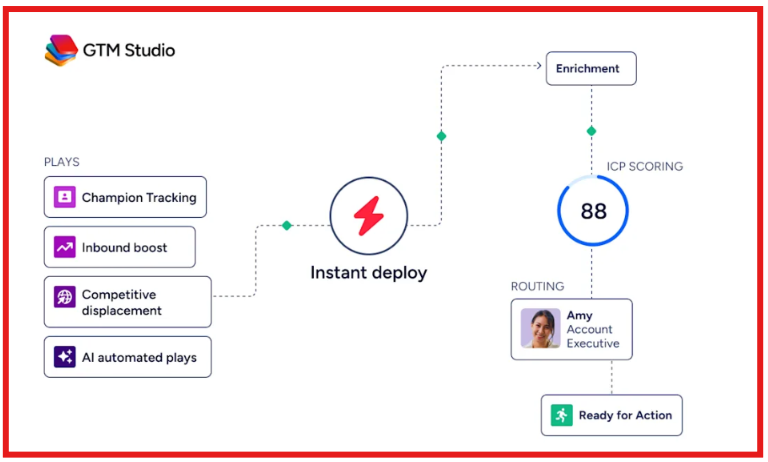
Teams can combine CRM data, buying signals, account activity, AI-generated insights, and workflow automation in a single workspace instead of jumping between multiple systems.
In my opinion, ZoomInfo is strongest for organizations that want a combination of high-volume data, intent signals, account intelligence, and workflow automation in one platform. The tradeoff is that it can be more expensive than many alternatives, especially for smaller teams.
ZoomInfo starts with its database of company and contact information. Teams can search for accounts, find decision-makers, build target lists, and enrich CRM records with verified contact and company data.
The platform then layers in intent signals, website visitor intelligence, job changes, funding events, technology adoption data, buying group insights, and account prioritization. This helps teams identify which accounts are actively researching solutions and deserve immediate attention.
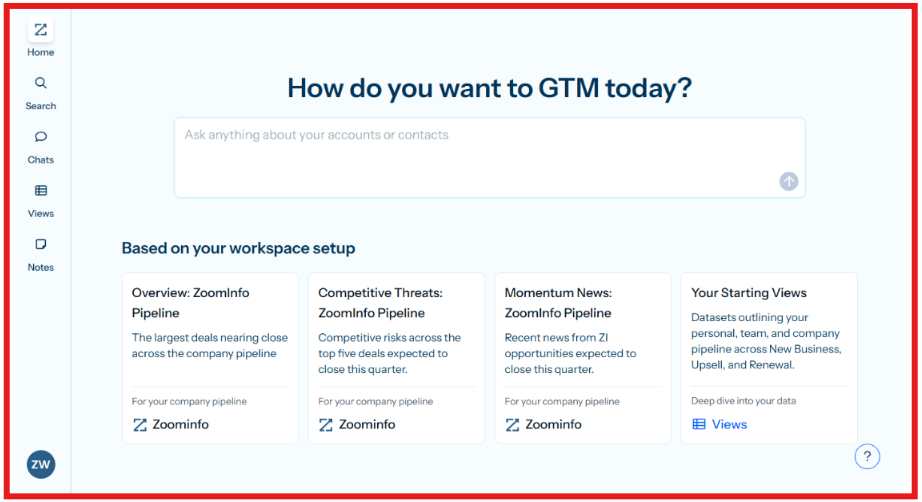
Through GTM Workspace, sellers can view account signals, CRM history, call activity, account research, and AI-generated insights from a single workspace. GTM Studio extends this further by helping teams build audiences, enrich records, automate workflows, create GTM plays, and activate sellers based on real-time signals.
The result is a platform designed to help teams identify, prioritize, and engage the right accounts faster.
ZoomInfo does not publicly disclose exact pricing for most plans. Pricing is based on features, licenses, credit usage, and add-on products. The company currently offers three primary sales packages:
Professional focuses on contact and company data, prospecting, CRM integrations, and AI-powered outreach. Copilot Advanced adds account prioritization, intent signals, website visitors, buying groups, and workflow automation.
Copilot Enterprise adds advanced signals, AI-generated account summaries, advanced reporting, custom intent, and deeper automation capabilities. Because pricing depends on licenses, credits, integrations, and product selection, teams need to speak with ZoomInfo for a custom quote.

6sense is one of the strongest GTM intelligence platforms for identifying accounts that are actively researching a solution before they ever fill out a form or talk to sales. The platform combines intent data, predictive analytics, account intelligence, contact data, website deanonymization, AI agents, and workflow automation into a single system.
Its Signalverse processes huge volumes of buying signals and uses 6AI to predict which accounts are most likely to buy.
What I like most about 6sense is its focus on timing. Instead of simply finding companies that match your criteria, it helps identify when those companies are researching solutions, moving through buying stages, and becoming sales-ready.
In my opinion, 6sense is less of a contact database and more of a revenue intelligence platform. It is built for teams that want to prioritize the right accounts, understand buying behavior, and coordinate sales and marketing around the same signals.
The tradeoff is complexity and cost. 6sense delivers a lot of intelligence, but it is typically best suited for larger GTM teams that can fully use its predictive analytics and workflow capabilities.
6sense collects intent, company, contact, website, and engagement signals through its Signalverse platform. It then uses 6AI to analyze those signals and identify which accounts are researching, how far they are in the buying journey, and which buyers should be prioritized.
Teams can use this intelligence to build target account lists, uncover anonymous website visitors, prioritize sales outreach, trigger campaigns, automate workflows, enrich CRM data, and coordinate sales and marketing activity around accounts showing buying intent.
6sense does not publicly disclose standard pricing. Pricing is typically customized based on products, data access, users, and platform usage. Teams need to contact 6sense directly for a quote.
One thing I like about 6sense is that it goes far beyond contact data by combining intent, predictive analytics, and GTM orchestration. The downside is that pricing can be difficult to evaluate upfront compared to tools with transparent plans.

Common Room is built for GTM teams that care about signals. The platform pulls together buyer activity from places like CRM, product usage, website visits, community, social, GitHub, Slack, sales tools, and other GTM systems. Then it connects those signals to real people and accounts so sales teams can see who is showing interest and why.
This makes Common Room especially useful for product-led, community-led, open-source, and developer-focused companies. These teams often have strong buying signals, but the signals are scattered across too many places.
Common Room’s strength is turning that messy activity into account-level and person-level intelligence. Reps can see who engaged, what they did, whether they fit the ICP, and what action to take next. It is not the tool I would pick if you only need a basic contact database. It is better for teams that already have signals coming from product, community, website, or customer activity and want to turn those signals into pipeline.
Common Room collects signals from more than 50 channels, including CRM, product, social, community, developer, and sales engagement tools. Its Person360™ engine helps enrich and resolve buyer identities, while RoomieAI™ helps with account research, prospect prioritization, message personalization, and outbound plays.
Teams can use Common Room to spot website visitors, track job changes, monitor product activity, identify warm accounts, score contacts, send alerts to reps, and launch workflows based on buying signals. The platform also includes MCP and CLI support, so teams can bring Common Room’s buyer intelligence into AI assistants and custom workflows.

Common Room pricing starts with the Essential plan at $2,500/month, billed annually.
The Essential plan includes 5 seats, up to 100k contacts, 5k RoomieAI research credits, 2.5k Prospector credits, unlimited alerts, workflows, and segments. Advanced and Enterprise plans add more seats, higher contact limits, more RoomieAI and Prospector credits, broader integrations, and stronger support options.
Common Room is not cheap, but that makes sense for the category. It is built for teams that want to operationalize buyer signals across sales and RevOps, not just buy another prospecting list.

Factors.ai is built for teams that care about which accounts are actually showing buying intent right now. While platforms like ZoomInfo focus heavily on data and platforms like Clay focus on enrichment workflows, Factors.ai is more focused on turning account signals into sales and marketing actions.
What stood out to me is that Factors does not stop at showing intent. It connects website activity, ad engagement, account scoring, attribution, sales alerts, and audience activation in one platform. Instead of seeing that an account is active, your team gets context around what the account did and what should happen next.
For ABM teams, this is where Factors is strongest. It helps identify target accounts, track engagement across channels, push audiences into LinkedIn and Meta, measure attribution, and surface high-intent accounts to sales.
I would not use Factors.ai as a primary prospecting database. I would use it to understand which accounts are moving through the buyer journey and where sales and marketing should focus next.
Factors starts by identifying companies visiting your website and combining that information with engagement signals from ads, CRM data, and third-party intent sources. The platform then scores accounts based on engagement, tracks account activity across the buyer journey, and surfaces high-intent accounts to sales teams.
Marketing teams can build audiences, sync them to LinkedIn and Meta, launch ABM campaigns, and measure performance through attribution reporting. For sales teams, Factors provides account timelines, engagement history

Factors.ai offers a free plan alongside custom paid plans.
The Free plan includes website visitor identification, traffic analytics, and alerts. Paid plans add account scoring, engagement tracking, attribution reporting, audience activation, workflows, AI-powered features, and advanced ABM capabilities.
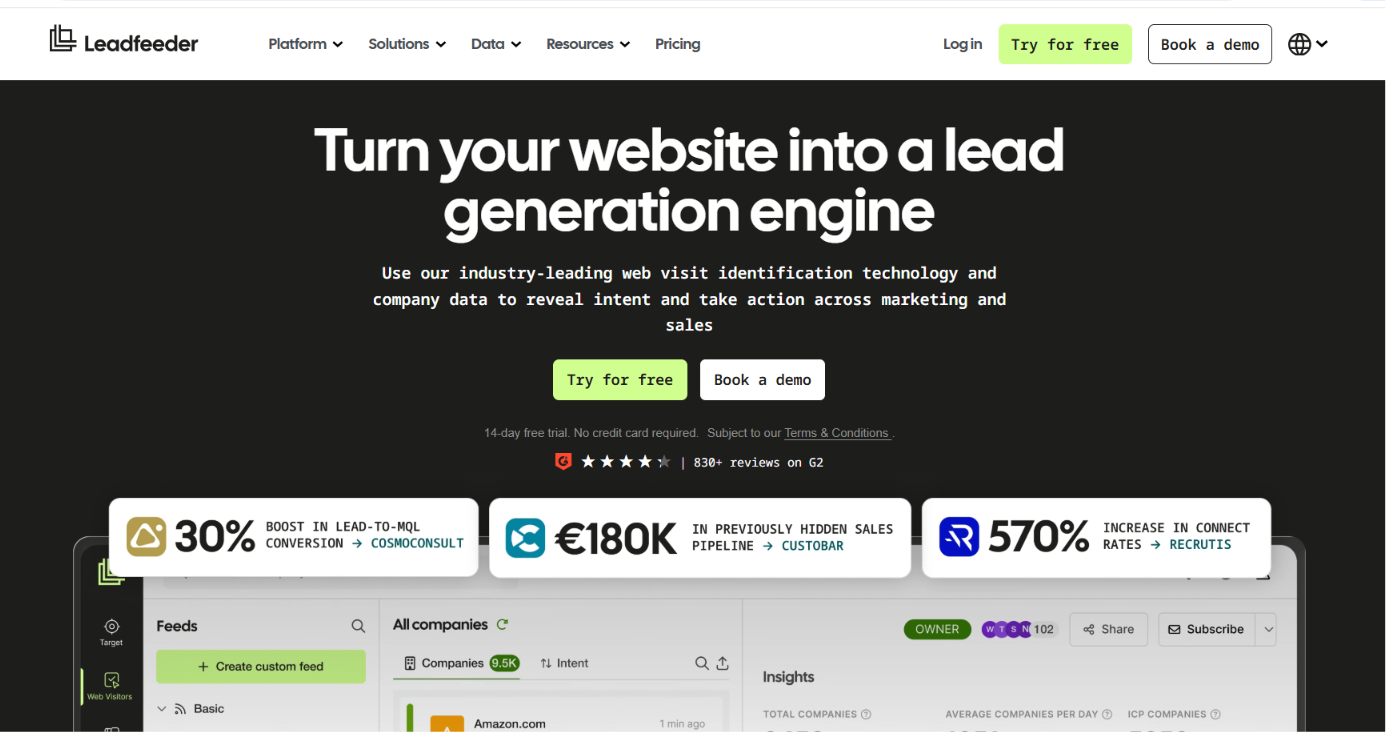
Leadfeeder is best understood as a website visitor intelligence platform. Its main job is to show which companies are visiting your website, what pages they viewed, and whether they look like real buying opportunities.
That makes it different from tools like ZoomInfo or Apollo. Leadfeeder is not trying to be a full sales database first. It starts with your website traffic and helps sales and marketing teams find demand that is already showing interest.
For GTM teams, this is useful because most website visitors never fill out a form. Leadfeeder helps uncover those hidden companies, score them, route them to sales, sync them to your CRM, and use them for follow-up or retargeting.
I would use Leadfeeder when website traffic is already meaningful but sales has no clear way to act on it. If your site gets very little qualified traffic, the value will be limited.
Leadfeeder identifies companies visiting your website and shows visitor behavior such as pages viewed, visit history, and engagement. Teams can then filter visitors by ICP, firmographics, behavior, intent, and other criteria.

Leadfeeder also supports prospect lists from its database of 60M companies and 400M contacts, with 100+ filters for targeting. Once accounts are identified, teams can score and prioritize leads, send alerts, sync data to CRMs like HubSpot, Salesforce, Pipedrive, Zoho, and Microsoft Dynamics, and build B2B display ad campaigns from visitor lists.

Leadfeeder offers three main pricing tiers:
The Lite plan reveals up to 100 companies per month and includes basic company details, up to 20 contacts, and a 7-day view of company visits. The Website Visitor Identification plan adds unlimited company reveals, full company details, unlimited visitor history, lead scoring, CRM sync, alerts, and B2B display ad campaign options.
The Platform plan adds prospecting from a global database of 60M companies and 400M contacts, 100+ filters, AI enrichment, lead prioritization, and embedded CRM company profiles. Leadfeeder also offers a 14-day free trial with no credit card required.

Apollo became popular because it bundled multiple sales tools into one platform. Instead of buying a database, enrichment tool, dialer, sequencer, and basic CRM workflow separately, teams can run most of that inside Apollo. The platform combines prospecting, outreach, enrichment, intent data, lead scoring, calling, and deal management in a single workspace.
What makes Apollo different from platforms like Clay or 6sense is its focus on execution. The product is built around helping reps find prospects and start conversations quickly rather than building complex GTM workflows. For growing sales teams, that simplicity is a major advantage.
A rep can search for prospects, enrich records, launch sequences, make calls, and manage follow-ups without constantly switching tools.
From a GTM intelligence perspective, Apollo sits between traditional sales intelligence and full GTM platforms. It provides account data, buyer signals, enrichment, automation, and outreach capabilities, but remains much easier to operate than platforms built primarily for RevOps teams.
Apollo starts with its contact and company database. Teams can search for prospects using firmographic filters, intent signals, technologies, job titles, hiring activity, funding events, and other buying indicators.
Once prospects are identified, Apollo can enrich contact records, score leads, sync data to CRMs, and push contacts into outreach sequences.

The platform also supports email campaigns, calling, meeting scheduling, workflow automation, AI research, and sales engagement from the same workspace. Apollo also includes intent data, waterfall enrichment, AI research, lead scoring, deliverability tools, email warmup, and multichannel outreach workflows.

The Basic plan includes 2,500 credits per user monthly, while Professional includes 4,000 credits and adds automation, unlimited mailboxes, call intelligence, and advanced reporting. Organization adds more intent topics, security controls, SSO, and custom reporting.
Demandbase focuses on account-based marketing, account intelligence, and pipeline generation. The platform helps GTM teams identify accounts showing buying activity, understand which stakeholders are involved, and coordinate sales and marketing efforts around the same opportunities.
Instead of looking at isolated intent signals, Demandbase combines account data, buying group insights, engagement activity, advertising, and analytics into a single system. Teams can see which accounts are moving toward a purchase, engage them across multiple channels, and measure how those activities influence pipeline.
From a GTM intelligence perspective, Demandbase is designed for organizations that run account-centric go-to-market motions. It gives sales, marketing, and revenue teams a shared view of accounts, buying groups, engagement, and pipeline performance.
Demandbase collects first-party, third-party, and engagement signals to identify accounts that are actively researching solutions. The platform then uses AI to prioritize those accounts based on fit, intent, buying activity, and revenue potential.
Teams can build target account lists, identify buying groups, launch account-based advertising campaigns, personalize website experiences, and coordinate sales outreach from the same platform. Demandbase also provides account scoring, journey analytics, predictive models, intent data, and pipeline measurement tools.
The platform integrates with CRM, sales engagement, advertising, and marketing systems so account activity stays connected across the entire revenue process. This helps teams understand which accounts are engaging, what content they consume, and how those interactions influence opportunities and revenue.
Demandbase does not publish fixed pricing on its website. Pricing is customized based on factors such as:
Demandbase offers:
Unlike tools such as Apollo or Leadfeeder, Demandbase uses a custom quote model, so teams need to contact sales for a tailored proposal. From my experience, Demandbase is typically evaluated by mid-market and enterprise companies running serious ABM programs rather than smaller teams looking for a low-cost prospecting tool.

Cognism is a B2B data platform built around prospecting, enrichment, and sales intelligence. The platform is particularly strong for teams selling into Europe and EMEA markets, where data coverage and compliance are often major concerns.
What stands out about Cognism is its focus on data quality. Instead of only providing contact records, it combines company data, phone-verified mobile numbers, intent signals, hiring data, funding alerts, technographics, CRM enrichment, and data delivery services in one platform.
Teams can use it to find decision-makers, enrich CRM records, identify buying signals, and prioritize accounts that are actively researching solutions.
For organizations that rely heavily on outbound sales, Cognism helps reduce time spent researching contacts and improves the chances of reaching the right people. The addition of Diamond Data®, phone-verified mobile numbers, is one of the platform's biggest differentiators and is designed to improve connect rates compared to standard contact databases.
Cognism starts with its database of contacts and companies. Users can search using firmographic filters, technographics, job titles, hiring activity, funding events, intent signals, and other account attributes.
The platform also includes AI-powered search, AI company research, persona creation, CRM enrichment, CSV enrichment, and Data-as-a-Service options for companies that want data delivered directly into internal systems.
For prospecting teams, Cognism provides contact data, verified emails, phone-verified mobile numbers, buying signals, and account intelligence. For RevOps and data teams, it offers enrichment, API access, CRM maintenance, and bulk data delivery workflows.
One area where Cognism places significant emphasis is compliance. The platform cross-checks data against multiple global Do-Not-Call lists and maintains GDPR and CCPA compliance frameworks for data collection and processing.
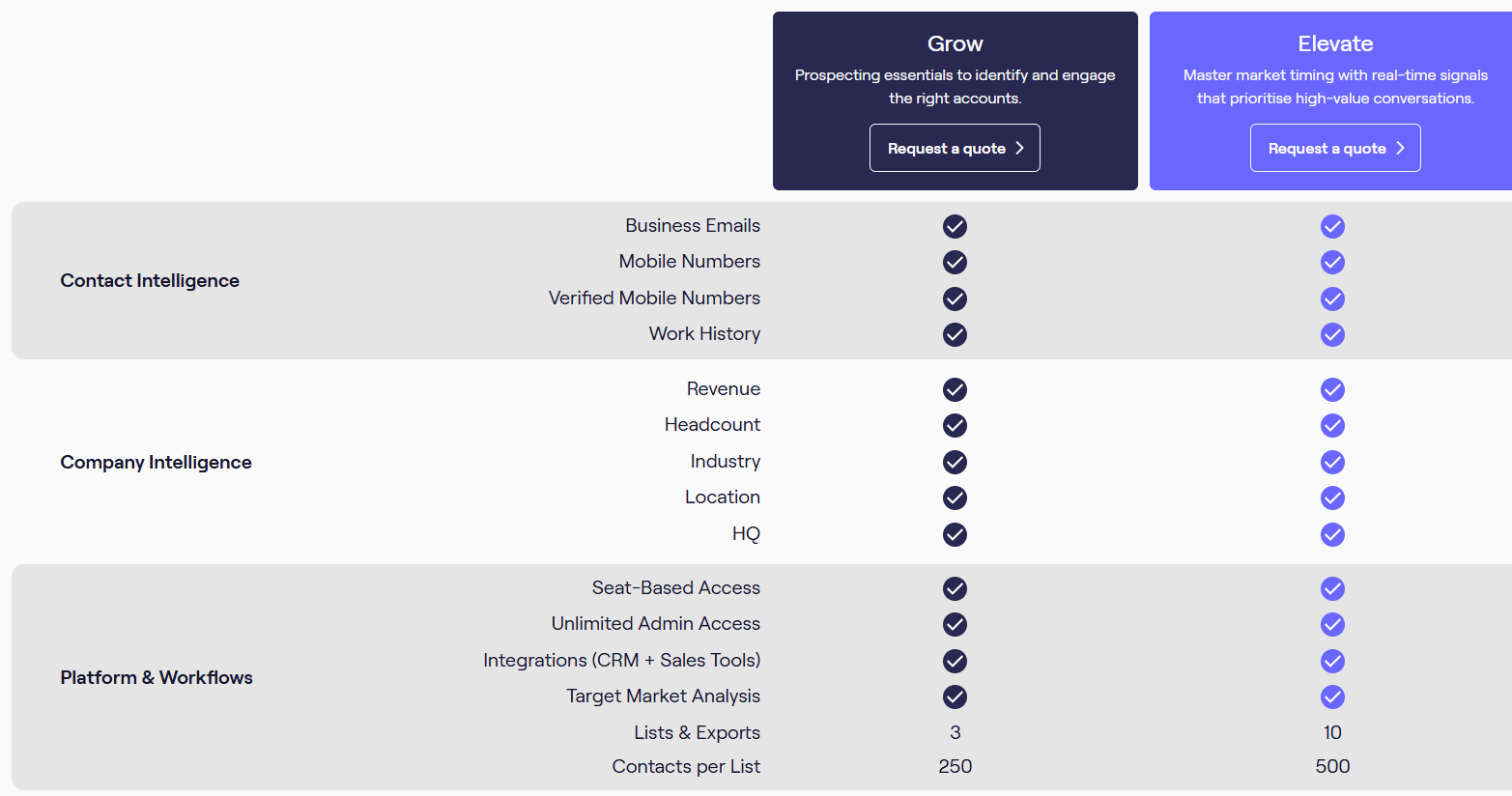
The Standard plan includes core prospecting capabilities, AI company research, AI search, CSV enrichment, and contact/company data. The Pro plan adds intent data, premium mobile filters, on-demand mobile verification, enhanced targeting capabilities, and additional prospecting features.
CRM Enrichment and Data-as-a-Service can be purchased as standalone products or added to either package. Pricing is customized based on team size, usage requirements, and data needs, so companies need to contact Cognism directly for a quote.
Choosing the right GTM intelligence platform depends on what problem you're trying to solve. Some platforms focus on account intelligence and intent signals. Others specialize in sales data, prospecting, enrichment, or AI-powered research. The best choice is usually the one that fits your GTM motion, team size, and workflow.
For most outbound teams, a combination of a prospecting platform and an execution platform works best. If your goal is simply finding qualified prospects, Leadsforge is often the easiest place to start. If your team needs deeper account intelligence, intent data, and enterprise GTM coordination, platforms like 6sense, Demandbase, Cognism, and ZoomInfo are stronger options.
Enter your email to get a custom plan & stack recommendation for your business
Please check your mailbox in 5 minutes
GTM intelligence is only valuable if it helps you create pipeline. Finding buying signals, identifying target accounts, and enriching data are important, but revenue teams still need a way to turn those insights into conversations and meetings.
If you want a complete outbound system instead of a collection of disconnected tools, the Forge Stack is worth considering. It combines prospecting, enrichment, outreach, deliverability, mailbox infrastructure, AI SDR automation, and MCP-powered workflows into one connected ecosystem.
This allows teams to move from account discovery to outbound execution without constantly switching between platforms.
And if your biggest challenge is finding the right prospects in the first place, start with Leadsforge. It helps you build targeted prospect lists, find lookalike companies, enrich contacts, and uncover new opportunities faster, giving your team a stronger pipeline to work from before outreach even begins.
Try Leadsforge now!