Here's something most sales teams completely overlook.
Your competitors have already done the hardest part of your job for you. Their LinkedIn followers have raised their hand and said, "Yes, I care about this type of solution."
These aren't random people. They're problem-aware prospects actively interested in your solution category.
I learned this the hard way. Early in my outreach days, I spent weeks building cold lists from scratch — filtering by industry, job title, company size — only to get dismal response rates.
Then I ran a small experiment: I targeted people following a competitor's LinkedIn page instead. The difference was night and day. Response rates jumped nearly 3x compared to my standard cold lists.
That experience changed how I think about prospecting entirely.
But here's the catch. LinkedIn doesn't let you see who follows a company page — not your competitors' page, not even your own. They make billions keeping this data locked behind Sales Navigator and ads.
That's exactly why you need to learn how to scrape LinkedIn company followers.
In this guide, I'll walk you through 5 proven methods to extract competitor follower data from LinkedIn — so you can skip the guesswork and reach people who already get what you sell.
Before you start scraping anything, you need to understand what LinkedIn actually gives you.
And more importantly, what it doesn't.
Let's start with what's publicly visible on any LinkedIn profile.
When you visit someone's profile, you can see their full name, job title, current company, location, industry, and their LinkedIn profile URL.
That's useful.
But you won't find their email address, phone numbers, or any private contact information anywhere. LinkedIn keeps that locked away.
If you're an admin of a company page, LinkedIn gives you access to follower analytics. But this data is completely aggregated. You'll see pie charts and bar graphs showing job functions, seniority levels, industries, company sizes, and geographic locations.
It tells you that 30% of your followers work in marketing. Or that 15% are VPs. But it never tells you who those people actually are. No names. No profiles. Nothing you can actually use for outreach.
And that "Export Followers" button in your company page dashboard? I know it looks promising.
But all it gives you is a spreadsheet with daily follower count numbers. Organic followers gained on Monday. Sponsored followers gained on Tuesday. Just numbers. Not names.
So if LinkedIn won't hand you the data, where does it come from?
That's where enrichment tools enter the picture.
But here's the key takeaway.
No single method gives you a complete, outreach-ready lead list in one step.
The real workflow looks like this: identify the followers, extract their profile data, enrich that data with contact information, verify everything, then launch your outreach.
It's a multi-step process. But once you set it up, it runs like a machine.
There’s no single “right” way to scrape LinkedIn company followers. While manual prospecting involves reviewing and recording information from public profiles by hand, this process is slow and error-prone.
In contrast, using LinkedIn automation tools can help you export company follower data efficiently, making it easier to integrate with your lead generation or outreach efforts.
Manual prospecting is only practical for small datasets, as manually reviewing profiles is time-consuming and not scalable.
The best one for you depends on your budget, your risk tolerance, and how many followers you need to extract.
I’ll walk you through all five methods.
Leadsforge is an AI-powered lead generation tool built by Salesforge.
It works differently from the Sales Navigator workaround. Instead of requiring you to set up a secondary account and manually export data, you just enter a competitor's domain and Leadsforge does the rest.
Here's how it works.
First, you need to create a free account on Leadsforge. It offers 100 free credits.
Then you click on the “Followers” feature.
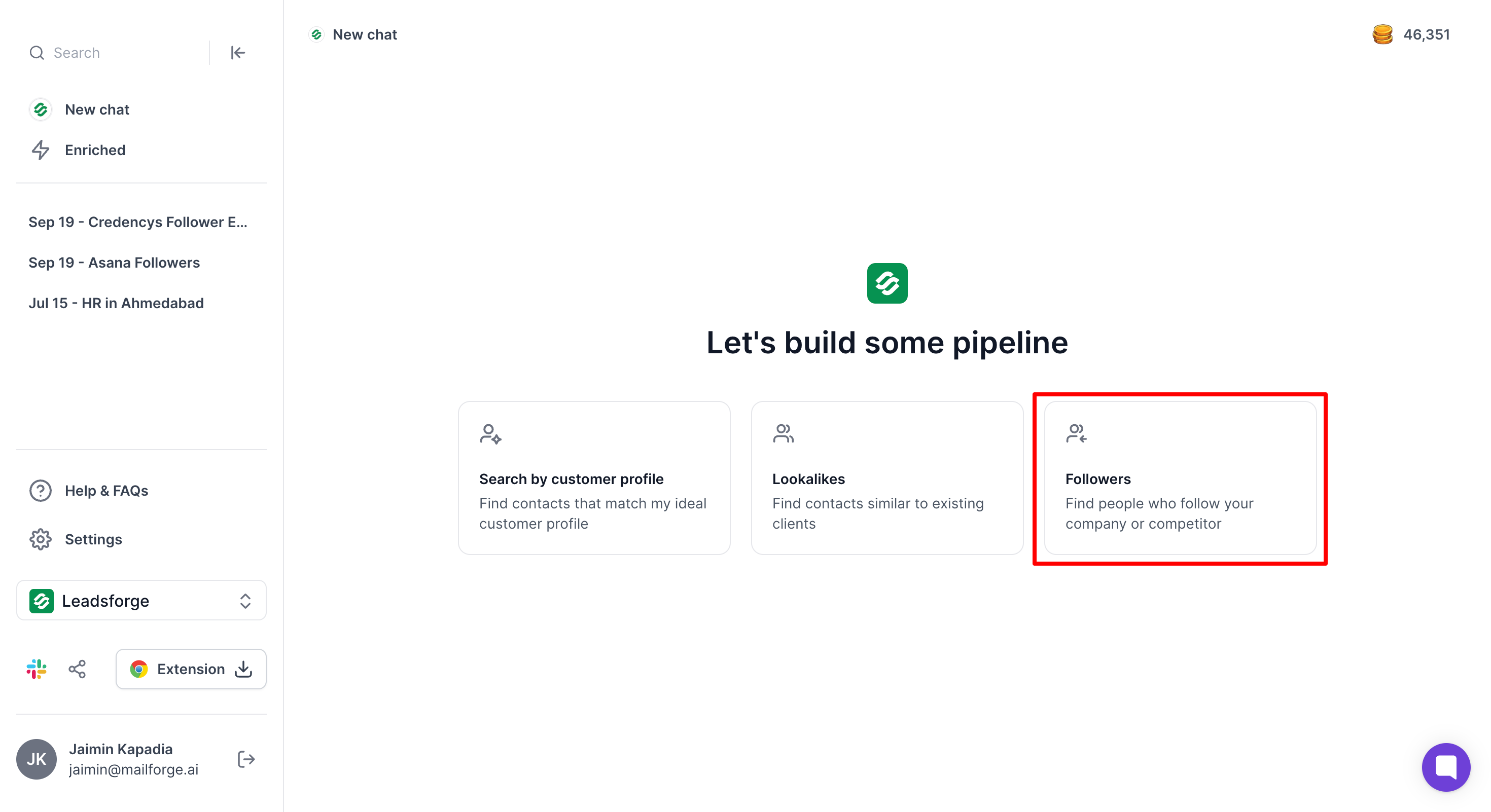
You type in your competitor's LinkedIn company page URL.
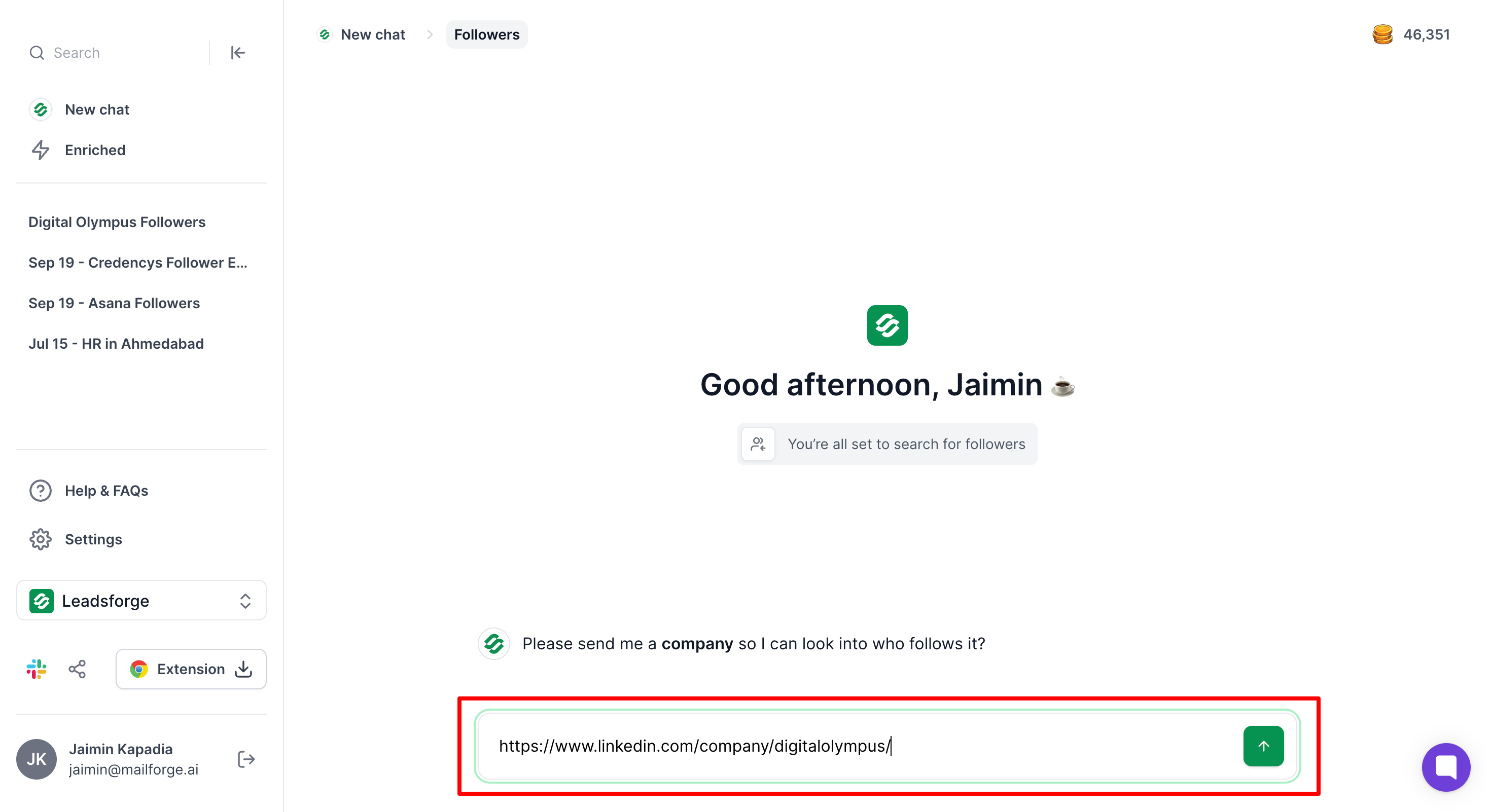
Leadsforge identifies their LinkedIn company page followers and returns a list with full LinkedIn profile URLs.
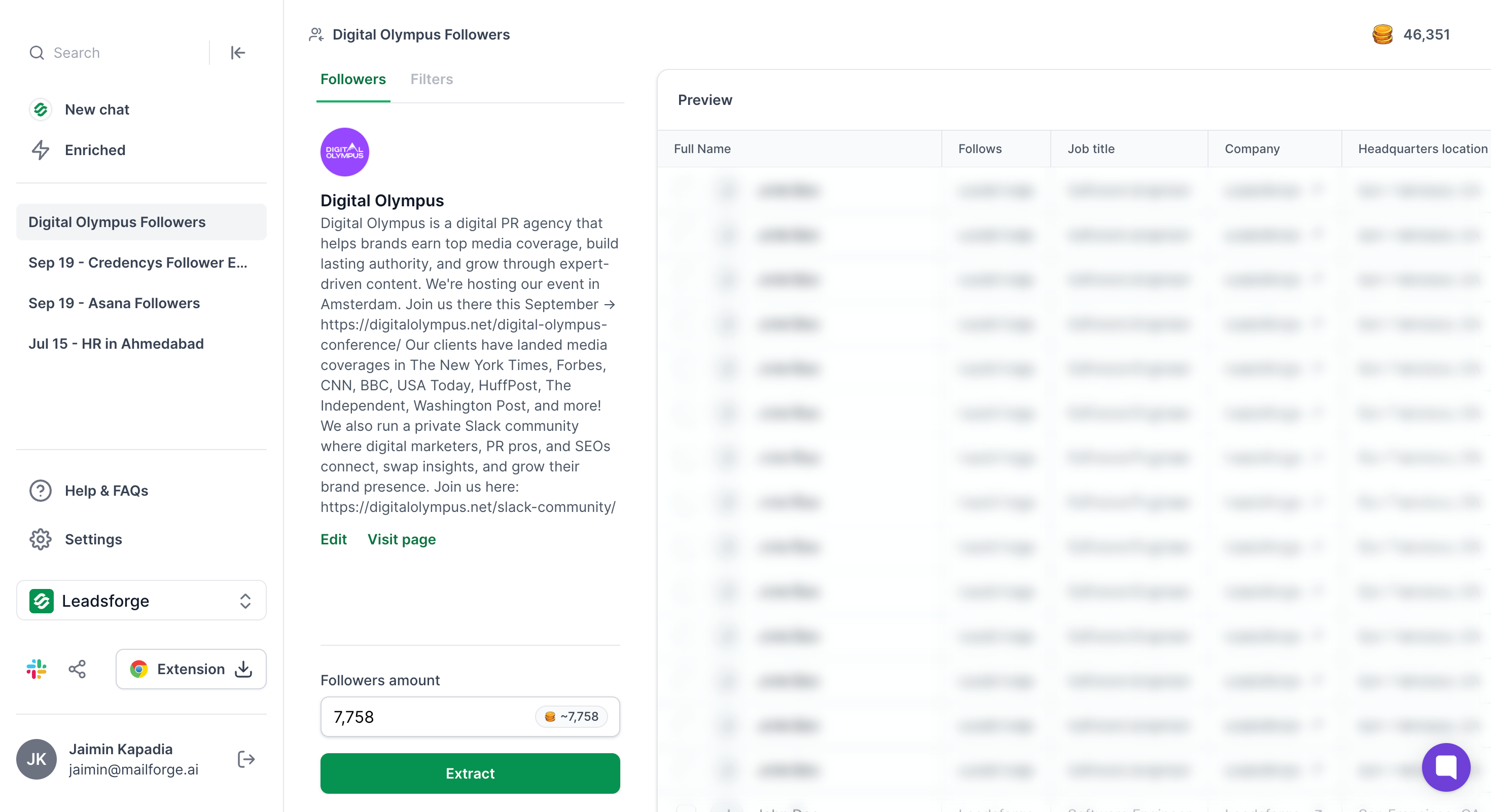
From there, you can enrich those profiles with verified email addresses, phone numbers, and company data in one click.
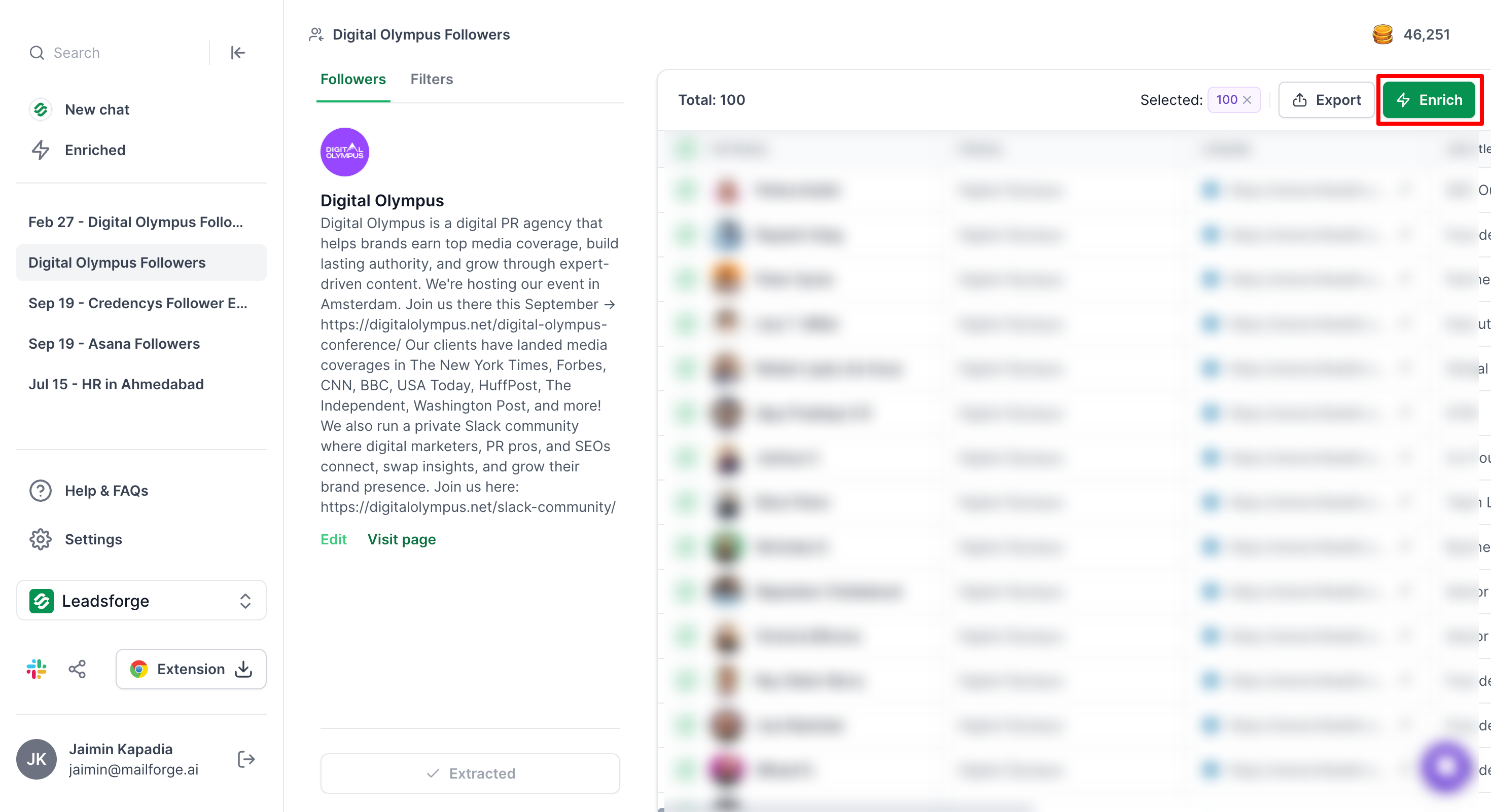
Then you export to CSV or push the leads directly into Salesforge for outreach.
That's it.
No Sales Navigator subscription required. No secondary LinkedIn account. No Chrome extensions. No technical setup.
The pricing is straightforward too. It's $49 per month for 2,000 credits. One company follower plus their LinkedIn URL equals one credit.
And here's something most competitors don't offer: your credits never expire. You also get 100 free credits when you sign up, no credit card required.
Compare that to the Sales Navigator method, where you're paying $99.99 per month for Sales Nav, plus another $9 to $69 per month for an export tool like Evaboot, plus another tool for email enrichment. The costs add up fast.
But the real advantage is the stack.
Once your leads are in Leadsforge, you can push them directly into Salesforge for multi-channel outreach. Then use Warmforge to keep your email deliverability in check.
It's one platform from follower identification to booked meetings.
The workflow looks like this: Leadsforge (find and enrich leads) into Salesforge (launch personalized sequences) into Warmforge (protect deliverability). No stitching together five different tools.
This is the method you’ll see recommended most often. And for good reason. It works.
Here’s the basic idea. LinkedIn Sales Navigator has a filter called “Following your company” under Buyer Intent.
It shows you every LinkedIn member who follows the company listed as your current employer.
The trick? You list the competitor’s company as your current employer on a secondary LinkedIn account. Then Sales Navigator shows you their followers instead of yours.
Here’s how to do it step by step.
After you have your enriched list, you can begin your outreach. Personalized outreach to these leads, using the comprehensive data and engagement signals you've gathered, can drive higher response rates and improve your conversion effectiveness.
The downside?
You need a Sales Navigator subscription ($99.99 per month minimum). And using a secondary account with a fake employer carries some risk.
LinkedIn’s terms of service don’t love this approach.
PhantomBuster has a tool called the LinkedIn Company Follower Collector.
This tool allows you to download the follower list, including new followers, from your LinkedIn company page. You must be an admin of the company page or use the admin's Session Cookie to download followers.
The LinkedIn Company Follower Collector can extract up to 10,000 followers from your company page in a single run and processes one company page at a time to avoid triggering LinkedIn restrictions. It’s fast—about 45 seconds per 800 followers.
But there’s a big catch.
It only works for company pages where you have admin access. That means you can use it to extract followers from your own company page, but not from competitors.
If you want to use PhantomBuster for competitor data, you’ll need to use their Sales Navigator Search Export phantom instead. That’s essentially the same workflow as Method 1, just automated through PhantomBuster’s cloud-based system.
The best use case for the Follower Collector? Extracting your own company’s follower list for retention campaigns, upsell sequences, or customer success outreach, and tracking new followers for targeted engagement.
It’s great for that. Just don’t expect it to work for competitive intelligence out of the box.
Pricing starts at $56 per month on the annual plan.
This one’s a bit different. Instead of scraping followers directly, you scrape the people who are actively engaging with your competitors’ posts.
For example, someone who likes, comments on, or shares a competitor’s LinkedIn post isn’t just a passive follower. They’re actively paying attention. That makes them warmer than someone who hit “Follow” six months ago and forgot about it.
Here’s the workflow.
Follow your top competitors’ company pages.
Monitor their posts for high engagement (lots of likes, comments, shares). Engaging with high intent leads who interact with competitor content can help you prioritize prospects most likely to convert.
Then use a tool like PhantomBuster’s Post Commenter and Liker Scraper or Apify’s LinkedIn Post Scraper to extract the profiles of everyone who engaged.
Once you have those profiles, enrich them with email addresses and reach out. Using enriched data increases the value of your outreach by enabling more personalized engagement strategies.
The best part? You can reference the specific post in your outreach.
Something like, “I saw your comment on [Competitor]’s post about [topic]. Thought you might find this interesting…”
That kind of personalization works. Automated engagement campaigns can also convert passive followers into active conversations by reaching out to those who have shown interest in your brand.
The downside is that this method gives you smaller datasets than scraping full follower lists. And it requires ongoing monitoring. You can’t just set it and forget it.
No Sales Navigator subscription is required for this method.
This is an underrated method that most people overlook.
When competitors host webinars, workshops, or networking events on LinkedIn, the attendee lists are often visible. And those attendees are some of the most qualified leads you’ll find.
They signed up for a competitor’s event about a topic directly related to your solution. That’s about as warm as it gets.
You can use PhantomBuster’s LinkedIn Event Attendees Export or Evaboot to scrape these attendee lists. Then follow the same enrichment and outreach workflow.
For effective business outreach, it's crucial to find and verify professional email addresses of these attendees.
The key is to stay on top of your competitors’ event schedules. Follow their company pages and turn on notifications so you know when they announce new events.
This method won’t give you thousands of leads at once. But the conversion rates on these leads tend to be significantly higher because the intent signal is so strong.
This is the section most blogs skip entirely. And I get why. It’s not as exciting as talking about tools and tactics.
But if you’re going to scrape LinkedIn data—especially if you’re considering scraping competitor's followers or followers data—you need to understand the legal landscape.
LinkedIn strictly restricts direct access to a company's or competitor's followers list, and scraping this information is against their policies. The risks are real, and they’ve gotten more serious in the past year.
Let me break it down.
Let's start with the basics. LinkedIn's Terms of Service explicitly prohibit scraping.
Section 8.2 says you cannot "develop, support or use software, devices, scripts, robots or any other means or processes (including crawlers, browser plugins and add-ons or any other technology) to scrape the Services."
That's pretty clear. LinkedIn doesn't want you using any third-party tool to extract data from their platform. Period.
They've also published a separate page on automated activity that says, "We don't permit the use of any third party software, including crawlers, bots, browser plug-ins, or browser extensions" to automate LinkedIn activity.
The consequences? Account restriction or a permanent ban. And in some cases, LinkedIn takes it further than just banning your account. They sue.
The legal picture gets even more complex when you factor in data privacy regulations.
Under GDPR (which applies if you're targeting anyone in the EU), scraped personal data counts as "processing." That means you need a lawful basis for collecting and using it.
Violations can result in fines of up to 20 million euros or 4% of global annual revenue, whichever is higher.
Under CCPA (for California residents), you're required to be transparent about your data collection practices and honor opt-out and deletion requests from anyone whose data you've collected.
And if you're sending cold emails to your scraped leads, CAN-SPAM requires an unsubscribe link in every message. Penalties run up to $50,120 per violating email.
That adds up fast if you're sending at scale.
I don't want to scare you away from this strategy entirely.
Competitor follower data is incredibly valuable for sales teams. But you need to be smart about how you collect and use it.
Here are five practical steps to reduce your risk.
If you think of the risk as a spectrum, it looks something like this. The official LinkedIn API sits on the safest end. Then Leadsforge's proprietary database. Then manual Sales Navigator exports.
Then automated scraping tools. And at the far end, creating fake accounts. That's where things get dangerous.
Stay on the safer side of that spectrum, and you can use competitor follower data without losing sleep.
Here’s the thing about scraping LinkedIn company followers. No single tool does everything you need, especially when it comes to exporting company followers data, enriching it with details like company name, and leveraging these insights for audience engagement.
Most workflows combine at least two or three tools. One to extract the followers data from your LinkedIn company page, another to enrich it with emails, phone numbers, and company name, and a third to run the actual outreach. Some tools try to cover multiple steps, but very few handle the entire pipeline from export company data to outreach and CRM enrichment.
That’s why choosing the right tool (or combination of tools) matters so much for building and engaging your audience.
Pick wrong, and you’ll waste months stitching together a workflow that doesn’t scale.
I’ve put together a full comparison of every major tool in this space, with current pricing, so you can make an informed decision.
It depends on what matters most to you.
If you want simplicity and built-in enrichment in one step, go with Leadsforge.
It's $49 per month, no Sales Navigator required, credits never expire, and it connects directly to Salesforge for outreach. It's the fastest path from "I need competitor follower data" to "I'm sending personalized emails."
If you already have a Sales Navigator subscription, Evaboot is the easiest add-on. It does one thing (exporting Sales Nav searches) and does it well.
If you have developers on your team and want API-level control, Apify is the way to go.
One last thing. Whatever tool you pick for extraction, make sure your enrichment and outreach tools play nicely together. The fewer manual steps between "scrape the data" and "send the email," the better your results will be.
That's why an integrated stack like Salesforge (Leadsforge plus Salesforge plus Warmforge) has a real advantage over stitching together four or five separate tools.
You’ve now seen five methods and nine tools for turning competitor follower data into real pipeline.
But knowledge without action is just trivia.
If you want the fastest and most affordable way to do all of this, Leadsforge makes the entire process simple.
Enter a competitor’s domain. Get their followers with verified emails and phone numbers. Push the leads directly into Salesforge for outreach.
No Sales Navigator subscription. No secondary LinkedIn accounts. No stitching together four different tools.
It’s $49 per month. Credits never expire. And the full Salesforge ecosystem (Leadsforge, Salesforge, Warmforge) gives you everything from lead extraction to email deliverability under one roof.
Start your free 14-day trial today and get 100 free credits. No credit card required.
Enter your top competitor’s domain and see their followers in minutes.
No. LinkedIn doesn't display individual follower names on any company page. Even admins only see aggregate demographics like job functions and seniority levels. To see individual followers, you need Sales Navigator's "Following your company" filter or a tool like Leadsforge.
It's complicated. The 2022 Ninth Circuit ruling confirmed that scraping public data doesn't violate the CFAA, but it does violate LinkedIn's Terms of Service. LinkedIn actively sues scrapers and shut down Proxycurl in 2025, so the breach of contract risk is real.
Not through LinkedIn directly. The native export only gives you aggregate follower count metrics, not individual profiles. You need a third-party tool like Leadsforge, Evaboot (with Sales Navigator), or a done-for-you service like Scrapeli.io.
It ranges from free (100 Leadsforge credits on signup) to $5.50 per 1,000 followers for done-for-you services. Most DIY workflows cost between $49 and $169 per month depending on the tools you choose.
For all-in-one simplicity, Leadsforge at $49 per month. For Sales Navigator users, Evaboot starts at $9 per month. For multi-platform automation, PhantomBuster at $56 per month.
The safe limit is around 500 profiles per day per account and under 2,500 total requests per day. Going above those thresholds significantly increases your chances of getting flagged or banned.
Directly from LinkedIn, you get name, job title, company, location, industry, and profile URL. With enrichment tools, you can add verified emails, phone numbers, company revenue, team size, and tech stack data.

