Custom workflow automation in sales simplifies how leads move through your pipeline by automating repetitive tasks and enhancing efficiency. Unlike generic systems, custom workflows are tailored to your specific sales processes, ensuring timely and personalized interactions. Here's what you need to know:
Sales reps often spend over half their day on tasks unrelated to selling - things like manual data entry and updating CRM records. Custom workflow automation tackles these inefficiencies by automating processes such as lead routing, data enrichment, follow-ups, and CRM updates. For instance, when a lead reaches a certain score, the system notifies the right rep, creates follow-up tasks, and updates records automatically.
The results are immediate and measurable. Tasks like verifying emails, enriching contact data, and routing leads take seconds instead of hours. According to industry research, sales automation can boost sales productivity by 14.5% and cut marketing overhead by 12.2% when applied effectively. This allows reps to focus on high-impact activities like discovery calls and deal negotiations, rather than wasting time switching between tools or manually transferring data.
Platforms such as Leadsforge streamline the entire prospecting process. Teams can describe their ideal customer profile in plain language, and the platform generates verified lead lists enriched with details like emails, LinkedIn profiles, and phone numbers - sourced from multiple databases. This multi-source approach ensures higher match rates compared to single-source tools. The leads can then be fed directly into multi-channel outreach campaigns without the hassle of manual imports or spreadsheets. By using tools like Leadsforge, sales teams can speed up data processing and maintain a steady, reliable sales pipeline.
Automation doesn’t just save time - it completely reshapes how leads are managed. For example, when a prospect visits your pricing page or downloads a whitepaper, the system instantly boosts their lead score, flags them as high-priority, and triggers a personalized follow-up. This real-time, behavior-driven engagement significantly increases conversion rates because reps can connect with prospects exactly when they’re most interested.
AI-powered scoring models take it a step further by analyzing both firmographic data (like company size, industry, and tech stack) and behavioral cues (such as page visits, email opens, and content downloads). Companies using these advanced scoring systems report 20–30% higher conversion rates compared to those relying on manual or rule-based methods. Additionally, nurtured leads - those guided through automated sequences - tend to make 47% larger purchases than leads that aren’t nurtured.
This creates a more efficient sales funnel. Automated lead management and nurturing can drive 10–30% more revenue from the same pool of leads, especially in B2B sales. Paired with smart routing and scoring rules, automation ensures reps spend their time on the most qualified, ready-to-buy prospects instead of wasting effort on cold leads.
As your team grows, managing an increasing number of leads manually becomes chaotic - handoffs get messy, leads slip through the cracks, and delays slow everything down. Custom workflow automation solves these issues by managing larger lead volumes and opportunities without requiring additional staff. With automated routing, pipeline updates, and follow-up schedules, one rep can handle significantly more accounts.
Automation also brings consistency to your processes, which is essential for scaling. New reps can quickly close deals when they follow established, automated workflows instead of starting from scratch. Whether dealing with 100 leads or 10,000, the system applies the same rules and actions, ensuring no one gets overwhelmed or duplicates efforts. This kind of standardized, repeatable process enables B2B teams to grow revenue faster than they grow their headcount.
Tools like ZoomInfo Engage and Apollo.io help B2B teams scale by automating workflows and playbooks. These tools use triggers based on behavioral and firmographic data - like page visits, job title changes, or company size thresholds - to launch sequences, assign tasks, and route leads. This allows teams to expand outbound efforts and build pipelines without adding more SDRs. When combined with AI-driven enrichment and intent tracking, these systems create a scalable, efficient sales engine.
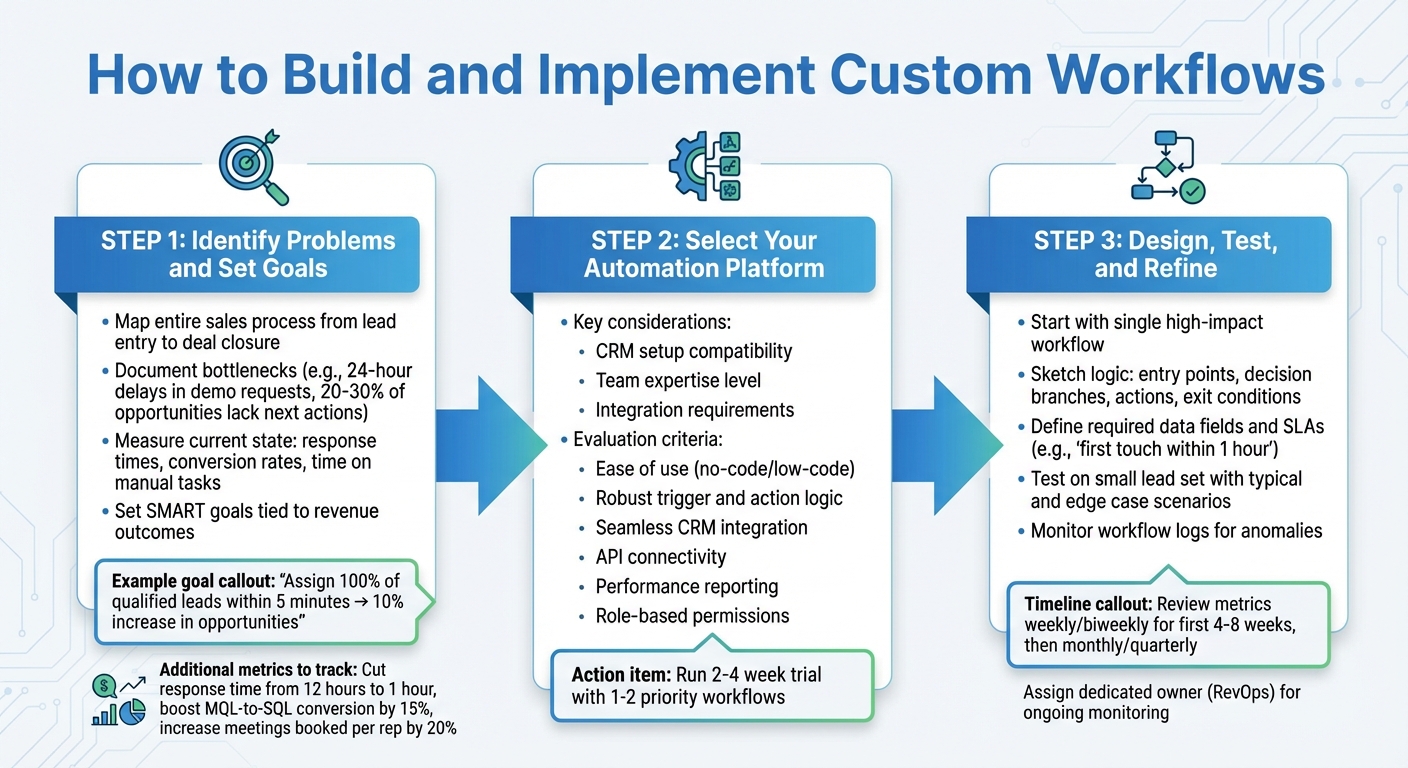
3-Step Process for Building Custom Sales Workflow Automation
Start by mapping out your entire sales process, from the moment a lead enters the pipeline to when the deal is closed. Document every stage, handoff, and decision point. This helps you uncover bottlenecks, like delays in follow-ups or unclear next steps. For example, if demo requests are sitting idle for over 24 hours or 20–30% of opportunities lack defined next actions, these are areas where automation can make a difference.
Next, measure the current state of these problem areas. Track response times, conversion rates between stages, and time spent on manual tasks like data entry or lead assignments. Use this data to set SMART goals that tie directly to revenue outcomes. For instance, if manual lead assignment is slowing things down, aim for something like: "Automatically assign 100% of qualified inbound leads within 5 minutes, leading to a 10% increase in opportunity creation." Other targets could include cutting first-response times from 12 hours to 1 hour, boosting MQL-to-SQL conversion rates by 15%, or increasing the number of meetings booked per rep by 20%.
Talk to your sales reps about tasks that eat into their time - things like updating CRM records, searching for duplicate contacts, or manually triggering follow-up emails. Review CRM records for patterns such as missing data, inconsistent notes, or unassigned leads stuck in the pipeline. These pain points are prime candidates for automation.
With clear goals in place, you’re ready to choose the right platform to support your workflow.
Choosing the right automation platform depends on your CRM setup, team expertise, and integration requirements. For Salesforce users, Salesforce Flow is a strong option, offering advanced logic, detailed permissions, and unified reporting - all within the Salesforce ecosystem. If you're working with a smaller team and need something more user-friendly, HubSpot Sales Hub provides visual workflows, built-in email sequences, and lead scoring that both sales and marketing teams can configure together. On a tighter budget but need customization? Zoho CRM offers advanced tools like process blueprints and multi-channel automation at a lower cost.
To evaluate platforms, create a scoring matrix based on key features: ease of use (no-code or low-code workflow builders), robust logic for triggers and actions, seamless CRM integration, API connectivity, performance reporting, and role-based permissions. Run a 2–4 week trial with one or two priority workflows to test real-world performance, error handling, and user adoption before making a final decision.
Consider adding AI-powered tools to streamline your workflow setup. For example, Leadsforge can automate prospecting by generating targeted, verified lead lists based on your ideal customer profile (ICP). It pulls enriched data - like emails, LinkedIn profiles, and phone numbers - from multiple sources, ensuring cleaner and more qualified leads. These leads can then flow directly into your CRM, enhancing personalization and improving response rates from the very first interaction.
Once you’ve chosen your platform, start designing workflows that address the key gaps you’ve identified. Begin with a single, high-impact workflow. A common example: when a new MQL is captured, the workflow can auto-enrich missing data, assign the lead to the appropriate owner based on criteria like territory or company size, notify the rep via email or Slack, create follow-up tasks, and enroll the lead in an email sequence. Use tools like whiteboards or flowchart software to sketch out the logic - entry points, decision branches, actions, and exit conditions - before building it in your platform. Be sure to define required data fields, service level agreements (SLAs) like "first touch within 1 hour", and error-handling paths for incomplete or invalid data.
Test the workflow on a small set of leads to make sure it behaves as expected. Create test cases that cover both typical scenarios and edge cases, such as missing owner assignments, duplicate records, or infinite loops. Monitor workflow logs for anomalies, like triggers firing too often or incorrect routing. Use a checklist to ensure every step works as intended - for example, "Does each lead receive only one welcome email? Are leads assigned correctly across all territories?"
Once the workflow is live, keep an eye on its performance. During the first 4–8 weeks, review metrics weekly or biweekly, then transition to monthly or quarterly reviews as things stabilize. Adjust timing, logic, and qualification thresholds based on what the data shows. For example, if conversion rates between stages are lagging, tweak lead scoring criteria or add a nurturing step for borderline prospects. Keep track of changes with version control and change logs, and assign a dedicated owner - often someone from RevOps - to monitor performance and ensure the workflow stays aligned with your sales strategy.
Choosing the right platform depends on your CRM setup, team size, and the complexity of your workflows.
Salesforce Flow is ideal for teams already using Salesforce CRM. Its deep native integration handles tasks like lead routing, deal stage updates, and approval chains with minimal coding. Most Salesforce Sales Cloud editions include it, with pricing typically ranging from $75 to $165+ per user per month.
HubSpot Sales Hub is a great fit for small to mid-sized teams seeking combined sales and marketing automation. It offers features like email sequences, lead rotation, task creation, and workflow rules directly within the HubSpot CRM. Pricing starts at free for basic features, $20 per user per month for Starter plans, and $100+ per user per month for Professional plans.
Zapier is perfect for connecting over 7,000 apps without writing code. It’s especially useful for integrating tools - for example, sending leads from forms to your CRM and triggering follow-ups in Slack. Plans start at around $20 per month, with team subscriptions going up to $299+.
For more advanced, enterprise-level needs, Workato is a robust option. It supports complex workflows with advanced logic, error handling, and integrations across CRMs, ERPs, and data warehouses. Pricing is available through custom quotes based on your requirements.
Leadsforge specializes in AI-powered lead generation and enrichment. You simply describe your ideal customer profile in natural language, and the platform generates verified lead lists enriched with LinkedIn, email, and phone data. It integrates seamlessly with The Forge Stack (including Salesforge, Mailforge, and Warmforge), offering end-to-end workflows for prospecting and outreach. Pricing is flexible, starting at $49 per month with a credit-based model.
| Platform | Primary Use Case | Key Strengths | Pricing (USD/month) |
|---|---|---|---|
| Salesforce Flow | Native CRM automation | Deep Salesforce integration, built-in approvals | Included in Sales Cloud ($75–$165+/user) |
| HubSpot Sales Hub | Unified sales + marketing | All-in-one system, email sequences, lead scoring | Free – $100+/user |
| Zapier | Cross-app integration | 7,000+ app connections, no-code setup | ~$20 – $299+ |
| Workato | Enterprise orchestration | Advanced logic, multi-system workflows | Custom enterprise pricing |
| Leadsforge | AI lead generation | Verified lead lists, native Forge Stack integration | $49+ (credit-based) |
Among these, Leadsforge stands out with its AI-driven approach to prospecting.
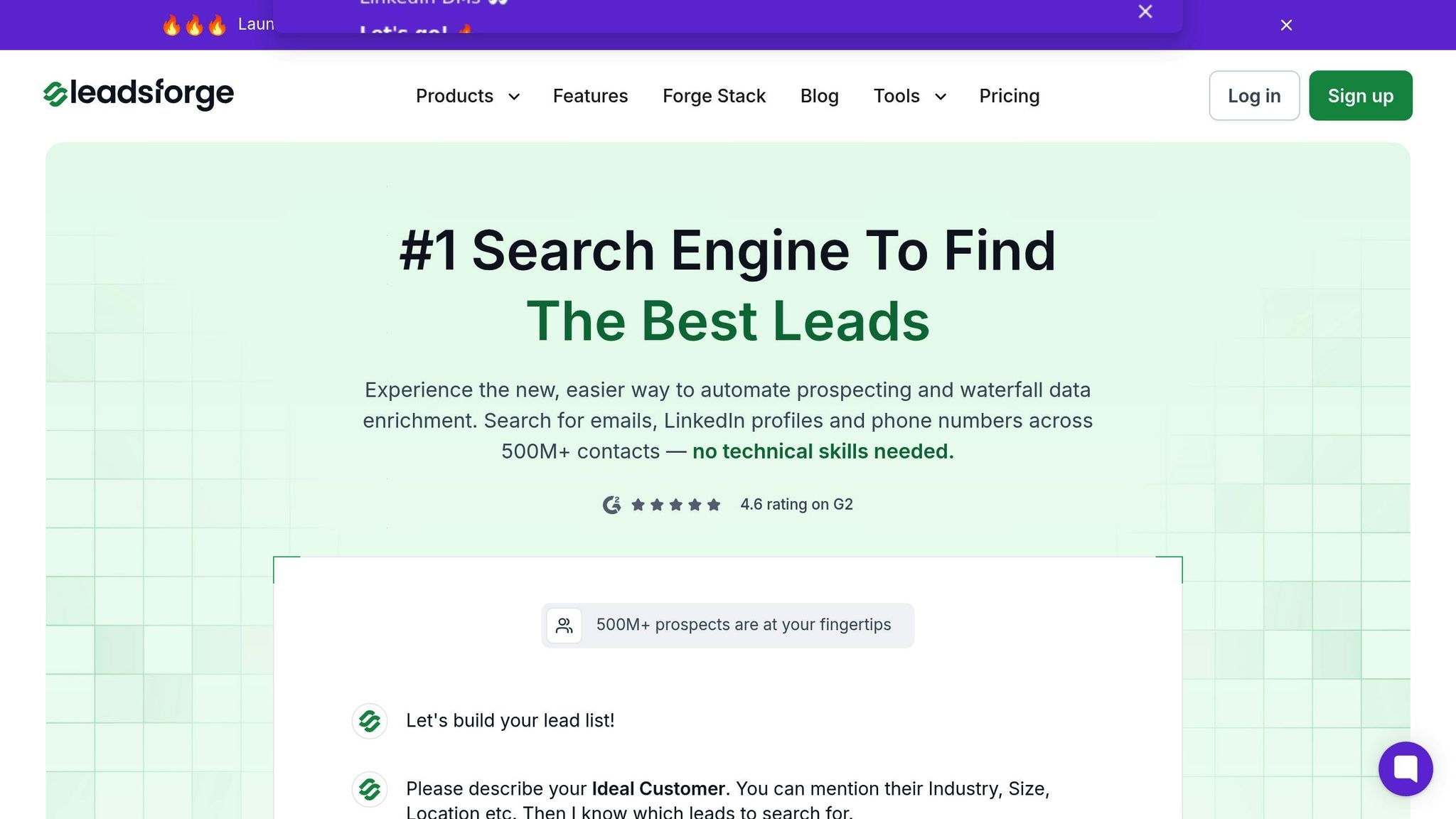
Leadsforge simplifies prospecting by transforming your customer profile description into a verified lead list enriched with LinkedIn, email, and phone data. Instead of manually combing through databases or struggling with complicated dashboards, you just describe your ideal customer profile through a chat-like interface, and the platform takes care of the rest. Its waterfall enrichment strategy ensures higher match rates by validating emails in real-time, confirming LinkedIn URLs against live profiles, and checking phone number accuracy.
With access to over 500 million global contacts, Leadsforge also includes built-in intent signals and lead qualification tools. These features help prioritize prospects most likely to convert, making scaling personalized outreach a breeze. The platform has earned a 4.6 rating on G2, reflecting its effectiveness in driving results.
Additionally, Leadsforge integrates natively with The Forge Stack, enabling seamless workflow automation. Enriched leads can be pushed directly into Salesforge, where you can launch multi-channel sequences that adapt to prospect behavior. This eliminates the need for manual imports or CSV uploads, ensuring a smooth transition from prospecting to outreach. By streamlining these processes, Leadsforge accelerates pipeline growth and aligns perfectly with broader sales strategies.
To optimize workflows, start by tracking the metrics that matter most. One key metric is lead response time - responding to leads within 5 minutes makes companies 9 times more likely to convert them compared to waiting 30 minutes. Another critical metric is conversion rates at each stage of the funnel, which can help identify where potential customers drop off. Don't overlook deal velocity either - measure how long it takes to move from first contact to closing a deal. Using automation, you can aim to shorten this time by 20–30%.
Real-time dashboards and alerts (through tools like HubSpot or Momentum) can help you stay on top of SLA breaches or slow-moving deals. Also, keep an eye on operational metrics, such as error logs, to proactively address technical hiccups. These insights will guide ongoing adjustments to your workflows, ensuring they perform at their best.
Once you've identified key metrics, it's essential to keep workflows up to date. Plan for quarterly audits to clean up outdated triggers, adjust routing rules for new regions, and fine-tune lead scoring based on recent performance trends. A/B testing can be invaluable here - experiment with email sequences, assignment rules, and timing cadences. Incorporate successful changes into your playbook and phase out what doesn’t work.
Create a system for gathering team feedback. For example, monthly Slack retrospectives or surveys can surface issues like misrouted leads or overly aggressive follow-ups before they impact conversions. Regular updates keep workflows flexible and scalable. To avoid disruption, use version control with clear naming conventions and change logs, and always have a rollback plan ready in case a new update causes problems.
Once workflows are refined and metrics are clear, AI can take your systems to the next level. AI-driven lead scoring and intent detection help prioritize high-value prospects, routing them into tailored cadences. Tools like Leadsforge can streamline lead qualification and data enrichment, cutting manual tasks by as much as 50%.
Integrating platforms is equally important. Whether through native connections or tools like Zapier and Workato, syncing platforms ensures smoother operations. For example, Leadsforge can automatically push enriched leads into Salesforge, triggering multi-channel sequences (email + LinkedIn) that adapt based on prospect behavior. Additionally, Slack deal rooms - activated by workflow events like stage changes or risk flags - keep cross-functional teams aligned in real time, ensuring everyone stays on the same page for big deals or potential roadblocks.
Workflow automation simplifies B2B sales processes by cutting out repetitive tasks, giving sales reps more time to focus on closing deals. In fact, automation can free up as much as 66% of a rep's time, leading to a 20–30% boost in productivity and a 10% increase in conversion rates.
To see these results, start by identifying the bottlenecks in your current process. Choose platforms that offer no-code builders and AI capabilities, and create workflows that you can test from start to finish. Keep an eye on metrics like lead response time, deal velocity, and pipeline coverage to fine-tune your approach. Remember: responding to leads within five minutes makes you nine times more likely to convert them.
Automation also allows you to scale efficiently, handling more leads without needing to grow your team. AI-driven lead scoring ensures your reps focus on the prospects most likely to convert. As John Kucera, SVP of Product Management at Salesforce, puts it:
Automated workflows remove bottlenecks and deliver contextual insights, enabling sales teams to build deeper relationships and scale experiences across departments.
These strategies provide a solid foundation for taking action.
Now it’s time to put these strategies into motion. Start by auditing your sales process to pinpoint manual bottlenecks - whether it’s lead qualification, follow-up tasks, or data entry. Then, select platforms that integrate seamlessly with your CRM and offer visual workflow builders. For prospecting, tools like Leadsforge can help you generate verified lead lists and feed enriched data directly into your outreach efforts.
Begin with a simple workflow, such as automated lead routing or a follow-up sequence, and build on it as you see results. Integrate your tools so that lead generation, enrichment, and outreach work together as one cohesive system. Leadsforge makes this easier with 100 free credits to get started and native integration with The Forge Stack, which includes Salesforge for outreach and Warmforge for email deliverability. With these tools, you can create fully automated funnels without juggling disconnected platforms. Start today to streamline your workflow and drive growth in your sales pipeline.
To pinpoint bottlenecks in your sales process, take a close look at where leads seem to stall or drop off entirely. Pay special attention to critical stages like prospecting, data enrichment, outreach, and follow-ups. Dive into metrics such as response rates, conversion rates, and how long leads linger at each stage to uncover problem areas.
Tools like Leadsforge can be a game-changer here. They provide insights into engagement patterns, verify lead information, and handle repetitive tasks, freeing up time for your team. Make it a habit to regularly evaluate your sales pipeline and involve your team in identifying inefficiencies. Once you’ve spotted the issues, consider using automation to cut delays and keep things running smoothly.
When selecting a sales automation platform, it's important to zero in on accuracy, integration capabilities, and ease of use. The best tools provide verified data from trustworthy sources, integrate effortlessly with your current systems, and have an interface that's simple enough to streamline everyday tasks.
Customization and pricing flexibility should also be on your radar. Take platforms like Leadsforge, for example - they offer standout features such as highly targeted lead generation, a chat-like interface that's easy to navigate, and credit-based pricing that adjusts to your specific needs. Choose a solution that fits seamlessly into your team's workflow and delivers results you can measure.
AI is reshaping custom workflow automation in sales by simplifying tasks like prospecting, data enrichment, and lead verification. It can analyze natural language descriptions of ideal customer profiles to pinpoint and deliver highly targeted leads, complete with verified contact details such as email addresses, LinkedIn profiles, and phone numbers.
With platforms like Leadsforge, sales teams can tap into AI to identify intent signals, qualify leads, and prioritize prospects with the greatest potential. This approach minimizes manual work while boosting precision and efficiency, allowing teams to spend more time building genuine relationships and closing deals more quickly.