Bad data costs businesses time and money. Around 30% of lead form emails are fake or invalid, and over 25% of form submissions are fraudulent. This disrupts workflows, damages email sender reputations, and inflates costs. Real-time lead verification solves this by instantly checking emails and phone numbers during form submissions, ensuring only accurate, contactable leads enter your system.
Real-time verification is a proactive solution to maintain clean, reliable lead data, protect your campaigns, and maximize outreach efforts.
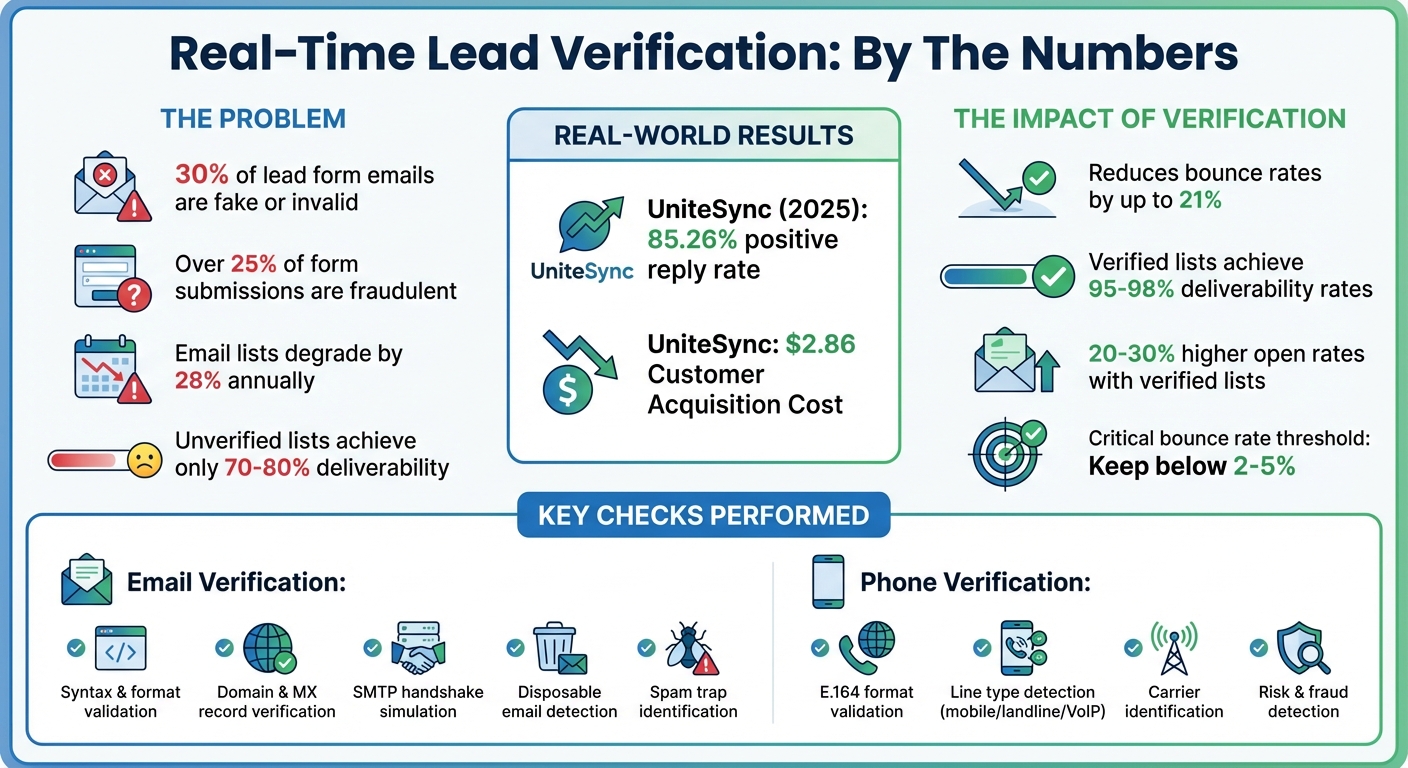
Real-Time Lead Verification Impact: Key Statistics and Benefits
Real-time verification systems are designed to quickly validate email addresses and phone numbers, ensuring they are legitimate and reachable. These checks happen in less than a second, preventing bad data from entering your CRM. By understanding how these systems work, you can better configure tools and improve lead scoring.
The email verification process starts with checking the syntax and format of an address. This ensures it follows IETF standards like RFC 5321 and RFC 5322, which require elements like the "@" symbol, a valid local part, and a proper domain. These checks catch common errors in formatting.
Next comes domain and DNS/MX record verification. This step confirms that the domain exists and can receive emails. The system checks the domain's Mail Exchange (MX) records to validate its ability to handle email traffic.
"An MX record is a DNS entry that points to the mail server responsible for receiving and sending emails for a domain. If a domain is meant to receive emails, it must have a valid MX record."
A key component of email verification is the SMTP handshake simulation. Here, the system connects to the recipient's mail server to confirm the mailbox exists, without actually sending an email. A "250" response means the mailbox is active, while a "550" response indicates it doesn't exist.
"Sending test emails to validate your list can harm your sending reputation. It's better to avoid this practice altogether."
Advanced systems go further by identifying disposable email addresses from providers like Mailinator or YOPmail. They also detect spam traps and honeypots - special addresses used to catch unauthorized senders. Other checks include identifying catch-all domains, filtering out role-based addresses (e.g., info@ or sales@), and flagging inboxes that are full. Since email lists can degrade by about 28% annually, and real-time verification can reduce bounce rates by up to 21%, these processes are essential for keeping your bounce rate below the critical 5% threshold.
Phone verification starts with format validation using the E.164 international standard. This ensures numbers are structured as +[country code][area code][local number], making them compatible with global CRM systems and reducing routing errors in international campaigns.
Next, line type detection identifies whether a number is a landline, mobile, or VoIP. This is crucial for TCPA compliance and helps determine the best outreach method - for example, SMS campaigns require mobile numbers, while voice calls might target landlines.
Carrier identification is another important step. It identifies the service provider responsible for the number, helping assess lead reliability and optimize call routing. Combined with real-time status checks from external databases, these validations confirm both formatting and reachability.
Advanced systems also include risk and fraud detection. They flag high-risk numbers and ensure compliance with protocols like STIR/SHAKEN, which help prevent spam labeling. Platforms like Leadsforge use a "waterfall enrichment" approach, querying multiple data sources to verify a number's authenticity when initial checks are inconclusive.
While API-based methods provide a seamless experience, the OTP method - though highly accurate for confirming device ownership - can lead to lower completion rates.
These detailed checks not only ensure data quality but also enrich lead profiles, making lead scoring more precise.
Verification data provides valuable insights that help prioritize leads in your sales funnel. For instance, when an email is flagged as disposable, catch-all, or invalid, it can be deprioritized or blocked before triggering costly automation workflows.
"Once a bad email enters your CRM, it can trigger automations, inflate your cost per lead, and skew your reporting. Catching it early is critical."
By enabling a blocking mode on your forms, you can prevent invalid or disposable addresses from entering your system entirely. Alternatively, a tagging mode allows you to flag leads with verification statuses, so they can be scored lower in your pipeline.
Phone verification adds another layer to lead scoring. It distinguishes line types and provides carrier details, helping prioritize mobile numbers for SMS campaigns and direct calls. High-risk or unreachable numbers can be flagged, ensuring only strong prospects move forward.
| Verification Check | Impact on Lead Scoring |
|---|---|
| Mailbox Existence | High score; confirms the lead is reachable |
| Disposable Detection | Low score/Flag; suggests low intent or fraud |
| Catch-all Status | Medium risk; may indicate a generic address |
| Line Type Detection | Prioritizes mobile numbers for SMS outreach |
| Carrier Identification | Flags high-risk or international numbers |
Given that about 30% of emails submitted through lead forms are fake, disposable, or invalid - and over 25% of ad clicks and form fills are thought to be fraudulent - using verification data for lead scoring helps protect your sender reputation and ensures your efforts focus on genuine prospects.
Real-time verification can be applied at critical points in lead management. The approach you choose will depend on your lead volume, budget, and required data quality. These methods work seamlessly with the real-time verification tools mentioned earlier, ensuring your data remains accurate and reliable.
The best way to ensure clean data is to verify it before it enters your system. By integrating API-based verification tools like ZeroBounce or Twilio directly into your lead forms, you can validate contact details in real time. These tools work in the background as users type, offering immediate feedback to correct errors before submission.
There are two main ways to configure your forms:
Blocking mode is highly effective, but you may want to allow "unknown" results to avoid accidentally excluding valid leads.
"Verifying after submission is too late. Once that bad email hits your CRM, it's already triggered automations, inflated your cost per lead, and thrown off reporting." - LeadCapture.io
For high-value offers like appraisals or reports, consider using OTP (One-Time Password) verification. This method requires users to enter a code sent via SMS, email, or WhatsApp before submitting the form, guaranteeing accuracy. Additionally, for B2B leads, filtering out personal email domains like Gmail or Yahoo can encourage the use of professional email addresses.
To maintain data quality after capture, you can implement verification directly within your CRM. For instance, tools like Neverbounce can integrate with platforms such as Salesforce. By configuring your API key and updating your Lead Page Layout, you can verify leads as they enter your system.
You can choose between blocking invalid contacts for immediate rejection or tagging them for later review. Many platforms also offer waterfall enrichment, which queries multiple data sources if the first one fails. This increases match rates and ensures more leads are verified.
For a more streamlined solution, consider platforms that come with built-in verification capabilities. Tools like UpLead, Apollo, and Leadsforge eliminate the need for third-party integrations by providing pre-verified contact data. Leadsforge, for instance, uses waterfall enrichment to achieve higher match rates compared to single-source tools. UpLead offers real-time verification and periodic rechecks on all leads, even on its free plan.
Verified email lists can significantly improve performance, achieving deliverability rates of 95–98%, compared to just 70–80% for unverified lists. This can result in 20–30% higher open rates. In 2025, UniteSync reported an 85.26% positive reply rate and a $2.86 Customer Acquisition Cost by leveraging the Forge Stack (Salesforge, Mailforge, and Warmforge). These tools helped scale cold outreach while maintaining high deliverability through built-in verification and warming features. Such integrations not only enhance efficiency but also protect your revenue and reputation.
| Feature | Leadsforge | UpLead | SalesIntel | Clearbit |
|---|---|---|---|---|
| Verification Method | Waterfall (Multi-source) | Real-time Automated | 95% Human-Verified | Real-time Enrichment |
| Primary Strength | Chat-based UI / Ease of use | High accuracy on free plan | Direct dial reliability | CRM/Form integration |
| Update Frequency | Real-time at search | Periodic rechecking | Every 90 days | Instant at capture |
| Best For | SMBs/Agencies | B2B Sales Teams | Enterprise/RevOps | Inbound Marketing |
With built-in verification, you can automate data accuracy right from the point of lead capture, streamlining your workflow and improving outcomes.
Creating a smooth and efficient verification workflow starts with identifying every point where lead data enters your system. At each stage, you need to apply the right verification method to filter out bad data early, all while keeping the user experience seamless and staying compliant with U.S. privacy laws like TCPA and CAN-SPAM.
Start by mapping out the entire journey of a lead, from the first interaction to its entry into your CRM. For example, a typical B2B lead flow might look like this: traffic source → landing page → form submission → CRM → outreach. The key points for verification are during form entry and upon CRM entry. At the form stage, tools like Twilio for phone verification and ZeroBounce for email validation are great options. For high-value offers, such as property appraisals or financial consultations, you might also want to add OTP (one-time password) verification, even if it slightly impacts conversions. Once these points are identified, set up automated decision rules to manage the data effectively.
Automated decision rules help you handle data verification outcomes efficiently. These rules can be broken into three categories:
Flagged leads should go into a manual review queue, where your team can decide the next steps. Leads that fail compliance checks - such as those on your internal suppression list or the National Do Not Call Registry - should always be rejected without exception.
With your decision rules in place, you can integrate them into a streamlined toolset for better efficiency. Enter your ideal customer profile into Leadsforge's chat interface, and the platform will deliver a verified lead list enriched with data from multiple sources. These verified leads can then be sent directly to Salesforge for multi-channel outreach in just one click. This unified ecosystem, managed through a single login (ForgeID), replaces over 30 separate tools, simplifying workflow management while ensuring data verification remains consistent throughout the lead lifecycle.
This approach has already shown impressive results. In 2025, UniteSync achieved an 85.26% positive reply rate and a $2.86 Customer Acquisition Cost by adopting this integrated system. Carlos Palop Moliner, CEO of UniteSync, emphasized the impact:
"Cold email only works when it lands. That's where Salesforge and Mailforge have made the difference".
Similarly, VAI Consulting used the Forge Stack's AI SDR, Agent Frank, to scale outbound lead generation without hiring additional sales development reps. This allowed them to test market positioning and quickly book qualified calls, proving how effective the system can be for scaling efforts.
Once your verification workflow is up and running, it’s time to track key metrics to measure its impact. Start with the lead-to-opportunity conversion rate - this is your guiding metric. It tells you how many verified leads are turning into actual sales opportunities. Compare this rate before and after implementing verification to understand its effectiveness. Another critical metric is your email bounce rate. Even a 2% bounce rate can harm your sender reputation and reduce email deliverability. If your bounce rate exceeds this threshold, it’s time to audit your data sources to pinpoint weak spots. To truly assess the impact, focus on targeted metrics that quantify these outcomes.
In addition to bounce rates, keep an eye on response rates and cost per qualified lead. These metrics help you determine if verification is boosting the efficiency of your outreach efforts. Use your historical conversion data to refine your thresholds over time. By filtering out invalid data at the point of capture, you’ll likely see a noticeable drop in your cost per qualified lead. Also, track how many leads fall into categories like Valid, Invalid, Disposable, Catch-all, or Unknown. This breakdown can reveal patterns and help you fine-tune your verification rules for better results.
Real-time verification isn’t a one-time fix - it requires ongoing attention. Enable blocking mode on your lead forms to prevent invalid or disposable emails from entering your CRM in the first place. This ensures your database stays clean from the start. For existing contacts, schedule bulk re-verification every 90 days to account for outdated entries. Create a suppression list for contacts that repeatedly fail verification or bounce, and automatically exclude them from future campaigns. This proactive approach keeps your database lean and prevents outdated information from skewing your metrics.
Keeping your data clean not only improves performance but also ensures compliance with privacy laws. Adhering to U.S. regulations like TCPA and CAN-SPAM is essential. For California residents, CCPA compliance is also required. To minimize privacy risks, store only necessary verification results - like "valid" or "invalid" status - rather than excessive personal details. Always obtain proper consent at the point of data capture and maintain clear, transparent privacy policies. If you’re dealing with healthcare or financial data, ensure compliance with HIPAA and the Gramm-Leach-Bliley Act. Assign clear responsibilities within your team for overseeing data quality standards and update schedules. This ensures your database remains compliant and actionable as it grows.
Real-time lead verification is a powerful way to protect your outreach efforts while keeping things efficient. By validating contact details right at the moment they’re collected, you’re not just safeguarding your campaigns - you’re also protecting your sender reputation. Keeping email bounce rates well below the critical 2% threshold is a key factor in ensuring strong email deliverability.
But the benefits don’t stop there. Verified data enhances deliverability and improves campaign performance. When this data flows directly into your CRM, it simplifies automated lead scoring and prioritization, making your operations smoother and more effective.
The process is simple: activate blocking mode on your lead forms, integrate email and phone verification, and allow "unknown" results to ensure you don’t miss out on legitimate prospects. This approach not only reduces complexity but also strengthens your overall data quality.
By capturing clean data from the start, you’ll minimize the need for tedious manual cleanups, increase conversion rates, and set the foundation for long-term growth - all while maintaining your sender reputation. High-quality data paves the way for immediate, impactful action.
Start using real-time verification now to secure and optimize your campaigns.
Real-time lead verification checks email addresses for accuracy, validity, and activity the moment they are collected. By instantly identifying and removing invalid or disposable emails, it helps lower bounce rates, safeguard your sender reputation, and increase the likelihood of your emails reaching recipients' inboxes.
This forward-thinking method boosts email deliverability while also saving time and resources, ensuring your outreach targets authentic, high-value leads.
Verifying phone numbers is a simple yet powerful way to keep your leads database accurate. By instantly spotting invalid or mistyped numbers, it saves sales teams from chasing dead ends and lets them focus on reaching genuine prospects.
Beyond accuracy, phone verification provides useful details, like whether a number is a mobile or landline. This kind of metadata can sharpen lead scoring models, ensuring your team prioritizes the best opportunities. The result? Lower outreach costs and a better return on investment (ROI).
Tools like Leadsforge make this process even easier. Their platform integrates phone verification into AI-powered workflows, enriching your leads with validated numbers and actionable insights. What sets Leadsforge apart is its seamless integration with their other tools, streamlining multi-channel outreach without the hassle of juggling multiple subscriptions.
To add real-time email and phone verification to your CRM, consider integrating a service like Leadsforge through its API or a pre-built connector. Start by getting an API key from Leadsforge. Then, configure your CRM - whether it's Salesforce, HubSpot, or another platform - to trigger a webhook whenever a lead is created or updated. This webhook will send the lead's email and phone details to Leadsforge. In return, Leadsforge verifies the information and provides useful data like validity, corrected contact details, and risk levels. You can map this data to custom fields in your CRM, enabling your team to prioritize verified leads.
If you prefer a no-code approach, tools like Zapier make it easy to connect Leadsforge to your CRM without the need for technical expertise. Verifying leads as they come in helps keep your database clean, ensures better email deliverability, and boosts the effectiveness of your outreach efforts.