If you use LinkedIn Sales Navigator, you know how long it takes to clean leads and find emails. Evaboot helps with that. It exports your Sales Navigator leads, cleans the data, and finds verified emails for you.
Evaboot is popular among users who want to clean and export LinkedIn Sales Navigator leads.
But Evaboot has limits. It does not give phone numbers. And it works only with LinkedIn and requires Sales Navigator to extract data.
And if you want a bigger database or more automation, you may need another tool.
That’s why many teams look for Evaboot alternatives in 2026, tools that can find more contacts, offer more data, provide fresh leads, or fit a different outbound workflow.
In this guide, you’ll see 7 tools that can replace Evaboot. Each one offers something unique, faster exports, larger databases, better emails, or more features.
Let’s break them down one by one.
7 Evaboot Alternatives for Finding Leads in 2026: Quick Look
Leadsforge – Best for teams that want to find and enrich leads automatically using AI.
Skrapp – Best for users who need a simple, low-cost email finder for LinkedIn.
Lusha – Ideal for SDRs who need verified emails and direct phone numbers.
UpLead – Best for teams that want a clean, accurate B2B database with direct dials.
Wiza – Ideal for anyone who wants the closest alternative to Evaboot for Sales Navigator exports.
Findymail – Best for cold email teams that need very accurate, low-bounce emails.
Apollo – Ideal for teams that want an all-in-one outbound platform with a large contact database.
Why Should You Look for Evaboot Alternatives?
Evaboot is helpful if you only need to clean and export leads from LinkedIn Sales Navigator, but many teams outgrow it quickly.
Once you want more data, more channels, or more automation, Evaboot’s limits become obvious.
Here are the main reasons people look for better alternatives:
Only works with Sales Navigator – Evaboot cannot find leads on its own; it only cleans the lists you export from Sales Navigator.
No phone numbers – It only provides emails, so teams doing cold calling or multi-channel outreach hit a limit fast.
No database of contacts – You cannot search for new leads directly inside Evaboot because it has no internal database. Some users also seek alternatives for higher data accuracy and data quality, as Evaboot relies solely on exported Sales Navigator data.
No intent or buying signals – It can’t show which prospects are actively researching or in-market.
No lookalikes or competitor followers – You cannot discover similar companies or target competitor audiences.
Limited enrichment – Evaboot enriches emails only; it does not provide technographics, firmographics, or deeper insights.
Evaboot only allows exporting results as a CSV file, which limits integration with other platforms and requires manual downloads.
Evaboot lacks live progress tracking, so you cannot see how many leads were collected or how much time the export took.
Evaboot's data cleansing helps remove special characters and messy formatting, making CRM exports smoother.
Evaboot does not emphasize data protection or compliance with privacy regulations – This can be a concern for teams handling sensitive prospect information who require strong data protection and adherence to standards like GDPR or CCPA.
Requires an extra paid tool – You must already pay for Sales Navigator, which increases your total cost.
Evaboot's pricing starts at $9 per month for 100 credits and scales up depending on usage. For example, $49 per month gets you 1500 credits, which is about $33 per 1000 leads without emails.
Compliance with LinkedIn's Terms of Service is a critical consideration when using scraping tools like Evaboot.
Many users seek alternatives to Evaboot due to its high pricing and feature limitations.
7 Evaboot Alternatives for Finding Leads: Quick Comparison
Tool
Works Without Sales Navigator
Emails
Phone Numbers
Standout Features
Pricing Plans / Credit Based Pricing Model
Leadsforge
Yes
Yes
Yes
AI chat search, multi-source data, lookalikes, competitor followers, intent signals
Multiple pricing plans, credit based pricing model
Leadsforge is a lead generation tool that helps you find emails, phone numbers, and LinkedIn profiles using a simple chat-based search. Leadsforge is a data automation platform that enables users to automate lead generation and enrichment tasks.
You don’t need Sales Navigator or any complex filters. You just describe your ideal customer, and Leadsforge gives you a ready-to-use lead list.
It uses multiple data sources, enriches contacts instantly, verifies emails and phone numbers, and offers extra features like lookalikes, competitor followers, and intent signals, all of which Evaboot does not provide. Leadsforge also provides detailed insights into each lead, including enriched data points for better targeting.
Leadsforge vs Evaboot: Quick Comparison
Feature
Leadsforge
Evaboot
Works without Sales Navigator
Yes
No
Emails
Yes
Yes
Phone numbers
Yes
No
Data sources
Multi-source database
Only Sales Navigator
Intent signals
Yes
No
Lead search style
AI chat prompts
Sales Navigator filters
Ideal For
Leadsforge is ideal for:
People who want emails and phone numbers together
Users who want to find leads without using Sales Navigator
SDRs doing cold calls and cold emails
Teams who need intent signals and high-intent leads
Agencies and founders who want fast list building
Sales professionals who want to automate prospecting and outreach
Anyone who wants a simple chat-style lead search instead of filters
2. Skrapp - Fast, Accurate Email Finder for LinkedIn
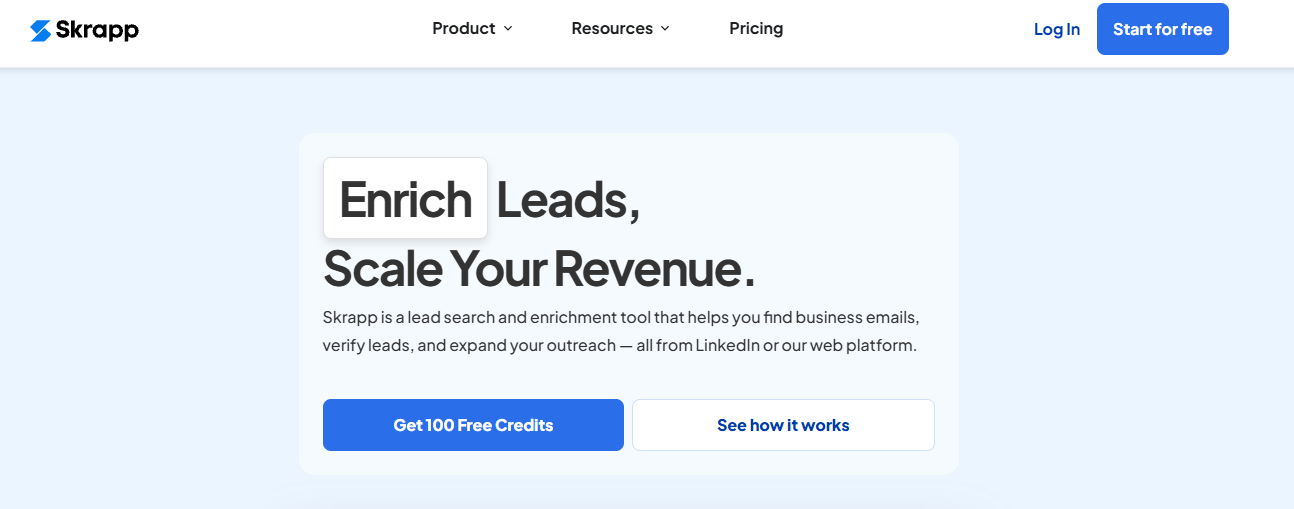
This image shows the Skrapp homepage
Skrapp is an email-finding and lead enrichment tool that helps you get verified business emails from LinkedIn, Sales Navigator, company websites, and a large 200M+ contact database.
Skrapp specializes in finding and verifying professional email addresses and accurate contact details, making it a strong choice for sales and outreach teams.
You can find emails by name, domain, company, or directly while browsing LinkedIn using the Chrome extension. Skrapp emphasizes data accuracy and offers robust email discovery features to ensure you reach valid prospects.
Skrapp also supports bulk email finding, bulk verification, and gives company details like industry, size, revenue, and job roles.
Skrapp vs Evaboot: Quick Comparison
Feature
Skrapp
Evaboot
Works without Sales Navigator
Yes
No
Finds verified emails
Yes
Yes
Chrome extension
Yes
Yes
Intent signals
No
No
Best use
Fast verified email finding
Exporting SN lead lists
Ideal For
Skrapp is ideal for:
People who mainly need verified business emails
SDRs prospecting on LinkedIn or Sales Navigator
Teams doing bulk email lookup
Recruiters needing email contacts fast
Founders doing simple outreach without complex tools
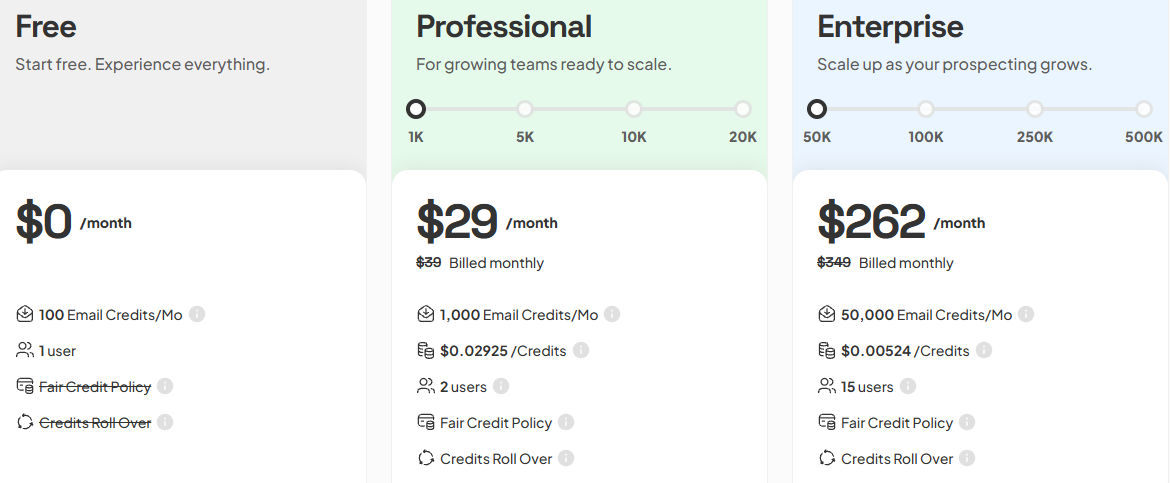
Professional – $29/month: 1,000 credits/month, unlimited searches, CRM sync, AI enrichment.
50,000 credits/month, API access, SSO, dedicated manager.
Skrapp offers multiple paid plans with different pricing tiers, each including a set number of email credits per month. Their pricing plans use a credit-based pricing model, where each action such as email finding or verification consumes credits.
3. Lusha – Full-Contact B2B Data With Phones, Emails & Intent Signals
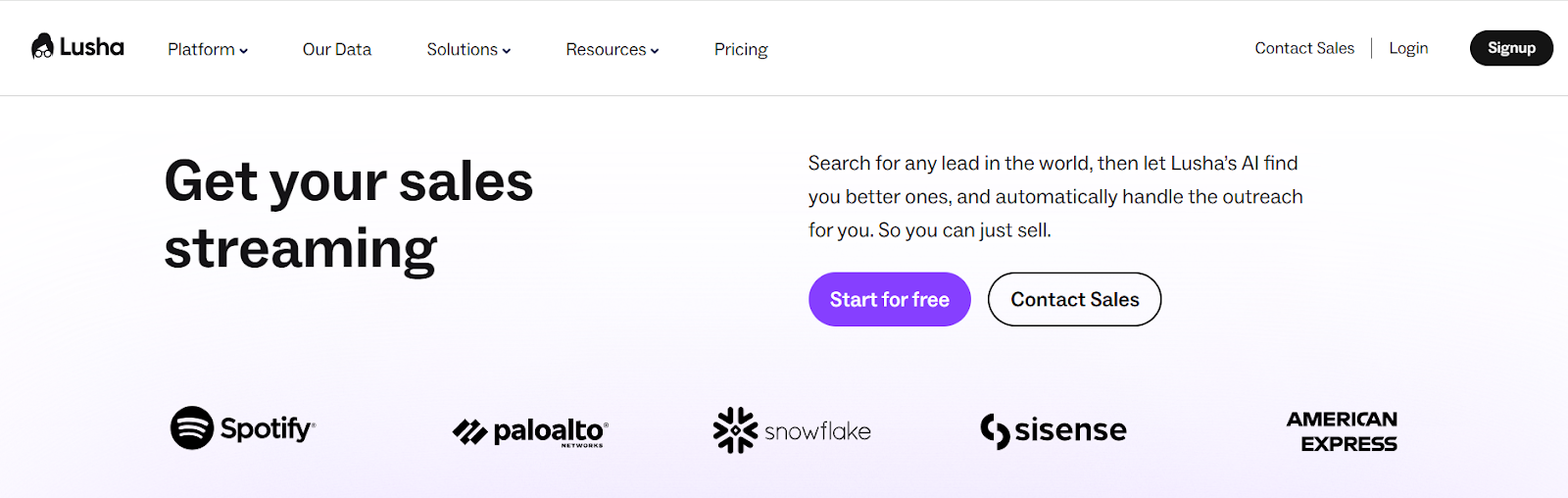
This image shows the Lusha homepage
Lusha is a sales intelligence tool that gives you verified B2B contact data, including direct dials, emails, company insights, and intent signals.
It comes with a large 280M+ contact database, strong global phone accuracy, and AI features for finding, enriching, and engaging leads.
Lusha is known for its high data quality and reliable data, ensuring accuracy and trustworthiness for effective sales outreach. The platform is committed to data protection, complying with privacy regulations such as GDPR and CCPA to safeguard prospect information. Lusha integrates seamlessly with CRM systems like Salesforce and HubSpot, streamlining lead management and improving sales workflows.
Lusha offers phone numbers, intent data, compliant enrichment, AI lead recommendations, and automation workflows.
Lusha vs Evaboot: Quick Comparison
Feature
Lusha
Evaboot
Works without Sales Navigator
Yes
No
Emails
Yes (98% deliverability)
Yes
Phone numbers (direct dials)
Yes (85% accuracy)
No
Intent signals
Yes
No
Database size
280M+ contacts
None (uses SN only)
CRM integrations
Yes (HubSpot, Salesforce, etc.)
Limited
Ideal For
Lusha is ideal for:
Teams who need direct dials and emails together
Sales reps doing cold calling and outbound
SDRs who want intent signals to find buyers early
Anyone who wants verified global contact data beyond Sales Navigator
Large sales teams that require scalable contact data solutions
Pros and Cons of Lusha
Pros
Cons
Very accurate phone numbers (85%)
Credits can run out fast
98% email deliverability
Phone reveals cost 5 credits
Large 280M+ database
More expensive than basic tools
Strong intent signals & buying signals
Some features only for Scale plan
AI lead recommendations & auto-updating lists
Can feel complex for beginners
Lusha Pricing
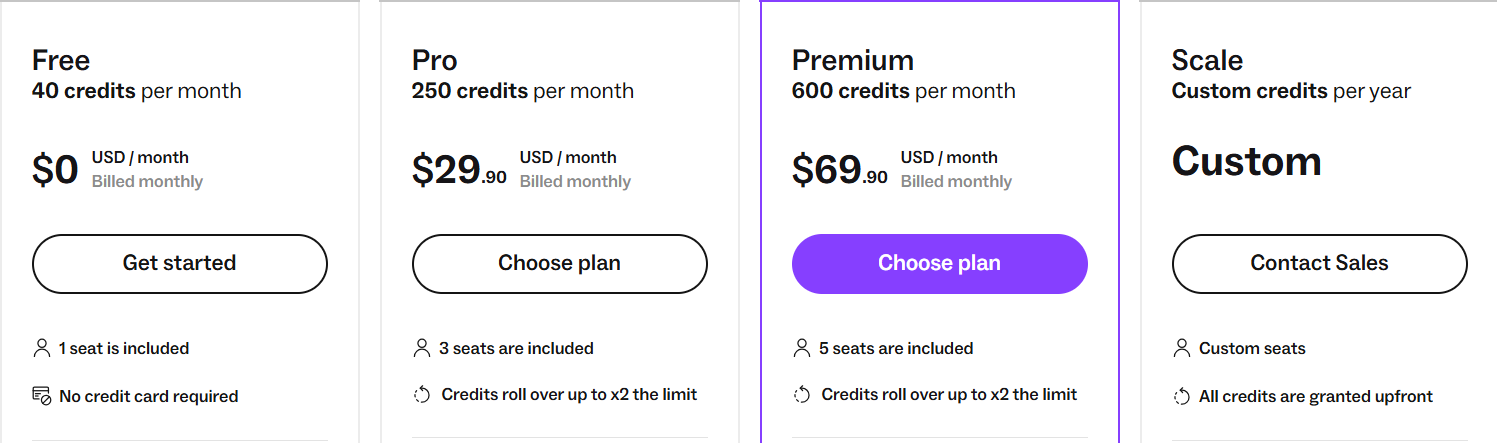
This image shows the Lusha pricing
Free – 40 credits/month
Pro – $29.90/month – 250 credits/month
Premium – $69.90/month – 600 credits/month
Scale – Custom – large credit bundles and premium automation
4. UpLead – High-Accuracy B2B Data With Real-Time Verification
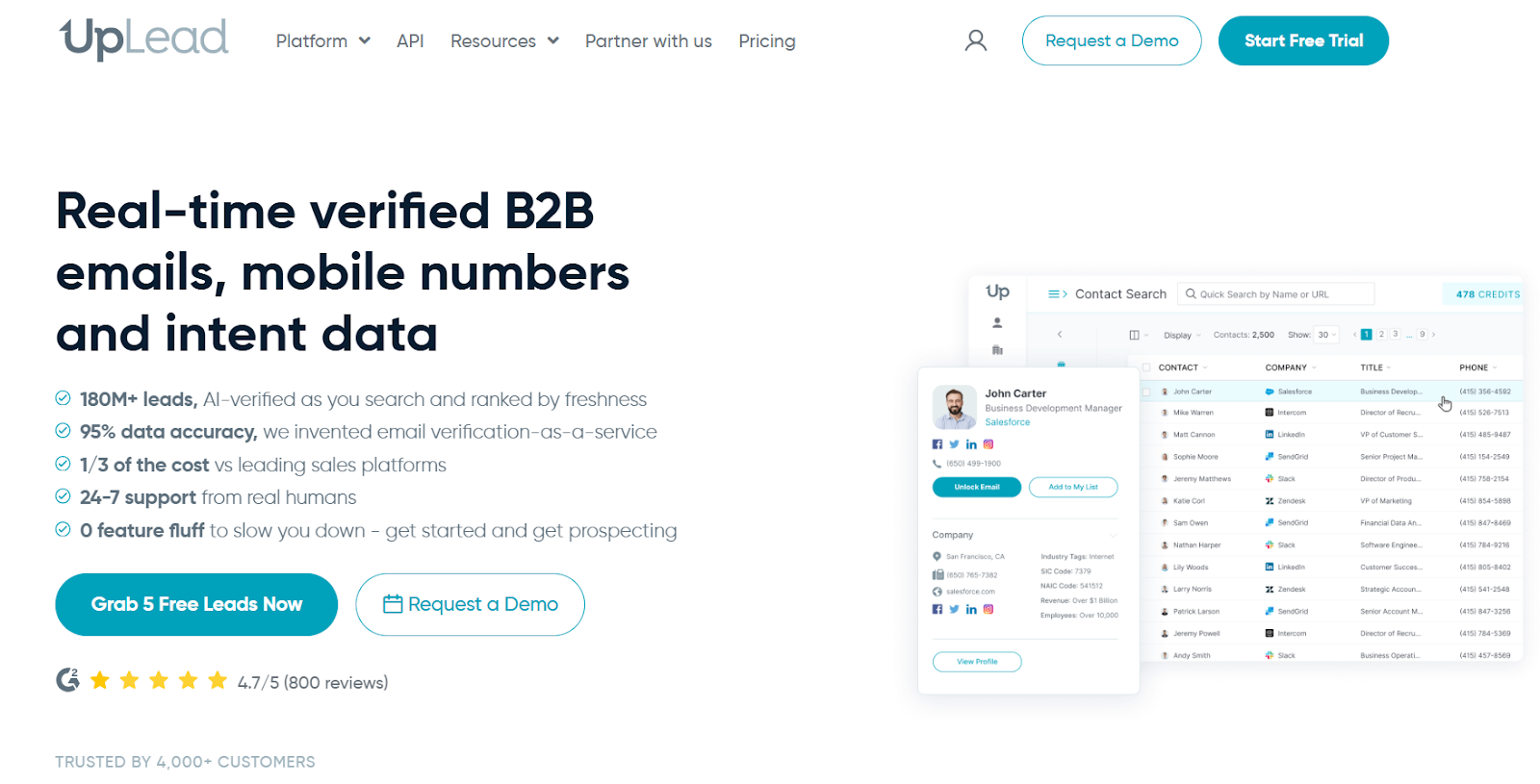
This image shows the UpLead homepage
UpLead is a B2B lead generation platform known for its 95%+ accurate data, real-time email verification, mobile numbers, and buyer intent signals.
It offers 160M+ contacts globally and verifies every email the moment you export it, which Evaboot cannot do.
UpLead excels at data enrichment and data extraction, providing enriched contact data that supports more effective outreach and seamless CRM integration.
You can search contacts using 50+ filters, get verified phone numbers, see company tech stack, enrich CRM data, run bulk lookups, and find prospects actively in-market using intent data.
UpLead vs Evaboot: Quick Comparison
Feature
UpLead
Evaboot
Works without SN
Yes
No
Email accuracy
95%+ (real-time verified)
Depends on Sales Navigator data
Phone numbers
Mobile & direct dials
No
Intent data
Yes (buyer intent)
No
Email verification
Real-time, included
Basic verification only
Chrome extension
Yes
Yes
Ideal For
UpLead is ideal for:
Sales teams who want accurate emails and mobile numbers
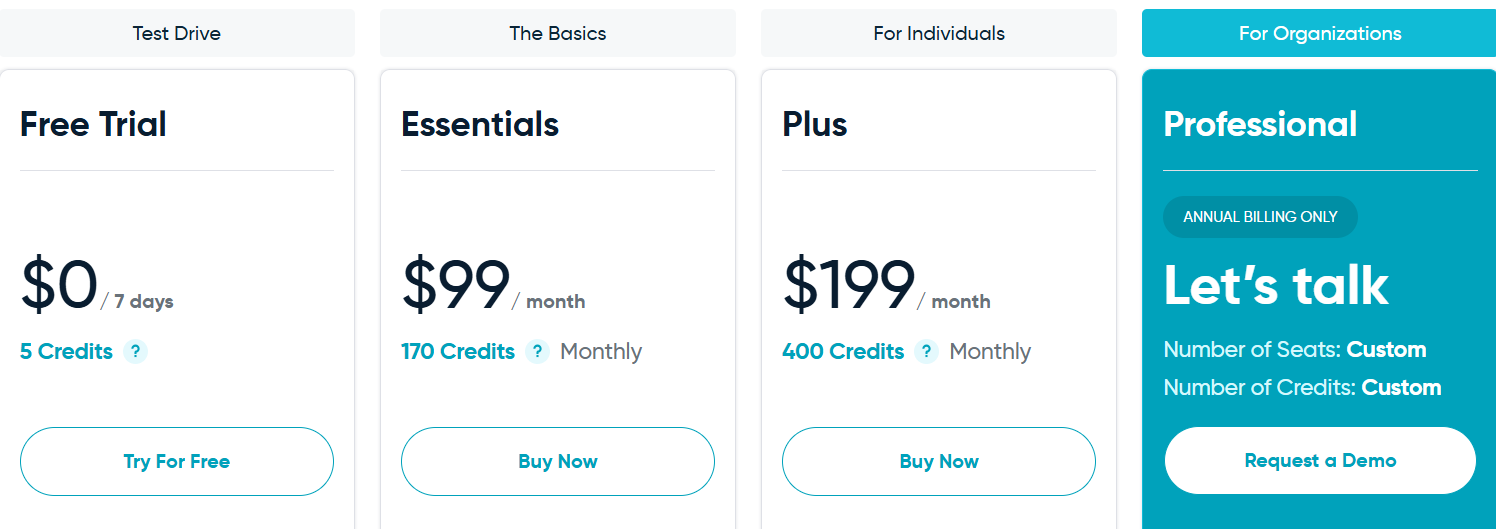
Professional – Custom: Buyer intent, full API, all search filters, competitor intelligence, team tools, priority support. UpLead also offers custom pricing for enterprise clients with special requirements.
5. Wiza – Real-Time Prospecting With 850M+ Contacts
This image shows the Wiza homepage
Wiza is a real-time prospecting tool that finds verified emails, phone numbers, direct dials, and even personal emails in seconds.
Wiza is recognized for its high speed and 99% email match rate, making it a strong competitor to Evaboot for exporting verified contact data.
It checks live data sources at the moment you request a contact, giving you extremely fresh and reliable information. Wiza specializes in extracting leads from LinkedIn Sales Navigator, providing real-time, fresh leads and high email match rates.
Wiza helps protect your sender reputation by providing verified email addresses, ensuring your email outreach campaigns are effective and deliverable.
Wiza has one of the largest contact databases in the industry (850M+ records) and includes features like job-change alerts (Wiza Monitor), Chrome extension for instant contact reveal, AI enrichment, and 30+ advanced filters.
Wiza runs tasks on its own servers, allowing users to monitor data extraction from a mobile browser.
Wiza vs Evaboot: Quick Comparison
Feature
Wiza
Evaboot
Works without Sales Navigator
Yes
No
Emails
Yes (99% accuracy, real-time)
Yes (from SN export)
Phone numbers
Yes (mobile, direct, cell)
No
Data sources
850M+ live verified profiles
Only Sales Navigator lists
Chrome extension
Yes (real-time reveal)
Yes
Intent / high-intent leads
Job-change signals
No
Ideal For
Wiza is ideal for:
SDRs who want emails and phone numbers instantly
Recruiters who need personal emails and mobile numbers
Revenue teams tracking job changes
Companies who want high-accuracy data without stale lists
Pros and Cons of Wiza
Pros
Cons
850M+ B2B contacts
Credits required for each reveal
Real-time verified data (99% accuracy)
Phone numbers cost extra on lower plans
Mobile numbers, direct dials & personal emails
No buyer-intent topics (only job-change signals)
Chrome extension finds “unfindable” data
Not as many filters as Sales Navigator
Wiza Monitor tracks job changes instantly
No enrichment-only plan
Wiza Pricing
This image shows the Wiza pricing
Wiza offers several paid plans with different pricing tiers, each including a set number of email credits per month. These pricing plans are designed to fit various user needs, with higher tiers providing more email credits and additional features.
6. Findymail – High-Accuracy Email & Phone Finder for Cold Outreach
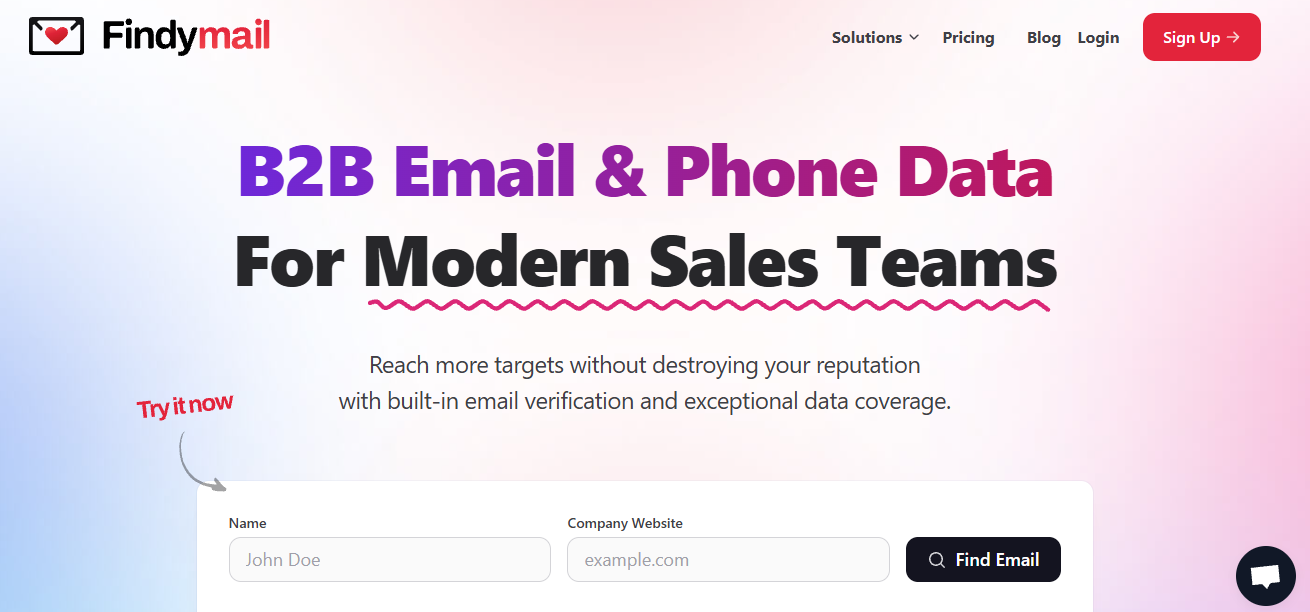
This image shows the Findymail homepage
Findymail is a B2B email and phone finder built for outbound teams who want high-accuracy data and very low bounce rates
It only charges for verified emails or phones and guarantees under 5% bounce, which is far better than most email finders.
Findymail uses AI-powered technology to verify professional email addresses and provide enriched contact data for outreach, ensuring high deliverability and reliable lead information.
Findymail supports AI lead search (Intellimatch), bulk enrichment, deep email verification, Google Sheets, API, plus native integrations with CRMs and cold email tools.
Findymail vs Evaboot: Quick Comparison
Feature
Findymail
Evaboot
Works without Sales Navigator
Yes
No
Verified emails
Yes (<5% bounce guaranteed)
Yes
Phone numbers
Yes (global, except EU)
No
Data sources
Multi-source global database
Only Sales Navigator
Chrome extension
Yes
Yes
Email verification
Deep, built-in
Basic
Automated list building
Yes
From Sales Navigator only
Ideal For
Findymail is ideal for:
Cold emailers who need high-quality, verified emails
Teams who want emails and phone numbers
Users who don’t want to rely on Sales Navigator
SDRs & founders who want low bounce rates
Anyone who wants automation (API, Zapier, Make, Sheets)
Pros and Cons of Findymail
Pros
Cons
Extremely accurate emails (<5% bounce)
No EU phone numbers
Provides emails and phone numbers
No intent data
Only charges for verified results
Phone numbers cost more (10 credits)
AI-native lead search (Intellimatch)
Smaller brand than Apollo/ZoomInfo
Chrome extension for instant contact finding
No LinkedIn-based filtering like SN
Findymail Pricing
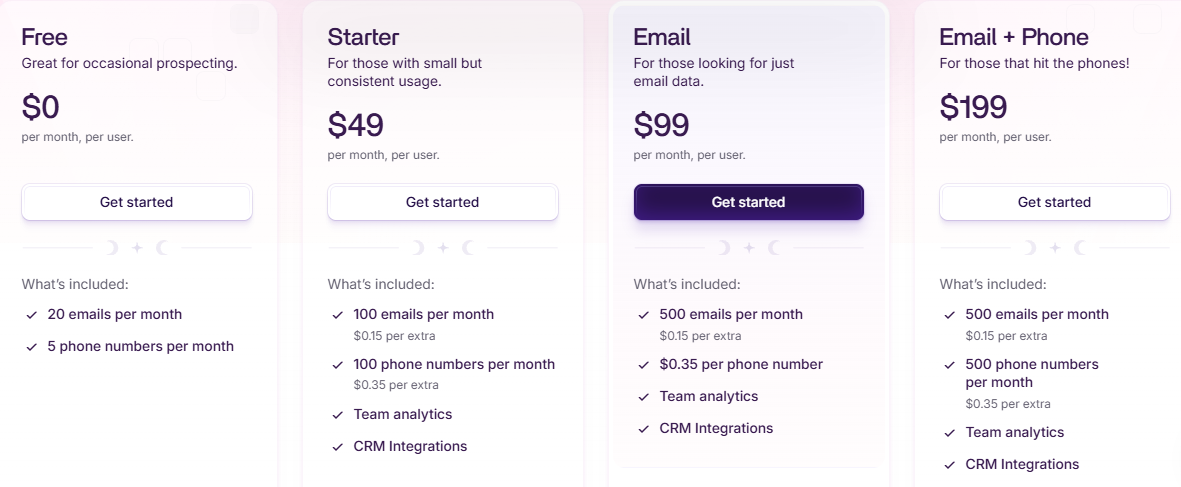
This image shows the Findymail pricing
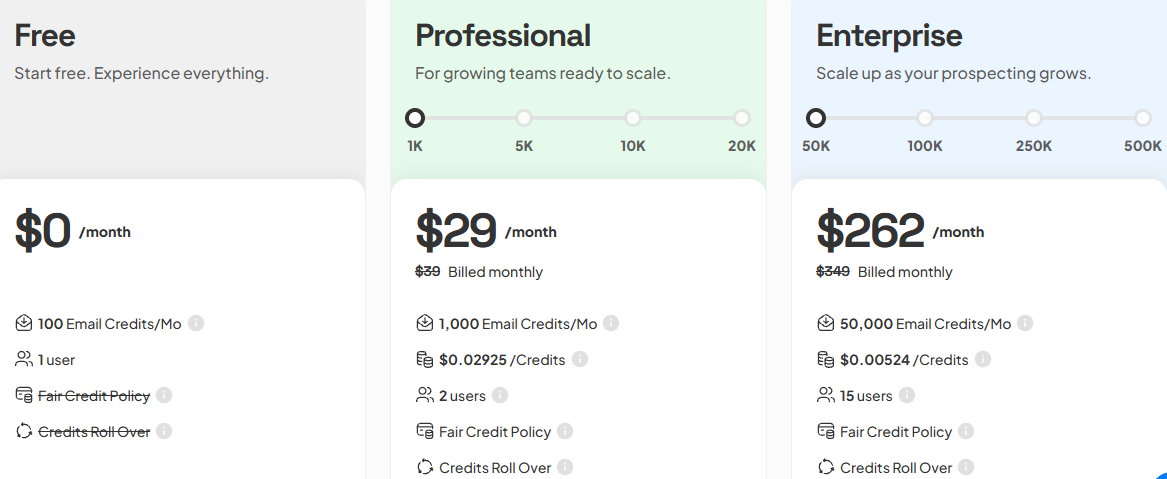
Findymail offers several paid plans with different pricing tiers, each including a set number of email credits per month. These pricing plans are designed to fit various user needs, from individuals to large teams.
Trial – $0, 10 finder credits, 10 verifications
Basic – $29/mo, 1,000 credits/month, API + integrations, 2 users
Enterprise – $262/month, 50,000/month, 15 users
7. Apollo – All-in-One Prospecting, Data, and Outreach Platform
This image shows the Apollo.io homepage
Apollo.io is a complete sales prospecting platform that combines a huge B2B contact database with email finding, sequencing, calling, enrichment, and automation tools.
Apollo is a comprehensive outreach tool that integrates seamlessly with LinkedIn, supporting advanced LinkedIn automation for prospecting and engagement. The platform integrates seamlessly with other popular tools, enhancing lead generation and outreach efficiency through robust LinkedIn integration.
Unlike Evaboot, which only exports leads from Sales Navigator, Apollo offers its own massive built-in database, plus powerful outreach tools like sequences, mailbox warmup, domain authentication help, and a deliverability suite.
Apollo vs Evaboot: Quick Comparison
Feature
Apollo
Evaboot
Works without Sales Navigator
Yes
No
Emails
Yes (verified)
Yes
Phone numbers
Yes
No
Database size
275M+ contacts
No database (only SN data)
Chrome extension
Yes
Yes
Intent signals
Yes
No
Email sequences
Yes
No
Ideal For
Apollo is ideal for:
Teams that want data and outreach automation in one tool
SDRs needing verified emails and phone numbers at scale
Companies running outbound with multiple mailboxes/domains
Founders and agencies doing cold email and LinkedIn prospecting
Teams wanting intent signals, sequences, enrichment, and CRM syncing
Large sales teams that require scalable outreach and automation
Pros and Cons of Apollo
Pros
Cons
Large database with verified emails & phone numbers
Can feel complex for beginners
Includes outreach tools (sequences, calls, tasks)
Some features locked behind higher tiers
Deliverability suite + email warmup + domain authentication help
Database quality varies by region
Strong Chrome extension for LinkedIn prospecting
More expensive than simple email finders
Apollo Pricing
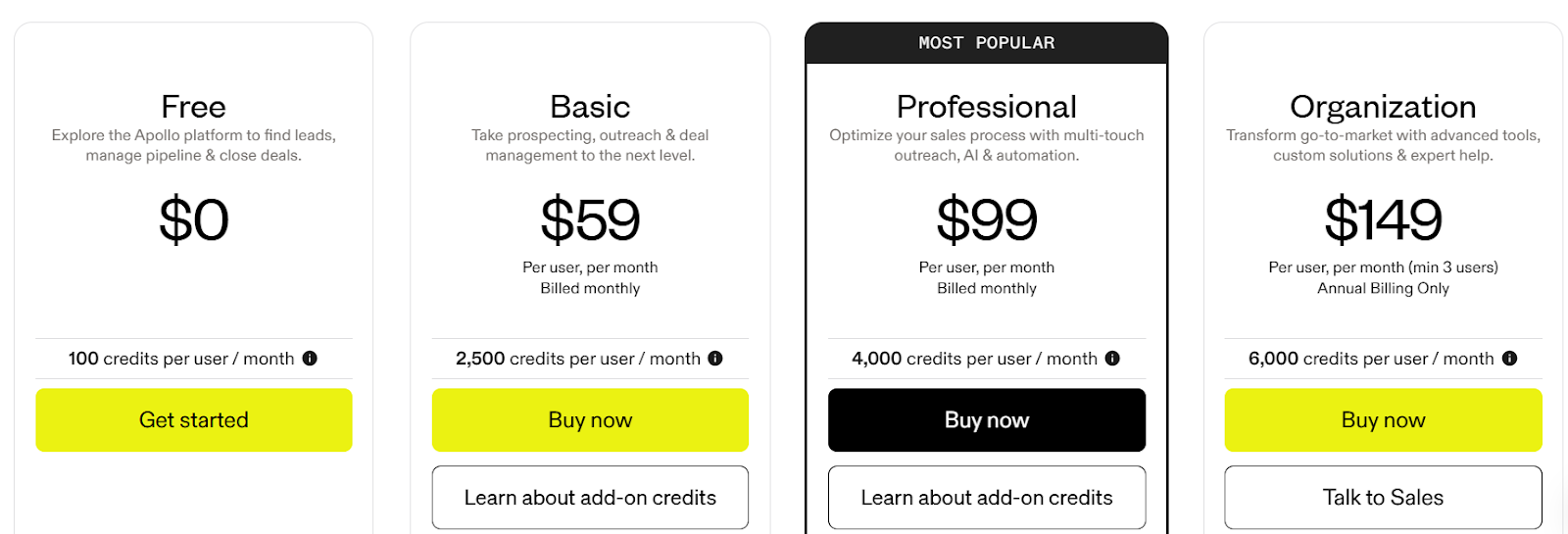
This image shows the Apollo.io pricing
Free Plan – $0/month: 100 credits
Basic Plan – $59/month: 2,500 credits
Professional Plan – $99/month: 4,000 credits
Organization Plan – $149/month: 6,000 credits
Apollo offers multiple paid plans with different pricing tiers, each including a set number of email credits per month. For larger teams or enterprise users, custom pricing is available to accommodate specific needs. These pricing plans help users choose the right level of access and features based on their requirements.
Evaboot works if you only need to export and clean leads from LinkedIn Sales Navigator.
But once you need more, verified phone numbers, real-time data, email sequences, or finding leads beyond LinkedIn, it starts falling short.
If you want more data, more channels, or more automation than Evaboot can offer, any of the tools in this list will give you a stronger setup.
If you only need verified emails → Skrapp or Findymail.
If you want phone numbers and global data → Lusha, UpLead, or Wiza.
If you want an all-in-one outbound platform → Apollo.
But if you want the fastest, simplest upgrade from Evaboot, then Leadsforge is the best overall choice. Leadsforge is considered the best Evaboot alternative for teams looking to optimize their lead generation efforts and access high-quality prospect data.
It gives you verified emails, phone numbers, lookalikes, intent signals, competitor followers, and an easy chat-based search that builds lead lists in minutes.
Evaboot is mainly used to clean and export lead lists from LinkedIn Sales Navigator. It removes duplicates, fixes job titles, and finds emails from the leads you export.
2. Why do people look for Evaboot alternatives?
Because Evaboot only works with Sales Navigator, does not provide phone numbers, and offers limited enrichment. Many teams need more data, more automation, and a larger database.
3. Do Evaboot alternatives work without Sales Navigator?
Yes. Most alternatives like Leadsforge, Skrapp, Lusha, UpLead, Wiza, Findymail, and Apollo can find leads without requiring Sales Navigator.
4. Which Evaboot alternative gives phone numbers?
Leadsforge, Lusha, UpLead, Wiza, Findymail, and Apollo all provide phone numbers. Evaboot does not. Additionally, some alternatives automate connection requests and follow-up messaging as part of their LinkedIn outreach features.
5. Which Evaboot alternative has the biggest database?
Wiza has 850M+ contacts, Apollo has 275M+, and Lusha has 280M+. Evaboot has no database because it depends entirely on Sales Navigator exports.
6. Do Evaboot alternatives support scraping LinkedIn data or exporting LinkedIn data?
Yes, many Evaboot alternatives offer LinkedIn data export, scraping LinkedIn data, and the ability to scrape LinkedIn profiles, LinkedIn search results, and Sales Navigator data. Many tools use LinkedIn scraping to extract data from profiles, search results, and company pages for lead generation and data enrichment. It's important to ensure compliance with LinkedIn's terms and consider regulatory requirements when using these features. Some tools use a Sales Navigator scraper or a LinkedIn data importer to pull and enrich LinkedIn profile data directly into your workflow.
7. What are the key features to look for in an Evaboot alternative?
Key features include sourcing data from multiple sources, enriched contact data, LinkedIn integration, CRM syncing, support for multiple accounts or LinkedIn accounts, and automation to reduce manual effort. Key features of Chrome extensions include retrieving contact details, verifying data, CRM integration, automating outreach processes, and ensuring compliance with data privacy regulations.
8. How do these tools handle account restrictions and manual effort?
Top tools minimize manual effort by automating data collection, enrichment, and outreach tasks. They also help avoid account restrictions by complying with LinkedIn’s terms, using safe automation practices, and supporting features like geotargeted IPs and cloud hosting.
9. Can these tools collect data on event attendees or job postings?
Yes, some platforms can collect data on event attendees, job postings, and other publicly available data from LinkedIn and other sources, helping with lead generation, recruitment, and market research.
10. How do these tools ensure data accuracy and quality?
These tools pull data from multiple sources, verify contact details, and enrich LinkedIn profile data to ensure reliable and accurate results for your prospecting and outreach needs.
11. Do these tools offer a free plan?
Yes, many Evaboot alternatives offer a free plan or free trial, allowing users to test limited features or usage quotas before committing to a paid subscription.
12. How does Evaboot's credit system work?
Evaboot charges 2 credits per lead with a verified email and 1 credit if no email is found.
13. How can I export data from Evaboot?
Evaboot only allows exporting results as a CSV file, requiring manual downloads.
14. Does Evaboot have an API?
Yes, but Evaboot's API documentation is considered basic and poorly explained, making it less developer-friendly.
15. How does Evaboot organize leads?
Evaboot allows users to organize lead lists into folders, which helps in creating industry-specific buckets.
16. Does Evaboot have a Chrome extension?
Yes, Evaboot offers a Chrome extension that collects leads directly from Sales Navigator.