If you’ve tried building lead lists inside Databar.ai, you’ve probably noticed it’s great at enriching existing data, but not at actually finding new leads. Many users seek Databar alternatives due to pricing concerns or missing features.
You still have to bring your own list, connect APIs, and configure workflows before anything useful happens.
So we started evaluating tools that go beyond enrichment, tools that can actually build, verify, and export clean lead lists without all that setup.
After weeks of evaluating, we narrowed it down to 5 Databar.ai alternatives that do the job better for list building.
Each one takes a different approach, some use AI to find leads automatically, others offer built-in outreach or real-time verification.
This guide will help you compare the best alternatives to Databar, focusing on finding the best fit for different business needs and budgets. In this article, you’ll discover the top Databar alternatives and compare their features, pricing, and suitability to help you choose the best fit for your requirements.
TL;DR - 5 Best Databar.ai Alternatives in 2025
Leadsforge: Chat-based lead finder that builds verified lists instantly from your ICP.
Apollo: All-in-one sales intelligence and automation suite with verified contact data, sequences, and deliverability tools.
Cognism: Best for verified mobile numbers and GDPR-compliant data across global markets.
Clay: AI-powered enrichment and workflow automation platform that combines 50+ data sources into one visual workspace.
LeadIQ: Easy Chrome-based prospecting tool to capture, enrich, and sync verified leads directly to your CRM.
Databar.ai is one of the most flexible enrichment tools in the market, offering a credit-based pricing model suitable for variable usage.
Both Databar and its alternatives provide free plans to get started.
However, when you actually start using it for GTM or lead generation, a few common pain points show up:
Many users seek alternatives to Databar due to pricing concerns or missing features.
1. Needs a starting dataset: Databar can’t generate leads from scratch. You must upload a CSV, connect a CRM, or use the Chrome extension to collect data first, which means it’s more of a data enhancer than a lead discovery tool.
2. Complex setup for non-technical users: The spreadsheet-style workspace, webhook mapping, and enrichment setup need manual configuration. Databar's ability to automate prospecting with its web scrapers and no-code features is effective, but users have reported a learning curve and occasional data inaccuracies with Databar.
If you’re not used to APIs or JSON data, the workflow feels slow compared to chat-based tools like Leadsforge.
3. No direct outreach or deliverability features: Databar enriches and cleans data but doesn’t include sending, warm-up, or inbox health tools.
You still need external platforms for cold outreach.
4. Chrome extension limited to basic scraping: The Chrome extension is convenient for quick data collection, but its functionality stops at scraping and basic enrichment. Deeper workflows still need to be built inside the main platform.
5. Lacks native AI personalization: The AI Research Agent can find and summarize data, but it doesn’t yet create personalized messages or outreach copy like Apollo or Salesforge’s AI SDR.
Databar provides ready-to-use data tables, while some alternatives allow users to build custom scrapers. Databar's pricing model may be more accessible for smaller projects compared to some alternatives.
How We Evaluated These Databar.ai Alternatives
To pick the most reliable Databar.ai alternatives, we evaluated these factors. It’s important to compare different options to find the best fit for your organization:
Ease of setup and time required to start building or enriching lists without technical setup.
Data accuracy and freshness to ensure verified, up-to-date contact and company information.
Pricing and scalability, including credit systems, flexibility, cost transparency, and considering your organization’s budget constraints.
Comprehensive suite of features to determine if the tool offers an all-in-one solution for various business needs.
AI and automation for research, enrichment, personalization, or lead scoring, focusing on how these features enhance research capabilities, optimize workflows, and improve decision-making processes.
Workflow depth, such as real-time enrichment, intent signals, and waterfall lookups.
Transparency of pricing and clarity on credit usage or hidden API limits.
Integrations and compatibility with CRMs, outreach tools, analytics platforms, and other systems to streamline workflows.
Compliance and security, including GDPR, CCPA, and SOC 2 standards.
Each tool was analyzed for how well it improves data enrichment accuracy, automation, and user experience compared to Databar.ai’s spreadsheet-heavy setup.
1. Leadsforge - Databar.ai Alternative for Fast, Verified List Building
This image shows the Leadsforge homepage
Leadsforge is a chat-based lead search engine built to simplify prospecting.
The platform offers a range of features allowing users to automate prospecting and data enrichment, making it a powerful solution for business needs.
Instead of setting up APIs or building spreadsheets like in Databar.ai, you just describe your ideal customer, and Leadsforge instantly generates a verified list with emails, LinkedIn profiles, and phone numbers from over 500M+ global contacts.
It combines multiple data providers and various sources under the hood, performs automatic waterfall enrichment in real time, and verifies every contact before export, providing comprehensive solutions for businesses.
Key Features of Leadsforge
Lookalike Audience: You can upload a few company domains and Leadsforge will find similar companies based on firmographics, funding stage, or industry.
This image shows the Find lookalike audience with Leadsforge
Competitor Followers: You can paste your competitor’s LinkedIn page, and Leadsforge finds people who follow them, giving you a ready-made list of warm, high-intent leads.
This image shows the Leadsforge competitor follower feature
Waterfall Data Enrichment: When you click Enrich, Leadsforge checks multiple databases in real time until it finds valid data, whether that’s an email, phone number, or LinkedIn URL.
Leadsforge vs Databar.ai
Category
Leadsforge
Databar.ai
Interface Type
Chat-based (no setup)
Spreadsheet-style workflows
List Building
Yes, generates leads from ICP
No, enriches imported lists
Enrichment Process
Automated real-time waterfall enrichment
Configurable waterfall enrichment across 90+ APIs
Data Coverage
500M+ verified contacts
90+ data sources, 450+ attributes
AI Capabilities
Natural-language lead search & signal detection
AI agents for data lookup & transformation
Best For
Instant lead discovery & enrichment
Complex, customizable data workflows
Both Leadsforge and Databar.ai support data extraction and web scraping to help users extract valuable information from any website.
Leadsforge focuses on automated data extraction for lead generation, while Databar.ai enables users to extract and transform web data from multiple websites for business intelligence and analytics.
Pros of Leadsforge:
You can upload your competitor LinkedIn pages or websites to find similar companies or their followers, turning warm interest groups into ready-to-contact leads. Leadsforge also enables you to access and utilize public data and public web data from various sources for comprehensive lead generation.
You can define custom signals like “Hiring outbound reps” or “Attended SaaS event,” and Leadsforge automatically finds accounts that show these indicators, helping you prioritize high-intent prospects.
Whether you use Leadsforge daily or occasionally, your unused export credits always roll over to the next billing cycle, giving you full control over cost and usage.
Cons of Leadsforge
It doesn’t support spreadsheet-style enrichment or formulas.
Leadsforge Pricing
This image shows the Leadsforge pricing
Essential (Monthly): $49/month for 2,000 export credits. Unused credits roll over automatically.
Essential (Yearly): $588/year (28,000 credits upfront). Save 14% with annual billing.
Add-on Credits: From $40/month for 8,000–100,000 extra credits. Credits never expire.
Free Trial: Get 100 free credits with full feature access.
2. Apollo - Databar.ai Alternative for All-in-One B2B Data and AI-Powered Sales Automation
This image shows the Apollo.io homepage
Apollo is a comprehensive suite and complete sales intelligence and automation platform that unifies data enrichment, outbound prospecting, and AI-driven workflows into one place.
The platform offers a wide range of features, including CRM integration and seamless integration with other business tools to streamline workflows and improve data accessibility. Its AI-driven workflows and analytics enhance sales automation and decision-making processes, providing added value for teams looking to optimize their operations.
It provides verified contact data, engagement tools, AI sales assistants, and real-time deliverability optimization, making it a full go-to-market operating system.
Key Features of Apollo
Largest Verified B2B Database: You can access 210 M contacts and 35 M companies, refreshed in real time. Each record goes through a 7-step email verification process with 91 % accuracy and less than 1 % invalid phone numbers.
Multi-Source Waterfall Enrichment: Data is collected from a 2 M-source contributor network, public crawling, engagement signals, and vetted third-party providers. Apollo automatically enriches, validates, and updates contacts whenever new data signals appear.
Signals & Intent Data: It is powered by Bombora, Apollo detects companies actively researching specific topics and surfaces buying signals like job postings or product interest, helping you prioritize hot accounts.
This image shows the Apollo intent topics types
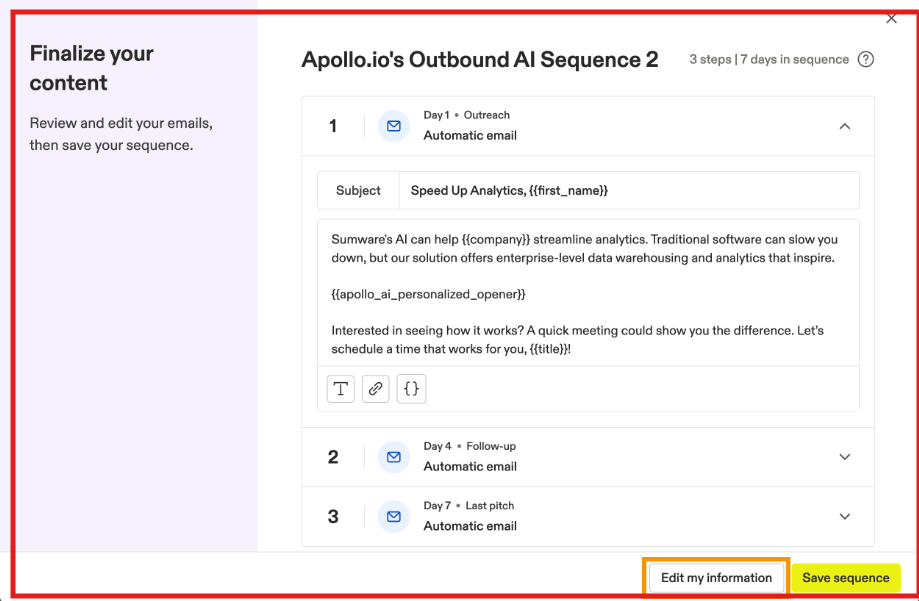
Outbound & Engagement Tools: You can send multi-channel sequences across email and LinkedIn, manage replies in a unified inbox, and analyze performance with built-in analytics and A/Z testing, allowing users to customize their workflows and access advanced analytics and automation features.
This image shows the Apollo sequences setup
Deliverability Suite & Warmup: It automates SPF/DKIM/DMARC setup, inbox ramp-up, blacklist checks, and domain reputation tracking to ensure your campaigns land in the inbox.
Apollo vs Databar.ai
Category
Apollo
Databar.ai
Interface Type
Full-stack dashboard + Chrome Extension
Spreadsheet-style workspace
List Building
Yes, build, enrich & verify leads
Enriches imported lists
Enrichment Process
Automated waterfall enrichment across 2M+ sources
Configurable waterfall enrichment across 90+ APIs
Data Coverage
210M contacts · 35M companies
90+ data sources · 450+ attributes
AI Capabilities
AI Research, AI Writer, AI Lead Scoring, Conversation AI
AI agents for data lookup & transformation
Export & Integrations
CRM sync (HubSpot, Salesforce), API, CSV, Zapier
CSV & API sync
Best For
Unified data + outbound automation + AI
Deep custom data workflows
Apollo also supports developers with advanced API access and workflow customization, making it a strong choice for technical users who need to build tailored data solutions.
Pros of Apollo
You can enrich, engage, score, and follow up with leads without leaving Apollo.
The 91 % email-accuracy rate and constant data refresh keep your CRM clean.
AI Research, Writer, and Lead Scoring handle prospect research, copywriting, and prioritization automatically.
Cons of Apollo
Users wanting only raw enrichment (like Databar AI spreadsheets) may find Apollo’s full suite more complex.
Unlike Databar AI, Apollo doesn’t let you build visual table formulas or multi-column enrichment logic.
Apollo Pricing
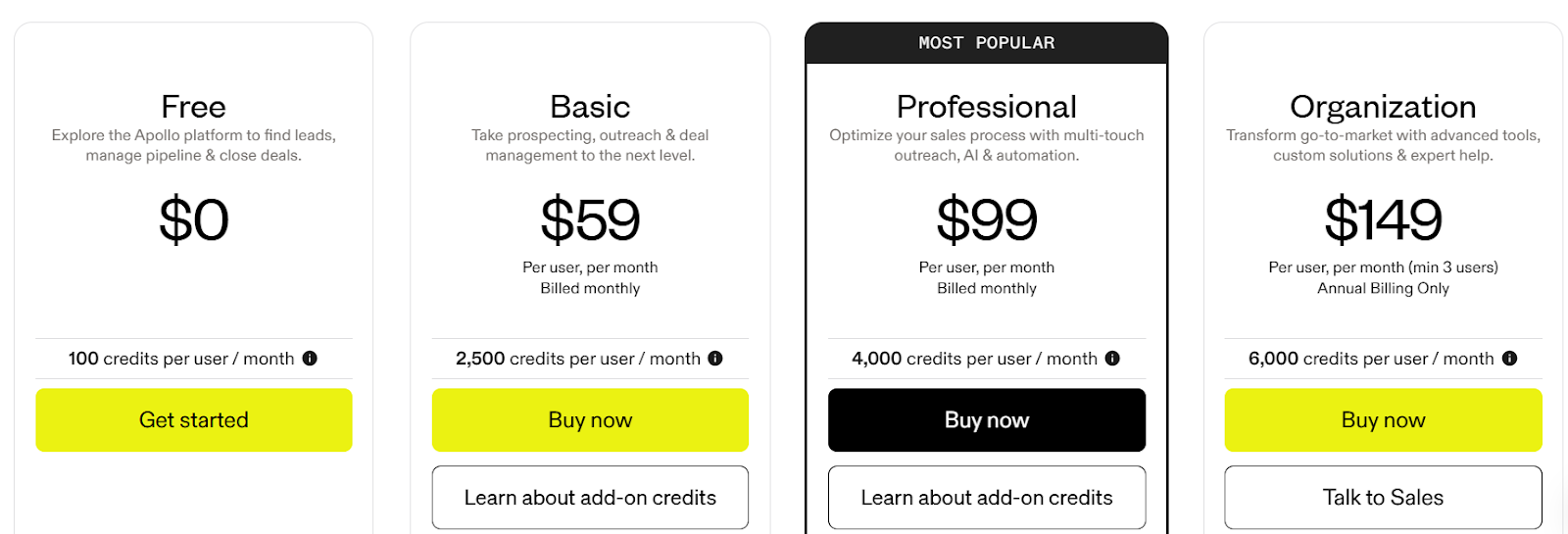
This image shows the Apollo.io pricing
Free: $0/ month, 100 credits
Basic: $59/ month, 2,500 credits
Professional (Most Popular): $99/ month, 4,000 credits
3. Cognism - Databar.ai Alternative for Verified Phone Data and Global Coverage
This image shows the Cognism homepage
Cognism is a B2B data platform that focuses on verified contact data, especially mobile numbers and decision-maker leads. Cognism provides solutions for organizations and businesses seeking verified contact data to support their sales and marketing operations.
Unlike Databar.ai, which helps you build custom enrichment workflows, Cognism is built mainly for sales and marketing teams that need accurate, compliance-ready leads to call or email right away.
Key Features of Cognism
Diamond Data® (Phone-Verified Contacts): Cognism’s biggest strength is its Diamond Data, every number is manually phone-verified by a human team, giving it one of the highest connect rates in the industry (around 87%).
This image shows the Cognism Diamond contacts only filter
Real-Time Refresh and Compliance: Director-level data is refreshed every 30 days, and all contacts are checked against 13 major Do Not Call (DNC) and TPS lists.
It’s also GDPR, CCPA, ISO 27001, ISO 27701, and SOC 2 Type II certified, something most enrichment tools, including Databar.ai, can’t match at this scale.
Platform Offers a Wide Range of Features: Cognism’s platform offers comprehensive data enrichment and compliance capabilities, including intent and signal tracking, real-time updates, and advanced filtering options.
Intent and Signal Tracking: Cognism offers buying signals like funding rounds, hiring trends, technographics (20K+ techs), and M&A alerts, helping you reach leads when they are most likely to buy.
AI Search and Enrichment: The new AI Search (beta) lets you describe the type of leads you want in natural language, similar to how Databar.ai allows text-based enrichment.
This image shows the Cognism AI search beta
Cognism also offers API and CSV enrichment, so you can clean or enrich existing lists with verified emails, phone numbers, and job data in seconds.
Cognism vs Databar.ai
Category
Cognism
Databar.ai
Interface Type
Dashboard + Chrome Extension
Spreadsheet-style workflows
List Building
Yes, global B2B database
No, enriches imported lists
Data Accuracy
Human & AI-verified phone + email
Automated multi-source validation
Compliance
GDPR, CCPA, ISO, SOC 2 certified
GDPR-compliant APIs
Intent & Signals
Hiring, funding, tech stack, M&A
Job posts, hiring, tech stack
Best For
Sales teams needing verified contact data
Analysts or teams doing API-based enrichment
Pros of Cognism
Industry-leading phone accuracy: Its Diamond Data gives one of the highest connect rates (around 87%), verified by humans and refreshed regularly.
Global and compliant coverage: Strong in Europe and North America, plus fully GDPR and SOC 2 certified for safe outreach.
AI-assisted search: The new AI Search makes finding ICPs simple and fast, like chatting with Databar.ai, but focused on verified data.
Cons of Cognism
Pricing not public: You need to book a demo to see pricing details, unlike Databar.ai’s transparent usage-based model.
Less customizable workflows: Databar.ai supports formula-based or multi-API workflows, while Cognism is more plug-and-play.
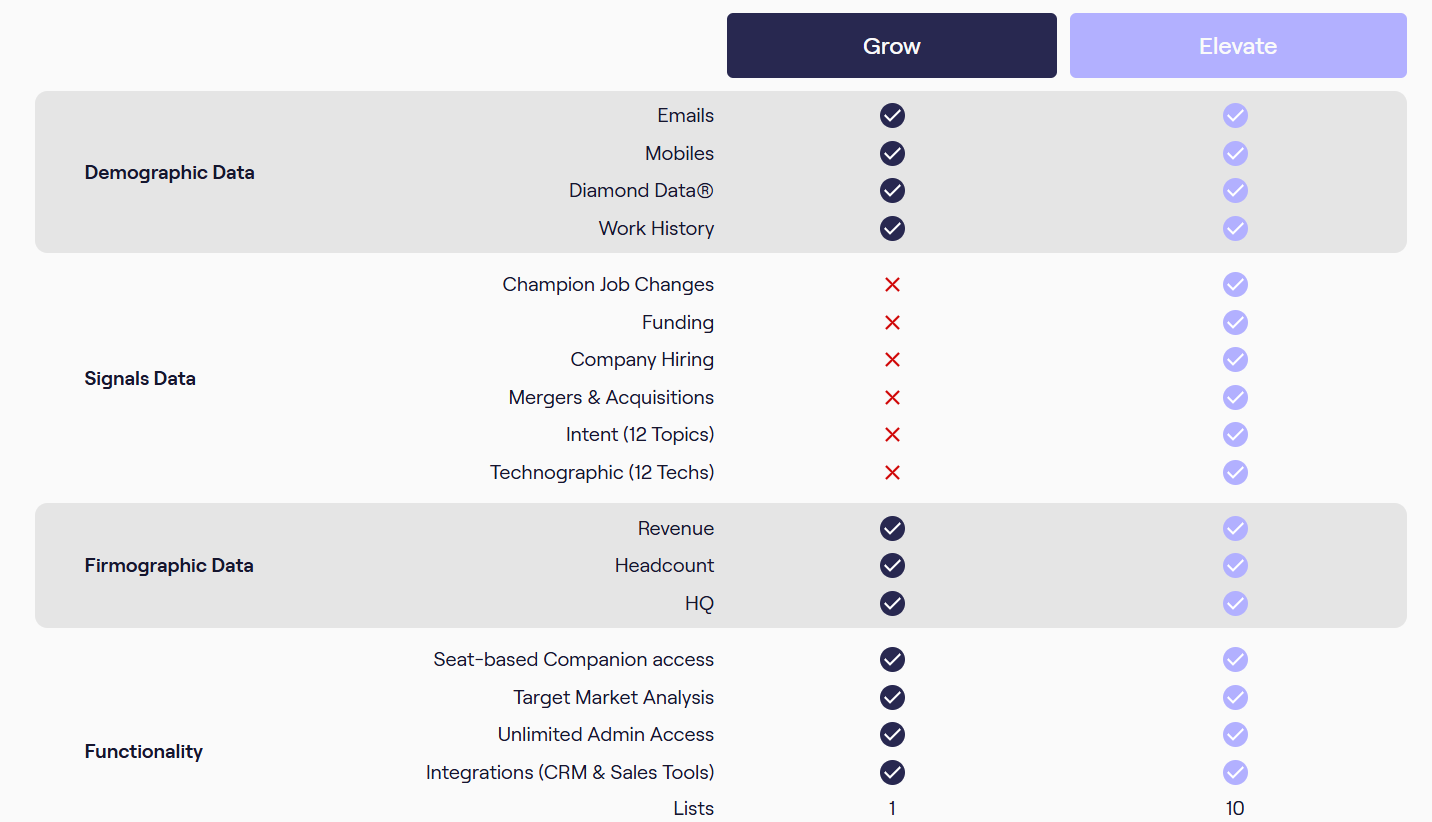
Cognism Pricing
This image shows the Cognism pricing
Cognism doesn’t publish prices publicly.
Plans are usually custom-based on team size and data volume, but here’s what’s known:
Grow Plan: Includes full Diamond Data access, global contacts, and core integrations.
Elevate Plan: Adds deeper enrichment, intent data, and automation workflows.
4. LeadIQ - Databar.ai Alternative for AI Prospecting and Enrichment
This image shows the LeadIQ homepage
LeadIQ is a unified prospecting and data enrichment platform that helps sales teams find accurate contacts, enrich CRM data, and send personalized outreach.
The platform offers robust CRM integration, allowing seamless connection with customer relationship management systems to streamline prospect management and sales workflows.
LeadIQ also provides a wide range of features and services, including integration with popular sales and marketing tools, automation, and professional support for custom data projects.
It is built for sales teams that want verified data, automation, and personalization inside tools they already use, like Salesforce, HubSpot, and Outreach.
Key Features of LeadIQ
Prospecting Hub: LeadIQ’s central workspace helps you find ICP-fit accounts, capture verified contacts, and measure team activity, all in one dashboard. It automatically syncs captured data to CRMs like Salesforce and HubSpot in real time, allowing users to easily capture, enrich, and sync data with their CRM.
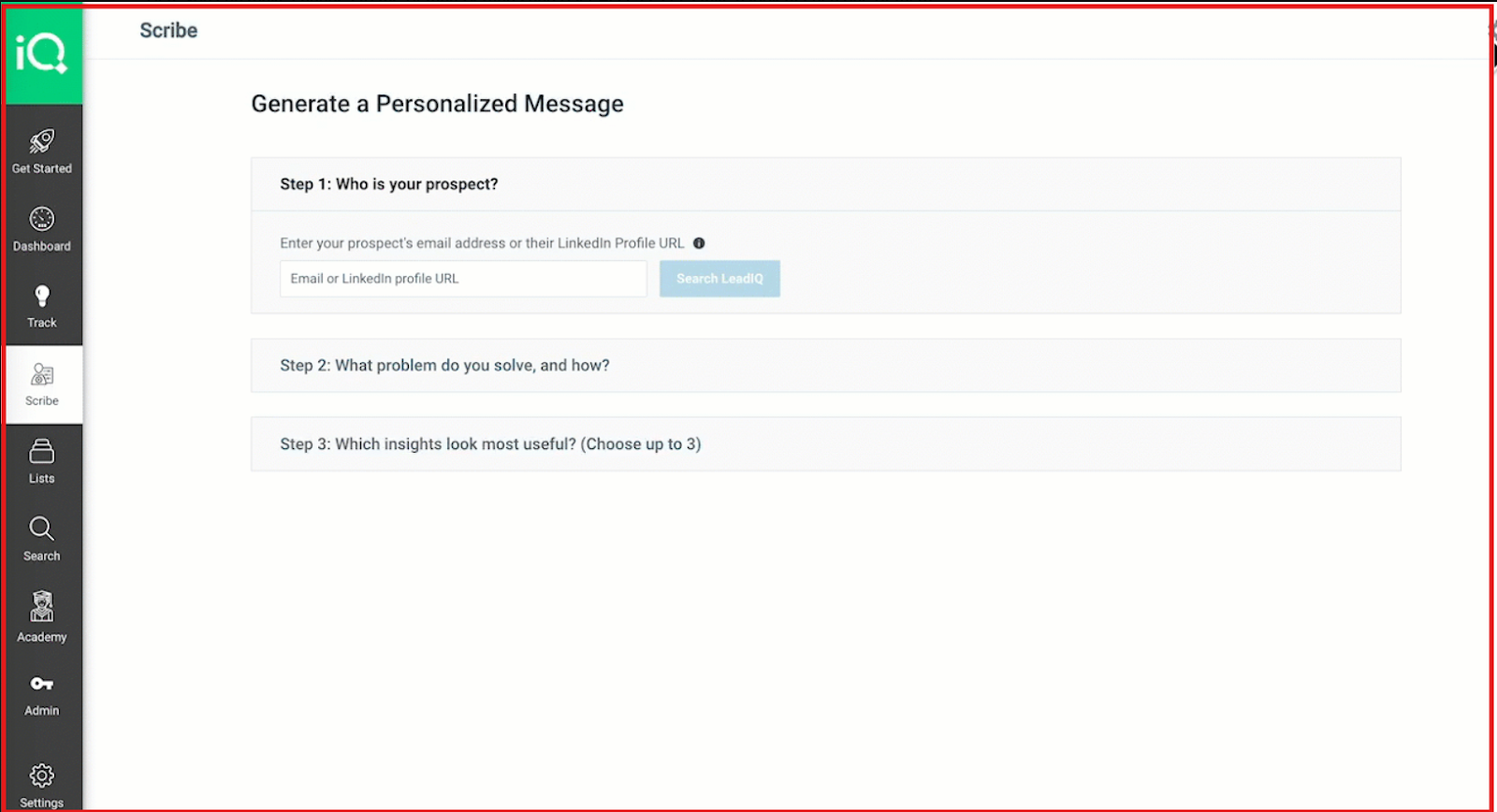
Scribe AI (Email Personalization): Scribe AI uses buying signals and company data to instantly write personalized sales emails. It works directly inside Prospecting Hub and integrates with Outreach, Gong, and HubSpot.
This image shows the Generate personalised message with Scribe
Champion Tracking: It automatically alerts you when past customers or decision-makers change roles or companies, helping you re-engage warm leads instantly.
AI Account Prospecting: LeadIQ identifies high-fit accounts and the right stakeholders automatically, so SDRs can focus only on the most relevant opportunities.
LeadIQ vs Databar.ai
Category
LeadIQ
Databar.ai
Interface Type
Dashboard + Chrome Extension
Spreadsheet-style workflows
List Building
Yes, via Prospecting Hub
No, enriches uploaded data
AI Capabilities
Scribe AI for personalized outreach
AI agents for enrichment
Data Accuracy
Verified email and phone data
Automated API validation
CRM Enrichment
Native Salesforce & HubSpot sync
Manual via APIs
Signals & Tracking
Champion tracking & buying signals
Job posts, hiring trends
Automation Workflow
Prospecting Hub (Find–Capture–Engage–Measure)
Custom formulas & workflows
Compliance
SOC 2 Type II, GDPR-compliant
GDPR-compliant APIs
Best For
Sales teams automating prospecting
Analysts building data pipelines
Both LeadIQ and Databar.ai support developers by offering API access and workflow customization, allowing technical users to build tailored data solutions and integrate with other tools.
Pros of LeadIQ
It includes built-in AI writing through its “Outbound Message Writer,” which personalizes emails instantly using company signals and context, something Databar.ai doesn't offer natively since it focuses only on data enrichment.
The Job Change Tracking feature alerts you when prospects or champions switch roles or companies, helping sales reps re-engage warm contacts, a real-time signal Databar.ai doesn't monitor.
LeadIQ's integrations go beyond enrichment. It connects deeply with Salesforce, HubSpot, Outreach, and Salesloft, letting you push contacts directly into live sequences, while Databar.ai still requires manual exports or API setup.
Cons of LeadIQ
LeadIQ focuses on sales teams, not analysts. Databar.ai’s spreadsheet workflows are better suited for technical users who need multi-API data blending or custom transformations.
Some advanced admin and governance controls are available only in the Enterprise plan, so smaller teams might not access all compliance and analytics tools immediately.
LeadIQ Pricing
This image shows the LeadIQ Pricing
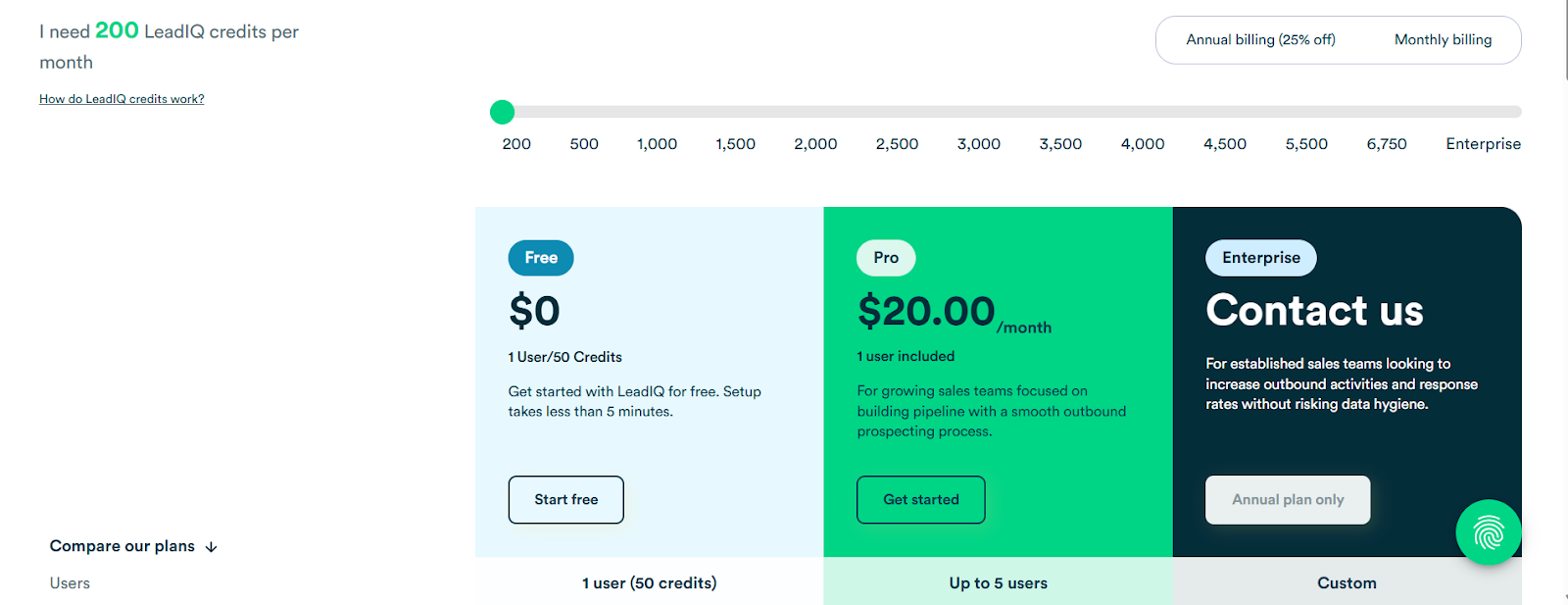
LeadIQ’s Pro plan starts at $20/month and can go up to $290/month, depending on how many credits you need.
Each lookup uses credits, 1 for email, 10 for phone, 11 for both, and 3 for account enrichment.
A free plan with 50 credits is also available, while Enterprise pricing is custom.
5. Clay - Databar.ai Alternative for AI-Driven Lead Enrichment and Workflow Automation
This image shows the Clay homepage
Clay is a comprehensive suite and solution for web data enrichment and automation, offering a wide range of features the platform offers for businesses seeking integrated data workflows. It helps you find, verify, and personalize leads across multiple sources.
Unlike Databar.ai, which focuses on spreadsheet-style enrichment, Clay gives you a visual workspace where you can automate research, enrichment, and personalization using AI — without code.
Key Features of Clay
Multi-Source Data Enrichment: Clay connects with 50+ data providers like Apollo, Clearbit, and ZoomInfo, letting you pull and verify contact, company, and intent data automatically.
AI-Powered Workflows: You can build enrichment pipelines that collect, clean, and personalize data in real time. Every field can be automated using pre-built steps or custom prompts, allowing users to automate data enrichment and workflow processes without code.
Real-Time Triggers: You can set automations for job changes, funding rounds, or new hires so your CRM lists update instantly when prospects change roles or companies.
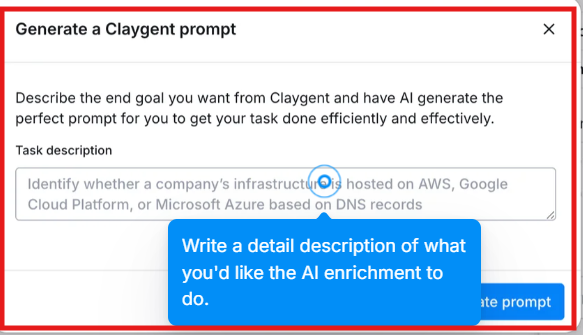
AI Personalization: Use Clay’s built-in AI writer tool to generate prompts for personalized email openers or any tasks to be done easily.
This image shows the AI prompt generation with Clay
Clay vs Databar.ai
Category
Clay
Databar.ai
Interface Type
Visual workflow dashboard
Spreadsheet-style workspace
List Building
Yes, build & enrich with AI workflows
Enriches imported lists
Enrichment Process
Multi-source (50+ APIs)
Configurable waterfall (90+ APIs)
AI Capabilities
AI enrichment · automation · personalization
AI research & lookup
Export & Integrations
CRM sync · API · Zapier · CSV
CSV & API sync
Best For
Automated lead research and personalization
Spreadsheet-based custom workflows
Clay supports developers with robust API access, enabling them to create custom solutions and workflows. It also allows integration of data from various sources, making it easy to consolidate and analyze information from multiple platforms.
Pros of Clay
AI-driven automation replaces manual enrichment. You can collect, clean, and personalize data automatically instead of using formulas or filters.
No-code setup makes workflow creation simple. Non-technical users can build enrichment automations in minutes.
With 50 + data sources and direct CRM sync, Clay ensures high data accuracy and flexibility.
Cons of Clay
No built-in warm-up or deliverability tools. You’ll still need an external email infrastructure for outreach.
Clay Pricing
This image shows the Clay pricing
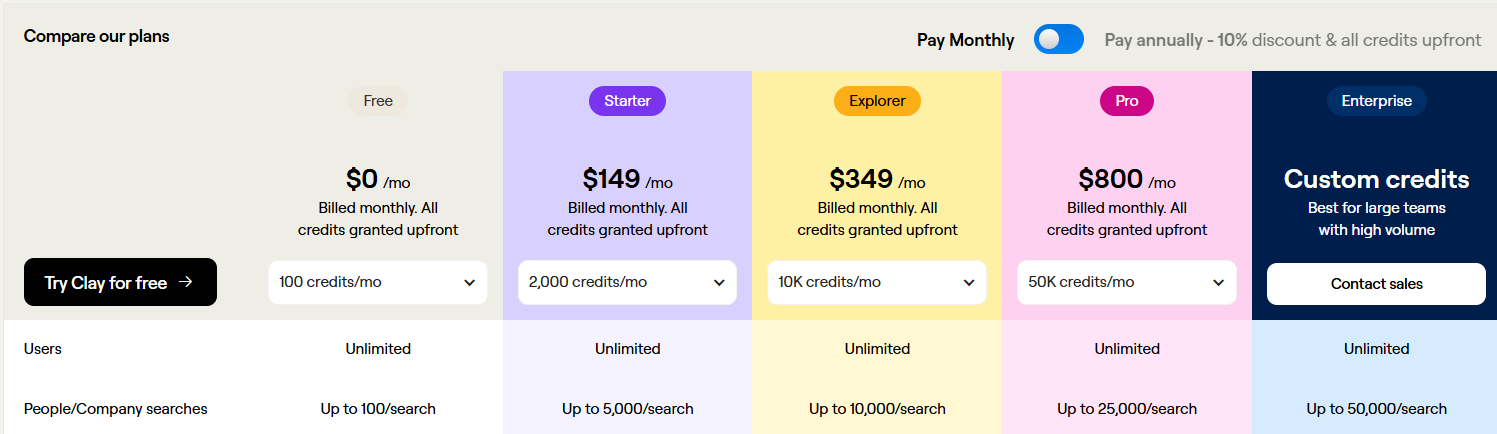
Free Plan: $0/ month
Starter Plan: $149/ month
Pro Plan: $800/ month
Enterprise Plan: Custom pricing with higher credit limits + API access
Which Databar.ai Alternative Should You Choose?
Each tool stands out for different reasons, some for data accuracy, others for automation or global reach.
When considering Databar alternatives, it's important to evaluate which solution is the best fit for your business or organization. There are solutions tailored for a range of needs, including options that are especially suitable for small businesses seeking cost-effective and easy-to-use platforms.
Apollo is ideal if you want one platform for enrichment, outreach, and AI-driven workflows.
Cognism fits teams that rely on verified phone data and global B2B coverage.
LeadIQ works best for quick lead capture and seamless CRM sync.
Clay is great for data analysts who prefer deep customization through APIs.
Leadsforge is perfect if you just want to describe your ICP and get verified leads instantly.
If you’re looking for a simpler, faster way to find and enrich leads without complexity, try Leadsforge. It gives you verified data and intent signals in seconds, ready for outreach.
Yes, Databar.ai is great for data enrichment and research, but it’s more technical and suited for users who are comfortable working with spreadsheets and APIs. Databar offers a free plan and a flexible credit-based model suitable for variable usage.
2. What makes these Databar.ai alternatives different?
Each alternative focuses on a specific strength, Leadsforge for verified leads, Apollo for automation, Cognism for phone data, LeadIQ for quick capture, and Clay for API-based workflows. Many alternatives also provide professional services to help with custom web scrapers and data extraction projects, offering support alongside their tools.
3. Which tool offers the easiest setup?
Leadsforge offers the simplest setup since it doesn’t require spreadsheets or API connections, just describe your target audience and get verified results. Users have noted a learning curve and occasional data inaccuracies with Databar.
4. Can I use these tools with my CRM?
Yes, all five tools integrate with major CRMs like HubSpot, Salesforce, and Pipedrive for seamless data syncing. Databar integrates with over 100 best-in-class data providers through a single interface.
5. Why do users look for Databar alternatives?
Users often look for alternatives to Databar due to pricing concerns, missing features, or better integration options.
6. How is Databar’s pricing structured?
Databar's pricing is transparent and value-focused, with a free trial option available.
7. Do Databar and its alternatives offer free plans?
Yes, both Databar and its alternatives offer free plans to get started.