

Personalized Outbound Strategy
Get The Right Outbound Strategy In Minutes
Enter your email to get a custom plan & stack recommendation for your business
It's being carefully crafted by AI
Please check your mailbox in 5 minutes
Your best customers already show you what a good account looks like. But finding more companies like them is not that simple. You need more than basic filters like industry, location, or employee count.
You need to know which companies have a similar tech stack, team size, hiring pattern, growth stage, buying intent, and market need.
Well, that’s where company lookalike tools come in. Some of them help you upload your best customers and find similar companies using AI. Others use intent data, enrichment, website visitor data, or prospecting activity to suggest accounts that look close to your existing buyers.
In this blog, I’ve listed the 7 best tools for finding company lookalikes in B2B sales, what each one offers, who it’s best for, and where it fits in your outbound workflow. So you can find better-fit accounts without building random lead lists from scratch.
Company lookalikes are businesses that are similar to your existing customers, target accounts, or closed-won deals. Instead of relying only on basic prospecting filters like industry, location, or employee count, company lookalike tools analyze deeper signals to find companies that closely match the accounts already buying from you.
These signals can include things like company size, revenue range, tech stack, hiring activity, funding stage, sales team growth, buying intent, and market category.
For example, if your best customers are fast-growing SaaS companies using HubSpot and actively hiring SDRs, a company lookalike tool will try to find other businesses with similar patterns.
This helps B2B sales teams build more targeted prospect lists instead of manually searching through large databases filled with broad or low-fit accounts.
For this list, I focused on platforms that can actually help sales teams find companies similar to their existing customers, target accounts, or won deals. I mainly evaluated these tools based on:
I also looked at how these tools fit into real outbound workflows. Some tools are better for enterprise ABM teams, while others work better for SDR teams, founders, agencies, or cold email prospecting.

Leadsforge is a B2B prospecting platform built for teams that want to find and enrich high-fit accounts faster. Instead of relying on complex filters, Leadsforge uses a chat-style search interface where you can describe your ideal customer profile in plain English and generate targeted lead lists instantly.
One of the strongest parts of Leadsforge is its built-in Company Lookalikes feature. You can input company domains or existing customer accounts, and Leadsforge will find similar companies based on patterns like company type, market, tech stack, and ICP signals. The platform also supports:
Leadsforge currently works across a database of 500M+ contacts.
Finding company lookalikes inside Leadsforge is relatively simple. First, open the Company Lookalikes section from the main dashboard.

Then upload:
Leadsforge analyzes those accounts and searches for similar companies inside its database. The platform then enriches those companies with, emails, LinkedIn profiles, phone numbers, and additional company data. You can also refine the results using ICP prompts, intent signals, or enrichment preferences before exporting the list.
One thing I liked is that the workflow feels much simpler than traditional lead databases with dozens of filters. It behaves more like a conversational prospecting tool instead of a static database.

Alt text: Leadsforge pricing
Enter your email to get a custom plan & stack recommendation for your business
Please check your mailbox in 5 minutes


Ocean.io is one of the most dedicated company lookalike platforms in the B2B market. Unlike traditional prospecting tools that mainly rely on filters, Ocean.io is built around AI-driven lookalike search and account discovery.
The platform helps sales and marketing teams find companies similar to their best customers using machine learning, natural language processing, and website-based company analysis.
One thing that makes Ocean.io different is its website-first approach. Instead of depending only on industry categories or static firmographic data, Ocean.io analyzes company websites, positioning, messaging, and contextual signals to understand what a company actually does. Besides company lookalikes, Ocean.io also includes:
The platform is built on a large global dataset and uses website crawling, AI, and contextual company analysis to improve company matching accuracy.
To find company lookalikes on Ocean.io, you simply enter the URL of your best customer into the search bar, and Ocean.io generates a large list of similar companies ranked by similarity score.

The platform then analyzes those companies using its AI engine and returns accounts based on contextual similarity instead of only traditional filters. You can further narrow the results using:
Ocean.io also lets users enrich the accounts with verified emails, phone numbers, and CRM-ready company data before export. What stands out about Ocean.io is that the entire platform is designed around lookalike discovery.


Clay is a prospecting and GTM workflow platform used by teams that want more control over how they find, enrich, and automate lead lists. Instead of only giving you a database with filters, Clay lets you build custom workflows for sourcing accounts, enriching data, tracking signals, and running outbound campaigns.
Clay also supports company lookalike workflows. You can start with a few customer companies or company domains, and Clay can generate similar companies using its native lookalike actions or Ocean.io integrations inside workflows.
The platform also includes enrichment, intent signals, CRM syncing, AI research agents, and access to data from 150+ providers. This makes Clay popular with outbound teams and GTM teams building custom prospecting systems.
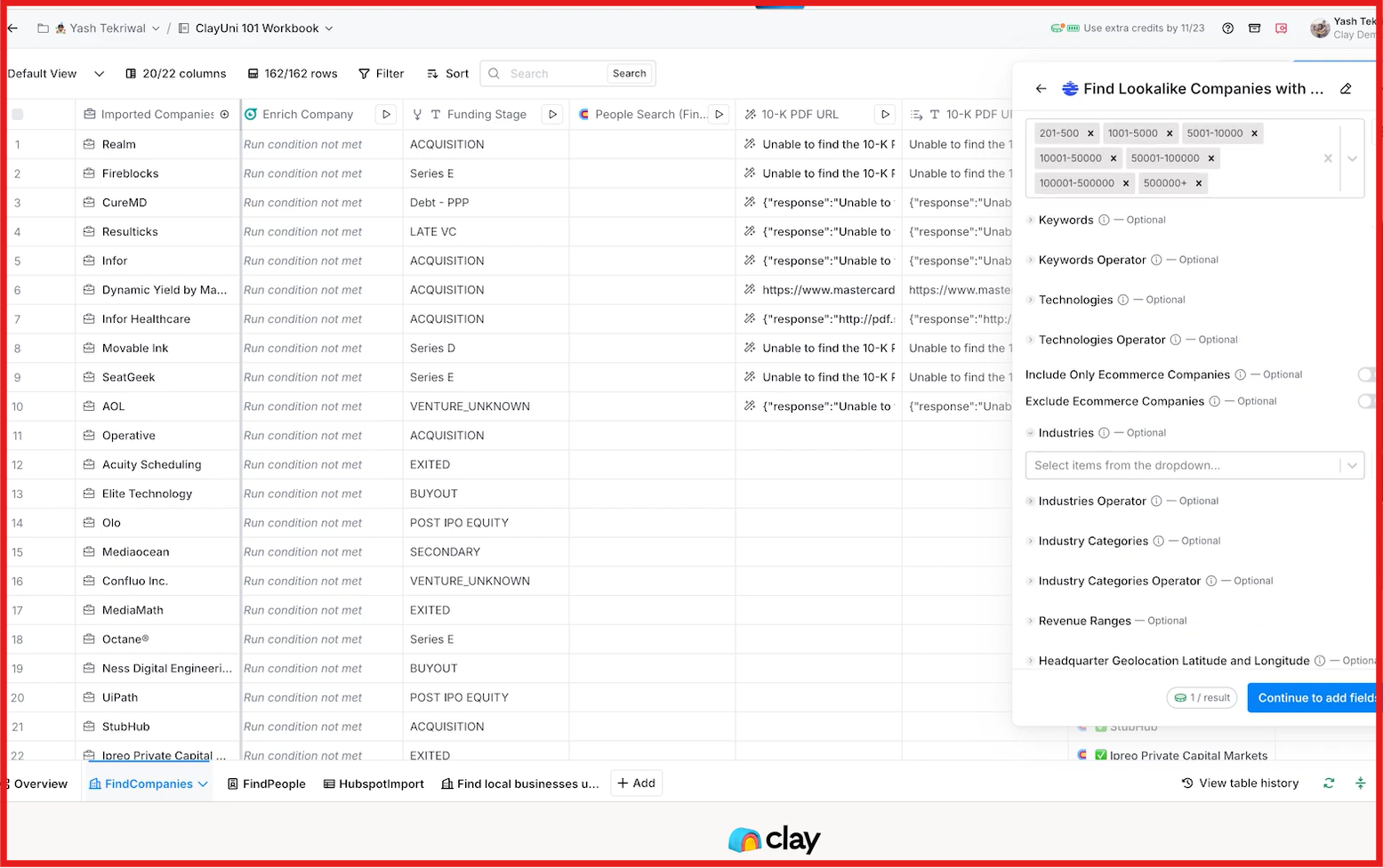
Clay supports company lookalike search through both native actions and Ocean.io integrations. You can start with a few customer accounts, company domains, or CRM records, and Clay will generate similar companies based on shared attributes. The workflow can include:
Once the lookalike accounts are generated, Clay lets you enrich, score, filter, and route those companies into outbound workflows automatically. This makes Clay more flexible than standard prospecting tools because you can combine lookalike discovery with enrichment, scoring, CRM syncing, and outbound automation in one workflow.


Lusha is a sales intelligence and prospecting platform used for finding verified contact and company data. Along with enrichment and prospecting, Lusha also includes a direct Lookalikes feature for both contacts and companies.
The platform helps users discover companies and contacts similar to the prospects they already work with. Lusha’s lookalike system uses signals like company profile, industry, seniority, technologies used, location, and prospecting activity to generate recommendations. Lusha also includes:
One useful part of Lusha is that its recommendations update automatically based on your prospecting activity and saved accounts.
Lusha shows company lookalike recommendations directly inside the platform based on your existing prospecting activity. The system analyzes the companies and contacts you already searched, revealed, or saved, and then suggests similar accounts automatically.
You can find lookalikes through:
Lusha uses signals like company size, industry, technologies used, seniority, location, and recent prospecting activity to generate similar companies and contacts.

Leadfeeder is a B2B lead generation and website visitor intelligence platform. It helps companies identify businesses visiting their website and turn those visits into sales opportunities. Along with visitor tracking, Leadfeeder also supports AI-based company lookalike discovery through its Target product.
The platform includes features like company and contact databases, buying intent tracking, ICP filtering, audience building, CRM syncing, and AI enrichment. One of the more useful parts is its Similar Companies and Cluster Lookalikes features, which help teams find businesses similar to their existing customers or won deals.
Leadfeeder lets users generate lookalike companies using its AI Tools and Company List Segmentation features. The process mainly starts with your existing customer or CRM data.
The workflow usually looks like this:
Leadfeeder’s AI analyzes factors like industry, business operations, employee size, and ICP similarities to generate matching companies. One useful part is that users can control how closely matched the suggested companies should be.

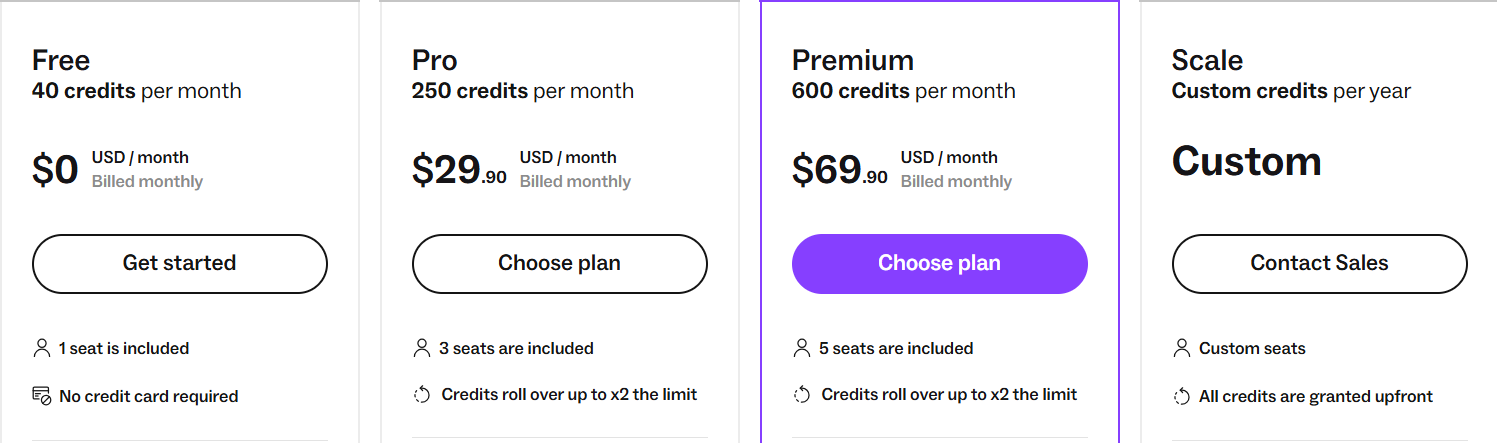
Alt text: Leadfeeder pricing

Apollo.io is a B2B prospecting and outbound sales platform. It helps teams find companies, enrich contacts, send cold emails, and manage outreach from one place. Apollo also includes a Lookalikes feature that helps users find companies and people similar to their existing customers.
Apollo’s AI looks at company traits and prospecting patterns to generate similar accounts automatically. It also includes enrichment, intent filters, email sequencing, CRM syncing, workflows, and outreach automation. This makes it useful for SDR teams, founders, agencies, and outbound sales teams running prospecting and outreach together.

Apollo lets users find lookalike companies directly inside its prospecting filters. You can start with existing customers, target accounts, or saved prospects that match your ideal customer profile.
The workflow usually looks like this:
Apollo mainly uses firmographic similarities and prospecting data to generate matching accounts. One useful part is that the feature works directly inside Apollo’s main prospecting workflow, so users can immediately enrich, export, or sequence the generated accounts.


Instantly is a cold email and outbound sales platform built for teams that want to manage lead generation, email outreach, warmup, and automation in one place. The platform is mainly known for cold email scaling, but its SuperSearch feature also supports company lookalike prospecting through a Lookalike Domain filter.
Users can enter a company domain, and it will generate similar companies based on matching business data and filters. The platform also combines lead search, enrichment, AI workflows, verified emails, outreach automation, and campaign management inside the same workflow.
Instantly is mainly useful for SDR teams, agencies, founders, and outbound teams that want to find lookalike companies and launch cold outreach campaigns from one platform.
Instantly supports company lookalike search through its SuperSearch feature. Users can enter a company domain inside the Lookalike Domain filter, and Instantly generates similar companies automatically.
The process usually looks like this:
One useful part is that Instantly combines lookalike search and cold outreach in the same workflow, so users can go from account discovery to email campaigns much faster.

All these tools help you find companies similar to your best customers, but they are built for different workflows. Some focus more on AI company discovery. Some are better for outbound automation. Others are mainly useful for website intent tracking or enterprise workflows. Here’s a simple breakdown to help you choose faster:
For most outbound teams, Leadsforge is probably the easiest place to start because it combines company lookalikes, enrichment, intent signals, and outbound prospecting in one simple workflow without needing complex setup.
Enter your email to get a custom plan & stack recommendation for your business
Please check your mailbox in 5 minutes
Finding company lookalikes is one of the fastest ways to scale outbound without guessing who to target next. Instead of building random lead lists, you can focus on companies that already look similar to your best customers.
Some tools are better for AI company discovery. Some focus more on workflows and automations. Others combine lookalikes with cold outreach and enrichment.
If you want a simple workflow that helps you:
then Leadsforge is one of the strongest options to try. You can upload customer companies or domains, generate lookalike accounts, enrich verified contacts, and move directly into outbound campaigns without using multiple tools.
Try Leadsforge now and get 100 free credits!