

Personalized Outbound Strategy
Get The Right Outbound Strategy In Minutes
Enter your email to get a custom plan & stack recommendation for your business
It's being carefully crafted by AI
Please check your mailbox in 5 minutes
Finding leads is easy. Getting verified emails, phone numbers, LinkedIn profiles, and company data for those leads is usually where the real work starts.
Most teams still move between multiple tools just to enrich and verify prospect data before outreach. MCP servers make that process much simpler. They connect tools like Claude, ChatGPT, and Cursor directly to lead enrichment platforms, making it easier to search, enrich, and organize prospect data from one place.
In this guide, I'll show you how MCP servers work for lead enrichment, how to build an enrichment workflow around them, and which MCP servers are worth using.
To use MCP servers for lead enrichment, connect your AI assistant to an MCP server that provides access to lead search, enrichment, and verification tools. Once connected, your AI assistant can help you find prospects, enrich contact data, verify information, and prepare lead lists for outreach using simple prompts.
A usual workflow looks like this: AI Assistant → MCP Server → Lead Enrichment Platform → Enriched Lead Data → CRM or Outreach Platform

In practice, the process is simple:
The biggest advantage is that it removes much of the manual work involved in lead enrichment. Instead of moving data between multiple tools, your AI assistant can access enrichment tools through the MCP server and complete much of the workflow from one place.
An MCP lead enrichment workflow is the process of finding prospects and enriching their data through an AI assistant. Let's say you want to find CMOs at SaaS companies in the US. Instead of opening multiple tools yourself, you give that request to your AI assistant.
The AI assistant sends the request to the MCP server. The MCP server then uses the connected lead enrichment platform to search for matching prospects and gather additional information about them.
That information can include:
Once the data is collected, the results are returned to the AI assistant, which can organize, filter, or prepare the list for the next step in your workflow.
In simple terms, the MCP server sits between your AI assistant and the lead enrichment platform, allowing the AI assistant to search, enrich, and retrieve prospect data on your behalf.
Once your MCP server is connected, you can use it to search for prospects, enrich contact data, verify information, and prepare leads for outreach.
The role of the MCP server is to give your AI assistant access to the lead enrichment tools needed to perform these tasks. Instead of manually moving between different platforms, the MCP server acts as the bridge between your AI assistant and the enrichment platform.
The first step is connecting your MCP server to an AI assistant such as Claude, ChatGPT, Gemini, or Cursor. Suppose you're using Forge MCP, you can connect it to Claude Desktop, Claude Code, Cursor, Windsurf, and other MCP-compatible clients. The first step is to generate your API key.
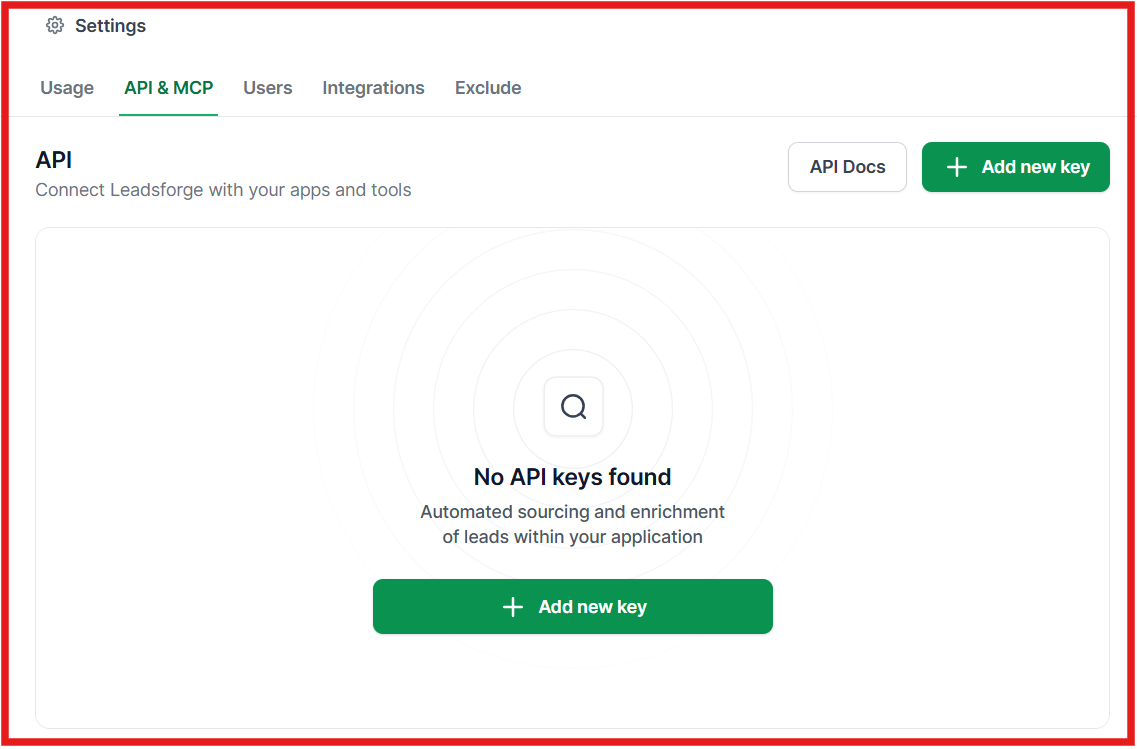
For lead enrichment through Forge MCP Server, you can generate an API key first on Leadsforge. Then you can go to the Claude Desktop to edit the configuration.
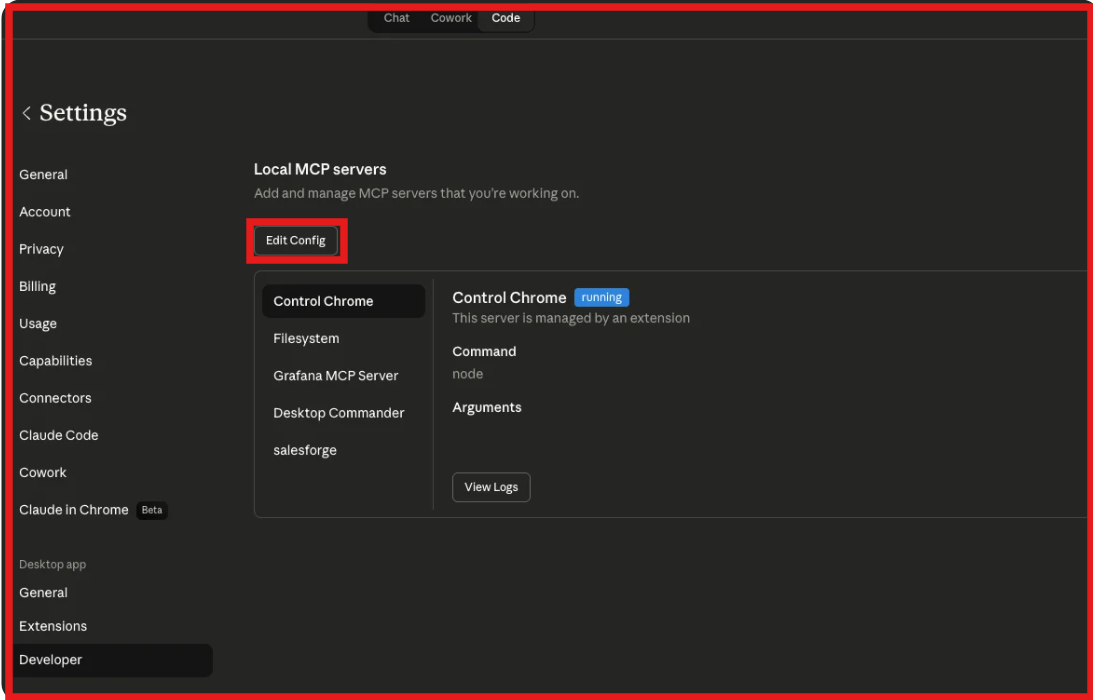
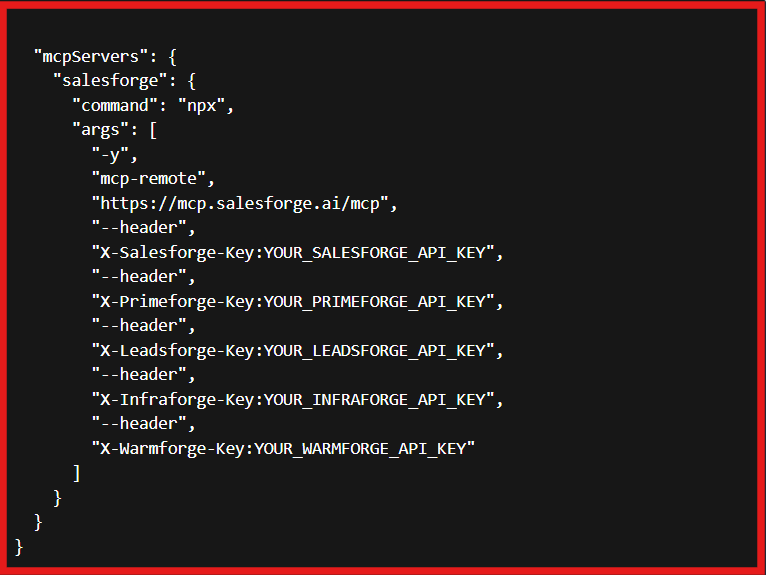
Once connected, the AI assistant can access Leadsforge tools for lead search, enrichment, and lookalike discovery through natural language prompts.
Once the connection is set up, define the type of prospects you want to find. This can include:
Instead of manually applying filters across multiple tools, you can simply describe your ideal customer profile and let the enrichment platform perform the search.
After finding matching prospects, the next step is enrichment. Using Forge MCP, the AI assistant can access Leadsforge to enrich prospects with:
This turns a basic prospect record into an outreach-ready contact.
Before adding leads to an outreach campaign, it is important to verify the data. Many enrichment platforms include email verification and validation features that help remove inaccurate or incomplete records before outreach begins. This helps improve data quality and reduces the chances of working with outdated contact information.
The final step is moving enriched leads into the systems your team already uses. For example, Leadsforge lists can be exported directly to Salesforge or downloaded as CSV files.
From there, the leads can be added to email or LinkedIn outreach campaigns. At this point, the lead enrichment workflow is complete, and the prospect list is ready for sales outreach.
That's the complete process. Once your MCP server is connected, your AI assistant can help you find prospects, enrich contact data, verify information, and prepare lead lists for outreach. The result is a simpler lead enrichment workflow with fewer manual steps and less time spent moving data between tools.
The best MCP server depends on what you want to do after enrichment. If you only want to add missing emails, phone numbers, or company data, a pure enrichment-focused MCP can work. But if you want to move enriched leads into sequences, update records, or run outbound from the same workflow, you need an MCP server that goes beyond data lookup.
Forge MCP is the strongest fit if you want lead enrichment to connect with the rest of your outbound workflow. It supports the Forge stack through one endpoint, including Leadsforge, Salesforge, Mailforge, Primeforge, Infraforge, and Warmforge.
For this article, the most important part is Leadsforge, because it supports contact search, email enrichment, phone enrichment, LinkedIn enrichment, and lookalike search.
The useful part is what happens after enrichment. You can enrich leads in Leadsforge and then move them into Salesforge for email and LinkedIn outreach. That makes Forge MCP more practical for teams that do not want enrichment to stop at a CSV export.
Best for: Teams that want to find, enrich, and move leads into outreach from one workflow.
Clay MCP makes sense if your enrichment process already lives inside Clay. It can help with contact search, detailed contact information, adding contacts, creating groups, updating groups, and managing notes. This is useful when you want your AI assistant to work with Clay records instead of manually clicking through the platform.
I would not choose Clay MCP as the first option if you want a full outbound workflow. But if Clay is already your data workspace, its MCP server can reduce a lot of manual work.
Best for: Teams already using Clay to manage contact data and enrichment workflows.
Apollo MCP is a good option for teams already using Apollo as their main GTM database. It lets AI tools search for leads, enrich contact data, create or update records, add prospects to sequences, and analyze performance. For lead enrichment, the main value is that you can get verified contact data such as emails and phone numbers inside your AI workflow.
Apollo MCP is useful because it connects enrichment with sequence actions. But it is still best for teams that already rely on Apollo. Your data access and limits depend on your Apollo account and plan.
Best for: Teams that use Apollo for prospecting and want AI-assisted lead enrichment and sequence management.
ZoomInfo MCP is built for teams that need deeper B2B data, not just basic contact enrichment. It can search companies and contacts, enrich accounts, enrich contacts, pull intent data, surface news, and support account research. This makes it useful for enterprise GTM teams that need firmographics, technographics, funding data, leadership data, and buying signals.
If you only need emails and LinkedIn profiles, ZoomInfo MCP may be more than you need. But if your workflow depends on account intelligence, it is one of the stronger options.
Best for: Enterprise sales and GTM teams that need deep account intelligence and contact enrichment.
MCP servers can make lead enrichment much faster, but they do not automatically fix bad data or poor prospecting decisions. Here are some common mistakes to avoid:
The best results come from combining MCP-powered enrichment with a clear ICP, good data hygiene, and a structured outreach process.
Enter your email to get a custom plan & stack recommendation for your business
Please check your mailbox in 5 minutes

MCP servers are changing how teams handle lead enrichment. Instead of jumping between prospecting tools, enrichment platforms, and CRMs, you can use an AI assistant to manage much of the workflow from one place.
The biggest advantage is not that MCP servers create better data. It is that they make it easier to find, enrich, verify, and organize prospect data without as much manual work. If you want an MCP server built specifically for prospecting, enrichment, and outbound workflows, Forge MCP is one of the strongest options.
It gives AI assistants access to Leadsforge for contact search, email enrichment, phone enrichment, LinkedIn enrichment, and lookalike search, while also connecting directly to the rest of the Forge stack.
And if your biggest challenge is finding high-quality prospects to enrich in the first place, Leadsforge can help. It lets you search across 500M+ contacts, enrich emails, LinkedIn profiles, and phone numbers, and build outreach-ready lead lists through a simple natural-language workflow.