If you have ever tried using Claude or ChatGPT for outbound sales, you have probably run into the same problem I did. The AI can give you ideas, write emails, and answer questions, but it cannot actually access your prospecting tools, lead databases, CRM, or outreach platforms on its own.
That is why MCP servers are getting attention. A good MCP server allows Claude, ChatGPT, and other AI agents to connect directly with your outbound stack. Instead of manually jumping between tools, you can research prospects, enrich contacts, manage campaigns, and automate sales tasks from a single conversation.
In this guide, I'll compare the best MCP servers for outbound sales and explain where each one fits, so you can choose the right one for your workflow.
Forge MCP Server: Best for AI-powered lead discovery and data enrichment.
Apollo MCP Server: Best for prospecting, contact search, enrichment, and adding prospects to sequences.
Lusha MCP Server: Best for finding and enriching B2B contact and company data.
ZoomInfo MCP Server: Best for B2B sales intelligence and company/contact research.
Clay MCP Server: Best for data enrichment and outbound workflow automation.
Letterdrop MCP Server: Best for intent signals, account research, and buying signals.
Instantly MCP Server: Best for campaign creation, lead management, and cold email analytics.
Smartlead MCP Server: Best for cold email campaign stats, lead access, and campaign diagnostics.
HubSpot MCP Server: Best for CRM-driven outbound workflows using contacts, deals, and engagement data.
GTM-MCP: Best for open-source outbound workflow automation.
How I Evaluated the Top 10 MCP Servers for Outbound
To compare these MCP servers fairly, I focused on the areas that matter most for outbound sales teams:
Prospect Discovery: How well the MCP helps find accounts and contacts.
Research Depth: The quality of company, contact, and buying signal data available.
Data Quality: The usefulness of the enrichment and sales intelligence data.
Outbound Workflow Fit: Whether it supports prospecting, enrichment, outreach, or CRM workflows.
MCP Capabilities: Whether the MCP enables meaningful actions instead of only data access.
Integrations: How well it connects with outbound, CRM, and sales tools.
Value for Money: Whether the pricing matches the value provided.
The tools below performed best across these areas and offer the most practical value for outbound teams.
What Can You Do With MCP for Outbound Sales?
Without MCP, outbound teams often switch between prospecting tools, enrichment platforms, CRMs, and outreach software to complete a single task. MCP helps bring these tools together by allowing AI assistants to access data and perform actions across your outbound stack.
Some of the biggest benefits include:
Faster Prospecting: Find and research leads without switching between multiple tools.
Better Enrichment: Pull company and contact data directly into your workflow.
Less Manual Work: Let AI handle repetitive research and data-gathering tasks.
Improved CRM Updates: Create, update, and manage records from one place.
Smarter Outreach: Access campaign and prospect data without leaving your AI assistant.
In short, MCP helps outbound teams spend less time managing tools and more time talking to prospects.
Top 10 MCP Servers for Outbound: Quick Comparison
MCP Server
Prospecting
CRM Access
Campaign Management
Research & Insights
Best For
Forge MCP
Yes
Yes
Yes
Yes
AI-powered outbound workflows
ZoomInfo MCP
Yes
Yes
No
Yes
Prospecting and account intelligence
Clay MCP
Yes
Via Clay workflows
Limited
Yes
Enrichment and GTM automation
Apollo MCP
Depends on your GraphQL setup
Depends on your GraphQL setup
Depends on your GraphQL setup
Depends on your GraphQL setup
Internal systems and GraphQL workflows
Letterdrop MCP
No
Not specified
No
Yes
Outbound analytics and buying signals
Instantly MCP
Limited
No
Yes
Yes
Cold email campaign management
Smartlead MCP
Limited
No
Yes
Yes
Deliverability and outreach operations
HubSpot MCP
No
Yes
No
Limited
CRM management
GTM-MCP
Limited
Yes (HubSpot)
No
Yes
Research and sales workflows
GTM MCP Server
No
No
No
No
Google Tag Manager management
1. Forge MCP Server
This image shows How Forge MCP Server works demonstrated
Forge MCP Server is the best fit if you want to connect your full Salesforge stack with AI tools like Claude, Cursor, Windsurf, and other MCP-compatible assistants. In my opinion, this is one of the most practical MCP servers for outbound because it is not limited to one small task.
It can help with lead discovery, enrichment, email outreach, LinkedIn workflows, mailbox management, warmup checks, and campaign tracking from one place.
Instead of opening five different dashboards, you can simply ask Claude to pull data, find leads, check mailboxes, or manage parts of your outbound workflow using natural language.
What Is Included?
This image shows Add the following configuration in the claude desktop configuration
Forge MCP Server supports the full Forge stack through one endpoint. It includes access to:
Primeforge: Workspaces, domains, mailboxes, DNS management, and prewarmed mailboxes.
Infraforge: Workspaces, domains, mailboxes, DNS, domain availability, and credits.
Warmforge: Mailboxes, warmup stats, and placement tests.
Mailforge: Workspaces, domains, mailboxes, DNS, and domain availability.
You only need API keys for the Forge products you use. If you do not connect a product, its tools will not appear inside Claude.
What Access Does It Give to Claude?
Once connected, Claude can access your configured Forge products and help you perform outbound tasks such as:
Find LinkedIn profiles that match your ICP.
Enrich leads with emails, phone numbers, LinkedIn profiles, and company data.
Build outreach sequences for email and LinkedIn.
Manage workspaces, domains, and mailboxes.
Check Warmforge warmup stats and placement test results.
Review campaign performance and outbound activity.
Move leads between LinkedIn and cold email workflows.
This makes it useful for teams that want to run LinkedIn-first outbound, cold email campaigns, or multi-channel outreach without jumping between tools.
Pros and Cons of Forge MCP Server
Pros
Cons
Gives Claude access to the full Forge stack through a single MCP server
Supports lead discovery, enrichment, outreach, mailbox management, and reporting
Works with Claude, Cursor, Windsurf, and other MCP-compatible tools
Helps combine LinkedIn and cold email workflows in one place
API keys stay on your machine and are not stored by the AI assistant
Requires API keys and initial setup before use
Best experience comes when using multiple Forge products together
Some features will not appear unless the related product is connected
May feel technical for users new to MCP and API configurations
No standalone pricing for the MCP server itself
Forge MCP Server Pricing
Forge MCP Server does not have separate pricing mentioned in the provided data. You need an account on the Forge products you want to connect, along with API access.
So the cost depends on which products you use, such as Salesforge, Leadsforge, Primeforge, Infraforge, Warmforge, or Mailforge.
Personalized Outbound Strategy
Get The Right Outbound Strategy In Minutes
Enter your email to get a custom plan & stack recommendation for your
business
It's being carefully crafted by AI
Please check your mailbox in 5 minutes
2. Apollo MCP Server
This image shows How Apollo MCP Server works demonstrated
Apollo MCP Server is one of the most interesting MCP projects I tested, but it is also one of the most technical. It is built for connecting AI assistants to GraphQL APIs. What I like about Apollo MCP Server is the amount of control it gives you.
You can choose exactly which GraphQL operations Claude or other AI tools can access instead of giving them access to everything.
At the same time, it is not the easiest MCP server to set up. To get real value from it, you need a GraphQL API and some technical knowledge. Because of that, I think it is a better fit for engineering, RevOps, and platform teams than for SDRs or small sales teams.
If your company already uses GraphQL and wants AI to work with internal systems, Apollo MCP Server can be a powerful option.
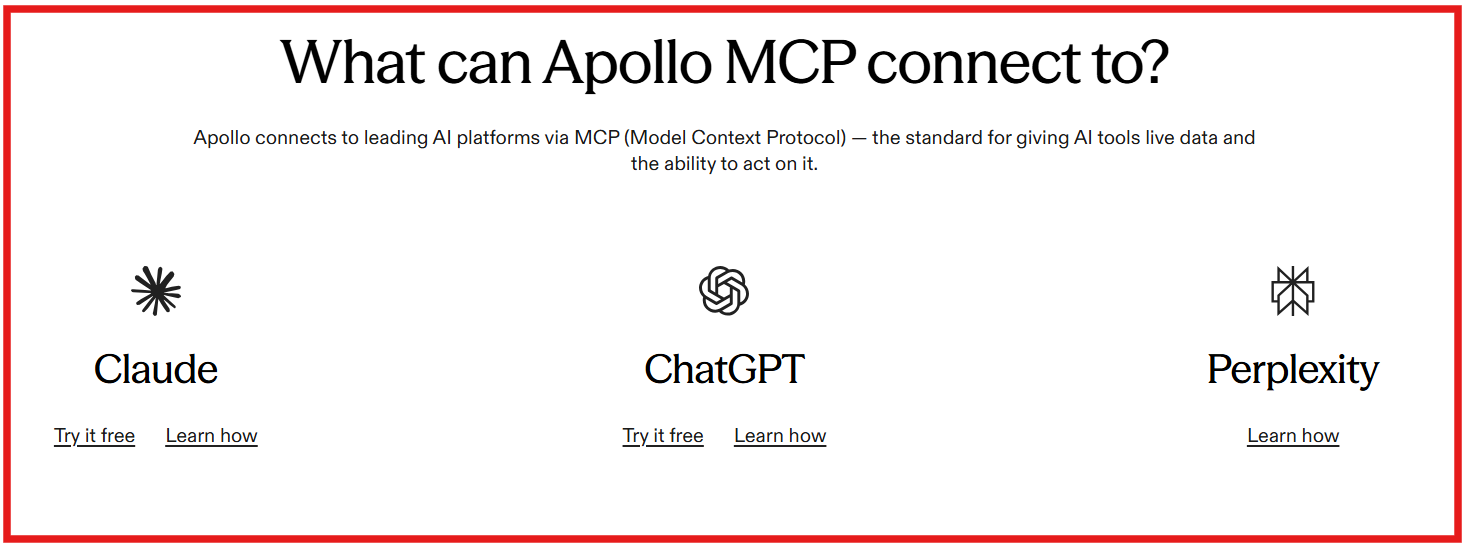
This image shows What can Apollo MCP connect to
What Is Included?
Apollo MCP Server includes:
GraphQL API access: It exposes GraphQL operations as MCP tools.
MCP prompts: It supports reusable prompt templates for guided workflows.
Operation controls: You can define tools using operation files, operation collections, persisted query manifests, or GraphOS-managed persisted queries.
Schema introspection: AI can explore the GraphQL schema if introspection is enabled.
Deployment options: It can run locally, through Rover CLI, Docker, or Apollo Runtime Container.
Security controls: It supports authentication, scopes, authorization, and approved operations.
MCP Apps support: Developers can build custom interactive app experiences for MCP-compatible hosts.
What Access Does It Give to Claude?
Once connected, Claude can use the GraphQL operations you expose as MCP tools. This can include actions like:
Pulling account or contact data from your GraphQL API.
Checking internal records before outbound campaigns.
Running approved queries against your sales or product data.
Using predefined prompts for multi-step workflows.
Executing only the operations your team allows.
Working with internal APIs without building a custom MCP server from scratch.
The key point is control. Apollo MCP Server does not give Claude open access to everything by default. Your team decides which GraphQL operations become available as tools.
Pros and Cons of Apollo MCP Server
Pros
Cons
Works well if your company already uses GraphQL or Apollo
Lets AI assistants access approved GraphQL operations as MCP tools
Gives strong control over what AI can access and execute
Supports Claude, ChatGPT, Cursor, Windsurf, and other MCP-compatible clients
Not a ready-made outbound sales tool like Forge, Instantly, or Smartlead
Requires technical setup and GraphQL knowledge
Not ideal for non-technical sales teams
You need a GraphQL API before it becomes useful
Apollo MCP Server Pricing
Apollo MCP Server is open source and available on GitHub under the MIT license. However, the total cost depends on your setup. You may need Apollo GraphOS, cloud hosting, developer time, infrastructure, and your existing GraphQL API environment.
So, I would not treat Apollo MCP Server as a simple paid outbound tool. It is better seen as a technical MCP layer for teams that want to connect AI with GraphQL-based business systems.
3. Lusha MCP Server
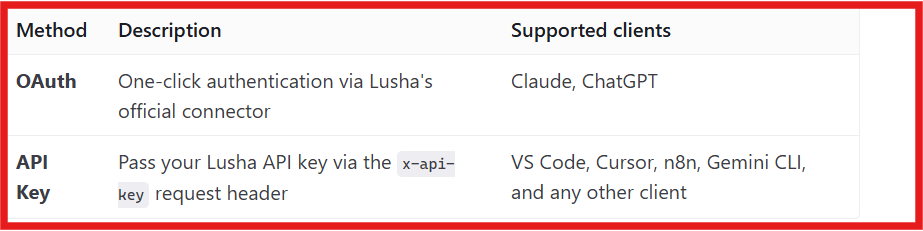
This image shows the Lusha MCP Server connection methods
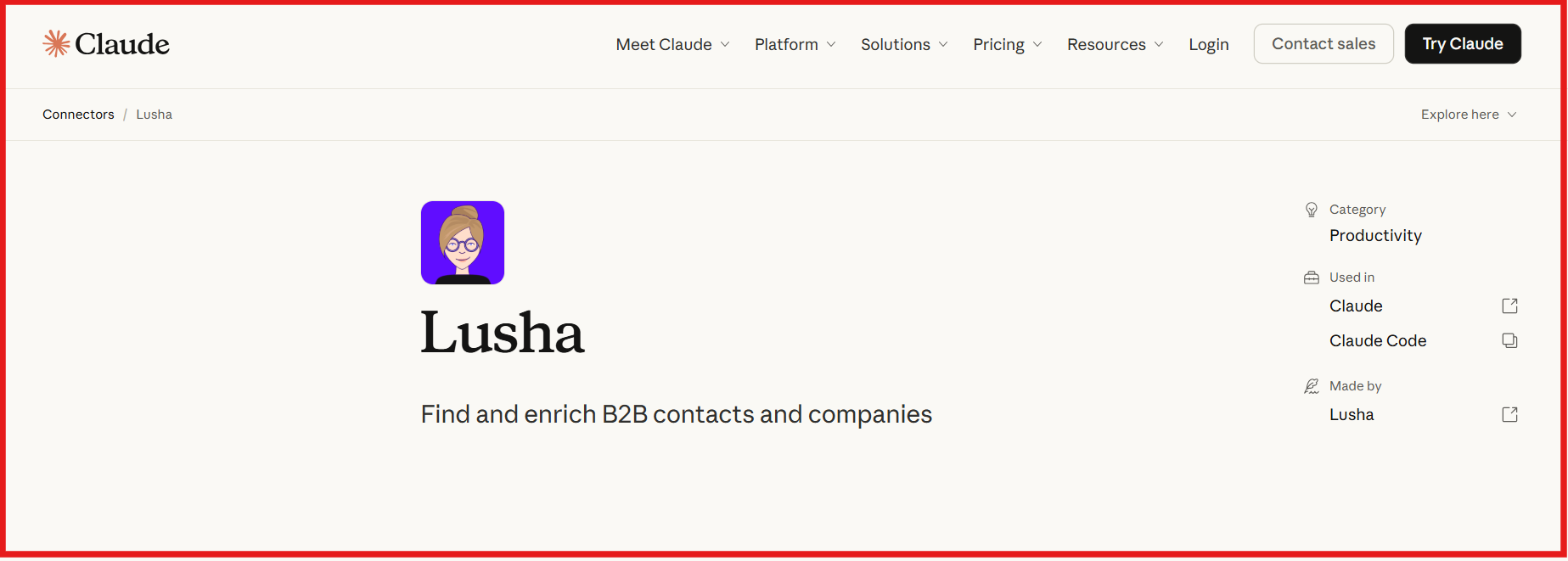
Lusha MCP Server connects Lusha's contact and company database directly to AI tools like Claude, ChatGPT, Cursor, VS Code, Gemini, and n8n. What I like about Lusha MCP is that it focuses on a simple job.
Instead of giving AI generic answers, it gives it access to Lusha's contact and company database. That means you can ask for prospects in plain English and get actual companies, emails, phone numbers, and company details back.
For outbound teams, this removes a lot of manual work. Instead of switching between Lusha, LinkedIn, spreadsheets, and your AI tool, you can do everything in one conversation. I also like that Lusha supports prospecting, enrichment, lookalikes, company research, and buying signals through MCP. That gives AI much more context when building prospect lists.
The biggest limitation is that Lusha MCP is still a data layer. It helps you find and enrich prospects, but it does not manage outreach campaigns, sequences, or mailbox infrastructure. You'll still need other tools for that part of your outbound process.
What Is Included?
Contact search and enrichment
Company search and enrichment
Prospecting using natural language prompts
Contact and company lookalikes
Buying signals and activity signals
Credit and account usage tracking
Claude, ChatGPT, Cursor, VS Code, n8n, Gemini, and Windsurf support
Remote MCP server access
What Access Does It Give to Claude?
This image shows Connect Lusha with Claude
Once connected, Claude can:
Search contacts using job title, company, industry, and location
Find verified emails and phone numbers
Research companies and firmographic data
Find lookalike contacts and companies
Discover buying signals and activity signals
Check account credits and usage
Build prospect lists using natural language prompts
Pros and Cons of Lusha MCP Server
Pros
Cons
Easy to connect with Claude and other AI tools
Gives AI access to verified contact and company data
Supports prospecting, enrichment, lookalikes, and signals
Natural language search makes prospecting faster
Does not manage email campaigns or outreach
Uses Lusha credits for searches and enrichment
Data quality depends on Lusha's database coverage
No mailbox, domain, or deliverability management
Lusha MCP Server Pricing
This image shows the Lusha pricing
Lusha MCP is included in Lusha plans that support API and MCP access.
Free: $0/month
Starter: $37.45/month
Pro: $52.45/month
Premium: $299.95/month
Scale: Custom pricing
MCP access is available on supported Lusha plans, and usage follows the same credit system used across the Lusha platform.
4. ZoomInfo MCP Server
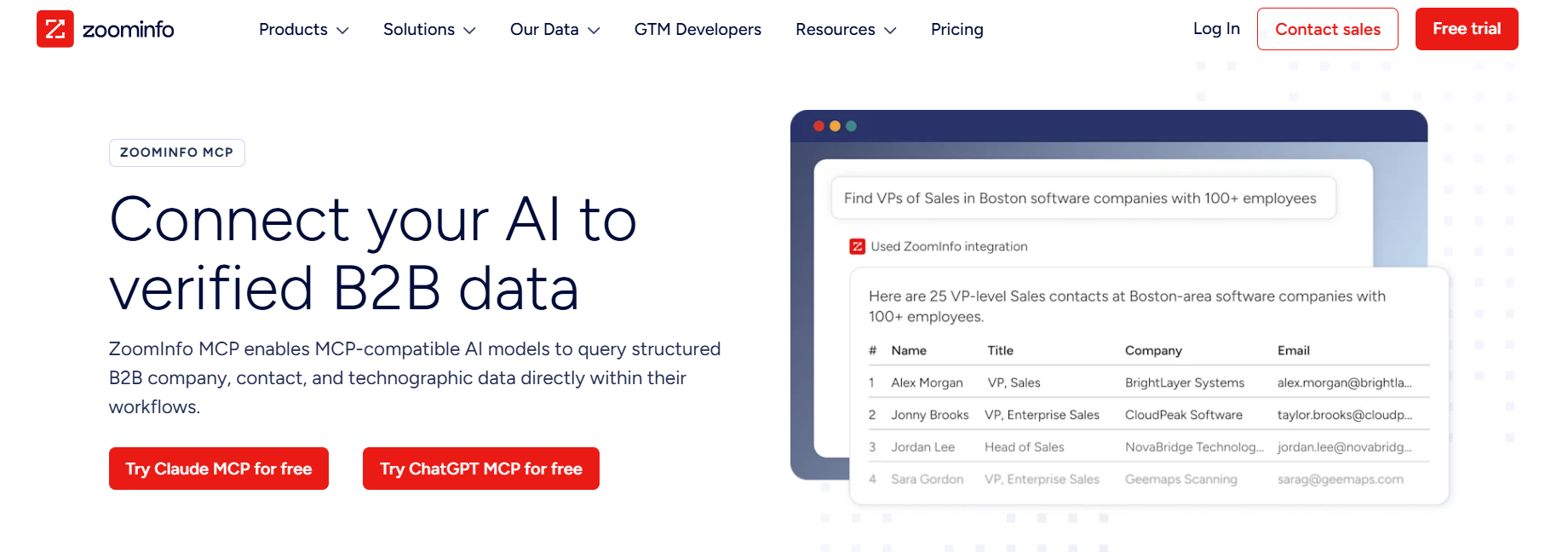
This image shows the ZoomInfo MCP Server
ZoomInfo MCP Server is built for teams that want to bring ZoomInfo's sales intelligence directly into AI tools like Claude and ChatGPT. What stood out to me is the depth of data available through the MCP connection.
It does not just help you find contacts. It also gives access to account research, intent signals, scoops, CRM context, technographics, funding data, and relationship intelligence. This makes ZoomInfo MCP feel more like a research and intelligence platform than a simple prospecting tool.
You can ask questions in plain English and get account insights, recommended contacts, company data, and outreach context without manually searching through multiple tools.
The downside is that ZoomInfo MCP depends heavily on having a ZoomInfo subscription and available credits. It is also more focused on research, enrichment, and account intelligence than campaign execution.
What Is Included?
Company search and account discovery
Contact search and prospect discovery
Company and contact enrichment
Intent signal intelligence
Scoops and buying signals
Similar companies and contacts
AI-recommended contacts
Account research and account intelligence
Contact research and background information
CRM and conversation history context
What Access Does It Give to Claude?
Once connected, Claude can:
Find companies that match your ICP
Find decision-makers and buying committees
Enrich company and contact records
Surface intent signals and buying activity
Research accounts before meetings
Pull company financials and technographics
Find similar companies and prospects
Access account intelligence and relationship context
Recommend who to contact at target accounts
Pros and Cons of ZoomInfo MCP Server
Pros
Cons
Gives AI access to ZoomInfo's company and contact database
Combines prospecting, enrichment, intent data, and account research
Supports Claude, ChatGPT, and other MCP-compatible tools
Helps identify buying signals and in-market accounts
Requires a ZoomInfo subscription
Credit usage applies to data pulls and AI research
Some data and features depend on subscription tier
Does not run outreach campaigns or send emails
ZoomInfo MCP Server Pricing
ZoomInfo does not publicly list MCP-specific pricing. ZoomInfo MCP is available to users with an active ZoomInfo subscription, including SalesOS or Copilot plans. Data pulls consume data credits, while AI research tasks consume AI credits.
You will need a ZoomInfo account and available credits to use the MCP server.
5. Clay MCP Server
This image shows the Clay MCP
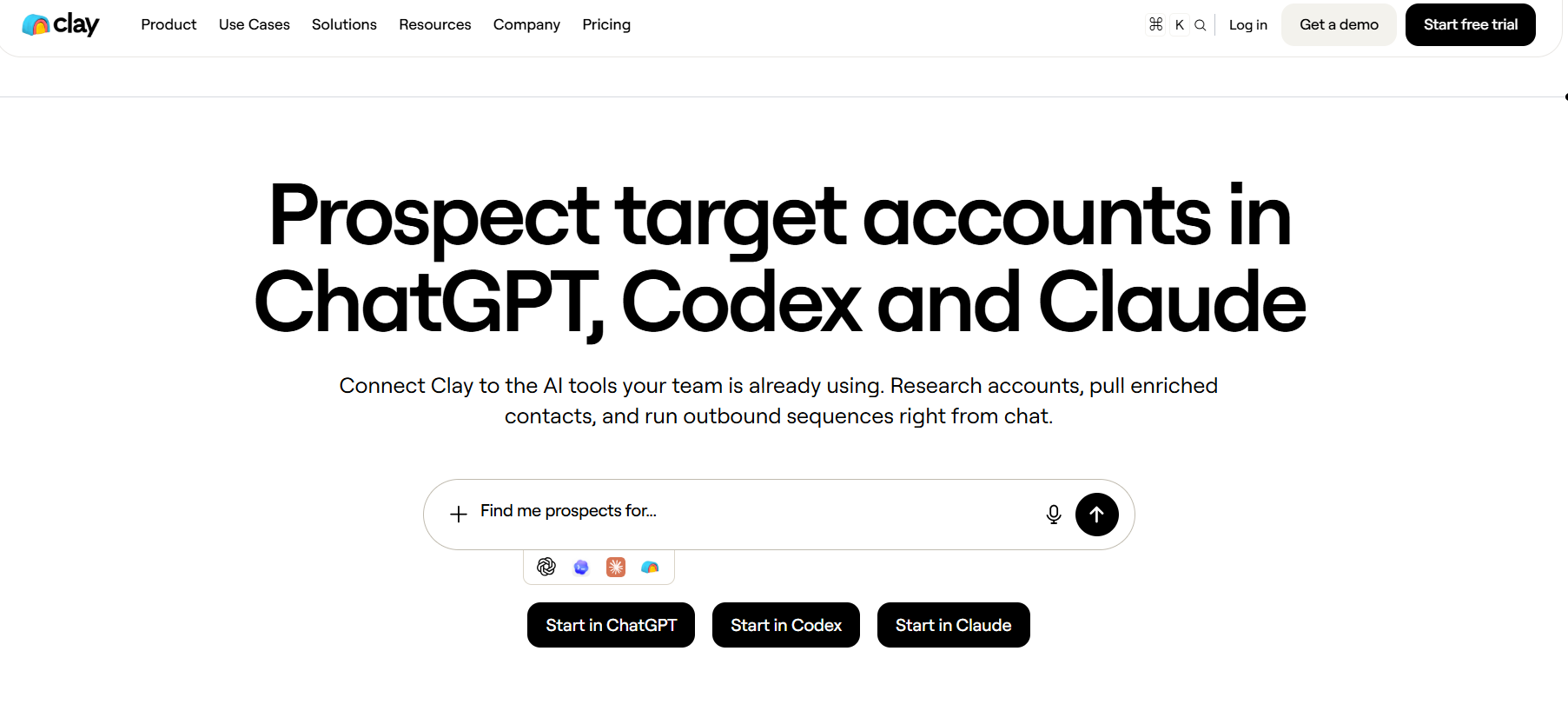
Clay MCP connects Clay directly to AI tools like ChatGPT, Claude, and Codex. Instead of opening Clay to build lists, enrich contacts, research accounts, or run workflows, you can do it through a simple conversation with your AI assistant.
What makes Clay MCP different is that it doesn't just expose a database. It gives AI access to the workflows your GTM team has already built inside Clay, including enrichment waterfalls, lead scoring, account research, and outbound automation.
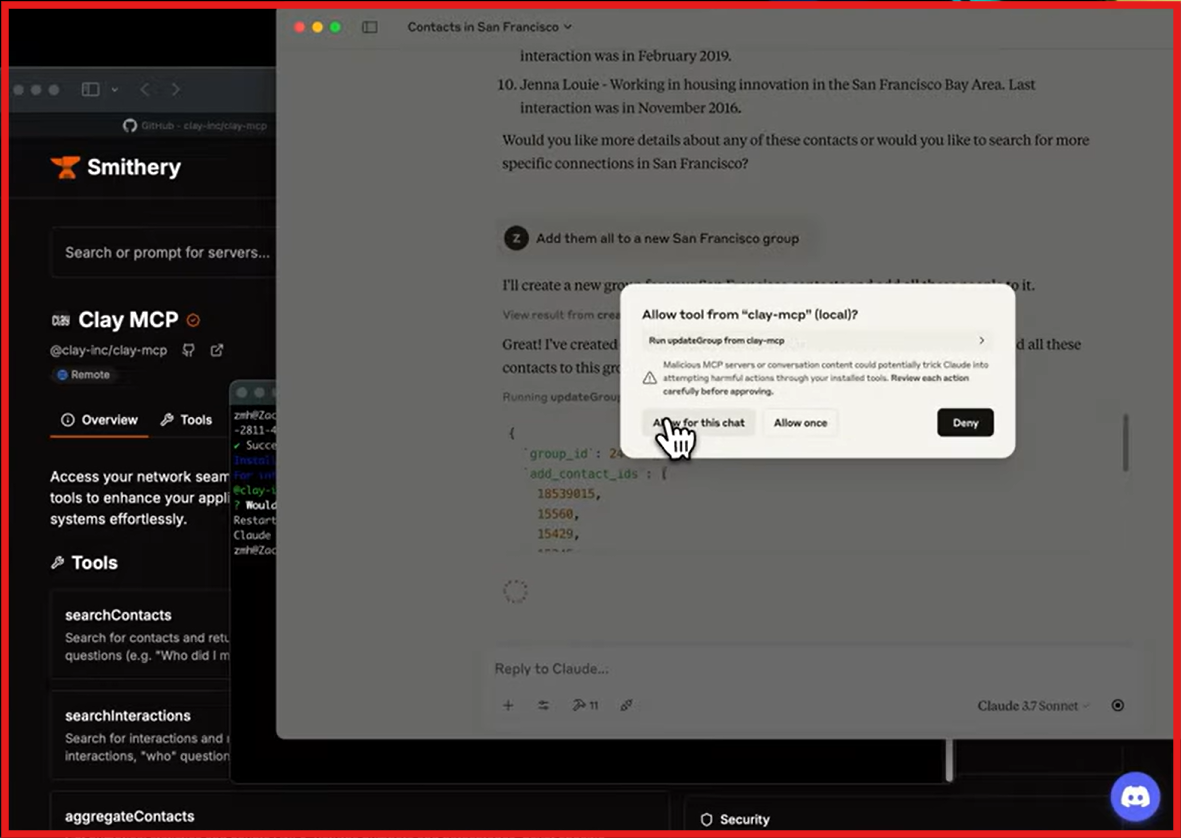
This image shows Clay MCP access given
After reviewing it, I think Clay MCP is most useful for teams that already run a large part of their prospecting process in Clay. It removes a lot of clicking and tool switching, but the real value comes from the workflows and data already configured inside your Clay account.
What Is Included?
Contact search
Account research
Contact enrichment
Company enrichment
Enrichment waterfalls
Clay Functions
Lead qualification workflows
ICP scoring workflows
Access to 150+ data providers
CRM integrations
Team permissions and budget controls
Prospecting workflows
What Access Does It Give to Claude?
Once connected, Claude can:
Find ICP contacts
Search prospects by title, company, and location
Research target accounts
Enrich contacts with additional data
Run enrichment waterfalls
Trigger qualification workflows
Generate personalized outreach
Access Clay Functions
Build buying committees
Pull company intelligence
Pros and Cons of Clay MCP Server
Pros
Cons
Works directly inside ChatGPT, Claude, and Codex
Gives AI access to Clay workflows, not just data
Supports enrichment waterfalls and multi-provider data
Includes controls for budgets, permissions, and workflow access
Most useful if your company already uses Clay
Can become expensive if workflows consume lots of credits
Some enrichments require paid plans
Not as simple as dedicated prospecting MCP tools
Clay MCP Server Pricing
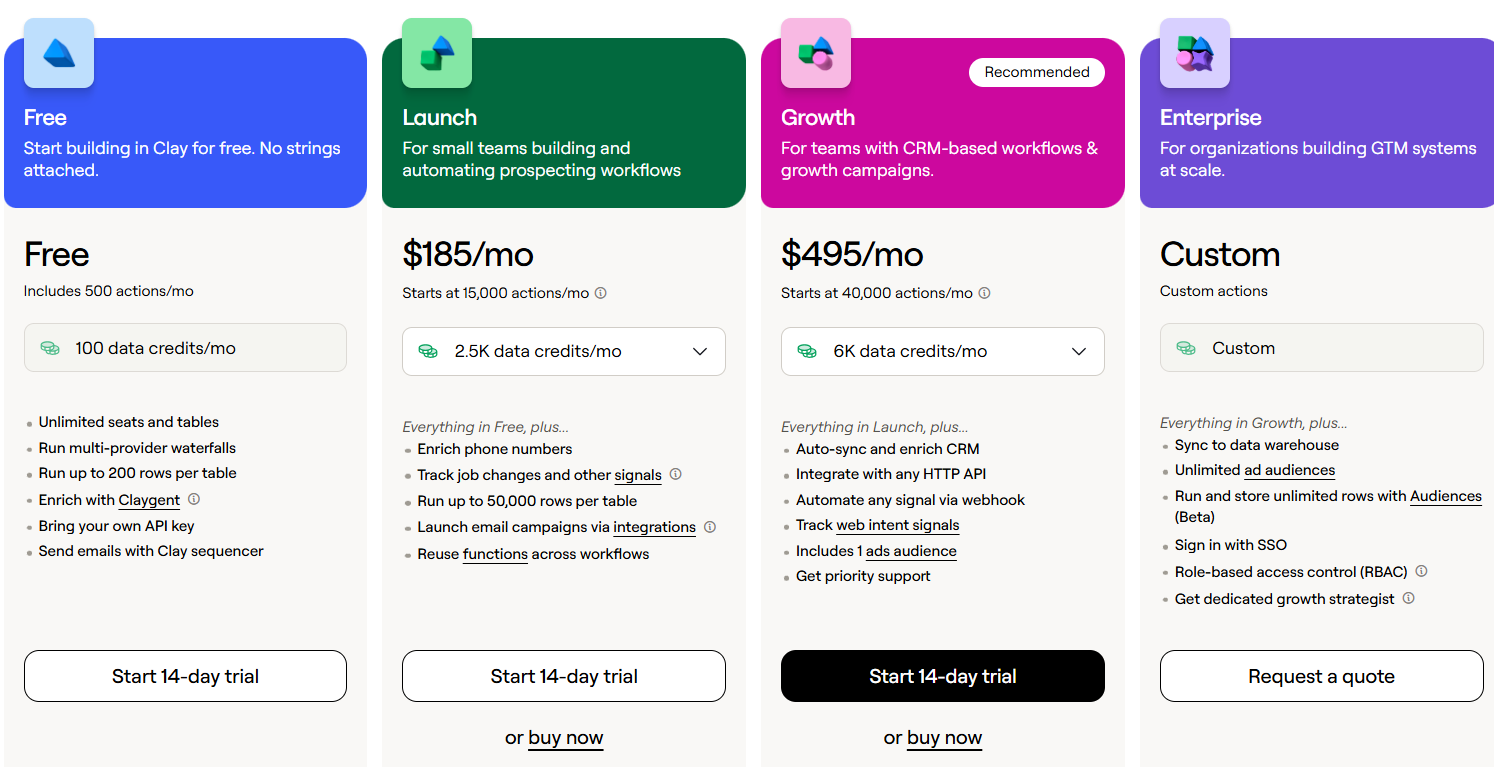
This image shows the Clay pricing
Alt text: Clay pricing
Clay MCP itself does not require a separate MCP fee. Usage is tied to your Clay account and credit consumption. Current Clay plans include:
Plan
Pricing
Free
Free with 100 data credits/month and 500 actions/month
Launch
Starts at $185/month
Growth
Starts at $495/month
Enterprise
Custom pricing
I would not think of Clay MCP as a standalone prospecting tool. It is better viewed as an AI layer on top of Clay that lets your team run prospecting, enrichment, and GTM workflows through natural language instead of clicking through the platform.
6. Letterdrop MCP Server
This image shows How Letterdrop MCP Server works
Letterdrop MCP Server is a little different from most MCP servers I tested. Instead of helping you find new leads or enrich contact data, it focuses on helping AI understand your outbound performance, intent signals, and sales activity.
What stood out to me is that Letterdrop is built around answering GTM questions. Rather than opening dashboards and digging through reports, you can simply ask Claude which accounts deserve attention, which sequences are underperforming, or which old opportunities should be re-engaged.
That makes it especially useful for sales leaders, RevOps teams, and GTM engineers who want faster answers from their outbound data. However, it is not a prospecting database like ZoomInfo, Lusha, or Clay. Its strength is helping teams understand what is happening inside their existing pipeline.
What Is Included?
Outbound performance analytics
Intent signals
Account prioritization insights
Contact intelligence
Closed-lost opportunity tracking
Sequence performance analysis
DM performance data
Re-engagement recommendations
AI-ready GTM reporting
MCP access for Claude, ChatGPT, Cursor, and other MCP clients
Setup support
What Access Does It Give to Claude?
Once connected, Claude can:
Identify accounts that deserve attention
Prioritize outreach opportunities
Surface intent signals and buying activity
Find former champions who changed companies
Identify closed-lost deals ready for re-engagement
Analyze reply rates across sequences
Compare rep performance
Spot declining campaign performance
Generate outbound performance reports
Provide recommendations based on sales intelligence data
Pros and Cons of Letterdrop MCP Server
Pros
Cons
Gives AI direct access to outbound performance data.
Helps prioritize accounts using real signals and context.
Makes reporting easier through natural language.
Useful for sales leaders, RevOps, and GTM teams.
Works with Claude, ChatGPT, Cursor, and other MCP clients.
Not a lead database like ZoomInfo or Lusha.
Requires Letterdrop data to be valuable.
Does not generate new contact data.
Focused more on analysis than execution.
Less useful for teams without an existing outbound motion.
Letterdrop MCP Server Pricing
Letterdrop MCP Server costs $100 per seat per month. The price includes MCP access, intent signals, outbound analytics, sales intelligence data, and setup support. Compared to most MCP servers on this list, Letterdrop is not focused on lead generation or enrichment. It is built to help AI answer questions about your pipeline, outbound performance, account activity, and sales opportunities using the data already inside Letterdrop.
7. Instantly MCP Server
Instantly MCP Server is one of the more practical MCP servers I looked at because it connects AI assistants directly to your cold email campaigns. Instead of jumping between dashboards, exporting reports, or manually updating campaigns, you can simply ask Claude, ChatGPT, or another AI assistant to do the work for you.
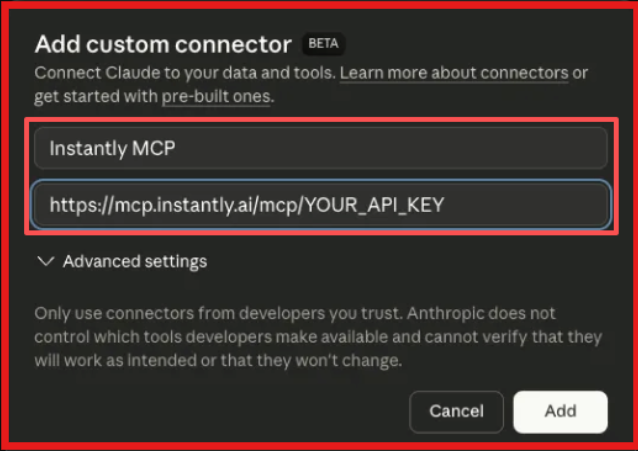
This image shows Add custom connector to connect Instantly to Claude
What stood out to me is that Instantly MCP is not just for reporting. It can actually help manage campaigns, leads, email accounts, and outreach performance from a single chat interface. If your team already runs outbound campaigns in Instantly, this can save a lot of time on daily campaign management.
That said, Instantly MCP is most useful if you are already using Instantly. It is not a prospecting database or sales intelligence platform. Its main job is helping AI assistants interact with your existing Instantly workspace.
What Is Included?
Instantly MCP Server includes:
Campaign creation and management
Lead management tools
Email and inbox operations
Campaign analytics and reporting
Sending account management
Warmup controls
Campaign performance monitoring
API-based AI integrations
Support for Claude, Cursor, ChatGPT, n8n, and other MCP-compatible clients
Access to 30+ campaign management tools
What Access Does It Give to Claude?
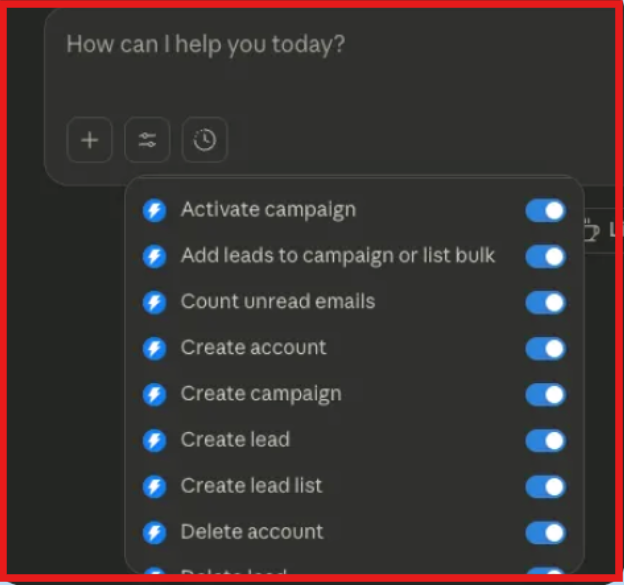
This image shows Once connected to the MCP Server, you will be able to manage the actions that Claude can perform.
Once connected, Claude can:
Create new outreach campaigns
Pause or update active campaigns
Add leads to campaigns
Move leads between campaigns
View campaign performance metrics
Analyze reply rates and engagement
Check account health and warmup status
Review recent email replies
Manage sending accounts
Generate campaign performance summaries
Pros and Cons of Instantly MCP Server
Pros
Cons
Makes campaign management much faster through AI.
Can create, update, and manage campaigns directly from chat.
Gives AI access to live campaign analytics.
Works with Claude, Cursor, ChatGPT, and n8n.
Only useful if you already use Instantly.
Requires API access and setup.
Not a lead database or enrichment platform.
Most value comes after campaigns are already running.
8. Smartlead MCP Server
Smartlead MCP Server is one of the more useful MCP servers I tested for cold email teams because it connects directly to the platform many teams already use every day. What stood out to me is that it is not focused on prospecting or research.
Instead, it focuses on managing campaigns, checking deliverability, monitoring mailboxes, reviewing analytics, and troubleshooting outreach performance from inside Claude.
Rather than opening Smartlead dashboards every time you want to check campaign performance, you can simply ask your AI assistant for campaign stats, lead data, sender health, or deliverability diagnostics.
I think Smartlead MCP is most valuable for agencies, outbound teams, and operators who already run a large number of campaigns inside Smartlead. If Smartlead is already part of your workflow, the MCP server can save a lot of manual work.
What Is Included?
Smartlead MCP Server includes:
Campaign management tools for creating, updating, and monitoring campaigns.
Lead management tools for importing, tracking, and managing prospects.
Email account management tools for sender accounts and warmup monitoring.
Analytics and reporting tools for campaign performance tracking.
Deliverability diagnostics and health checks.
Domain and sender reputation monitoring.
Webhook and integration support.
Client and workspace management tools.
Support for Claude Desktop and other MCP-compatible clients.
What Access Does It Give to Claude?
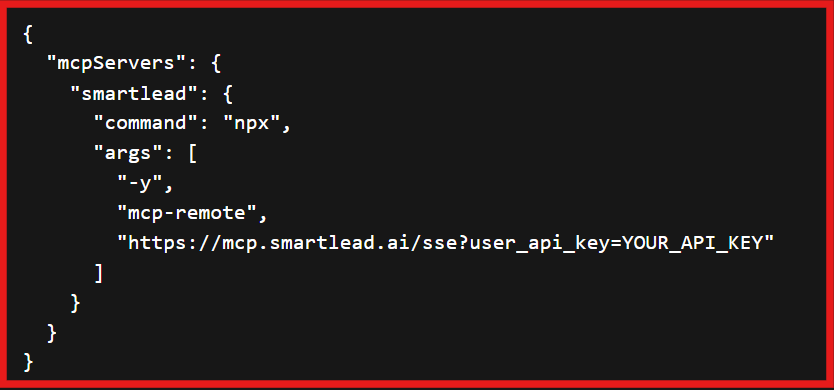
This image shows the Smartlead MCP configuration to connect to Claude
Once connected, Claude can work directly with your Smartlead account and data. This can include actions like:
Viewing campaign performance and analytics.
Retrieving lead information.
Checking sender account health.
Running deliverability diagnostics.
Reviewing bounce rates and campaign issues.
Monitoring warmup performance.
Checking domain health and reputation.
Accessing campaign and account statistics.
The biggest advantage is that Claude can help troubleshoot outreach problems using live Smartlead data instead of making recommendations based only on assumptions.
Pros and Cons of Smartlead MCP Server
Pros
Cons
Works directly with Smartlead campaign and deliverability data.
Makes campaign monitoring much faster through AI prompts.
Can run diagnostics for domains, campaigns, and mailboxes.
Helpful for agencies and high-volume outbound teams.
Most useful only if you already use Smartlead.
Requires Smartlead API access and setup.
Claude Desktop setup requires configuration and Node.js.
Some advanced workflows may require technical knowledge.
Smartlead MCP Server Pricing
Smartlead MCP Server does not have separate pricing. You need an active Smartlead subscription and API access to use it. The MCP server connects to your Smartlead workspace using your API key and gives AI assistants access to campaign, lead, deliverability, and analytics data.
Smartlead plans start at:
This image shows the Smartlead pricing
Base: $39/month
Pro: $94/month
Unlimited Smart: $174/month
Unlimited Prime: $379/month
If your team already uses Smartlead for cold email outreach, the MCP server can make campaign management, reporting, and troubleshooting much easier.
9. HubSpot MCP Server
This image shows the HubSpot MCP Server
HubSpot MCP Server is one of the most practical MCP servers for CRM teams. Instead of switching between HubSpot, spreadsheets, reports, and AI tools, it lets Claude, ChatGPT, Cursor, and other MCP-compatible clients work directly with your HubSpot data.
What I like about HubSpot MCP Server is that it is not limited to reading CRM records. It can also create, update, search, and manage contacts, companies, deals, tickets, tasks, engagements, and more. For teams already running their sales, marketing, or customer success operations inside HubSpot, this can save a lot of manual work.
It is also easier to connect than many MCP servers because it supports OAuth authentication instead of requiring manual API key management. However, the real value depends on how much your team already uses HubSpot. If HubSpot is not part of your workflow, this MCP server will not add much value.
What Is Included?
HubSpot MCP Server includes:
Contact management for creating, updating, searching, and retrieving contacts.
Company management for managing company records and firmographic data.
Deal management for tracking pipelines, stages, and opportunities.
Ticket management for customer support workflows.
Engagement tracking for calls, emails, meetings, notes, and tasks.
Workflow and automation access.
List and segmentation management.
Form and submission tracking.
Marketing campaign reporting.
OAuth authentication with customizable CRM access permissions.
What Access Does It Give to Claude?
Once connected, Claude can work directly with your HubSpot CRM data. This can include actions like:
Finding contacts, companies, and deals.
Updating CRM records.
Creating new contacts and companies.
Moving deals through pipeline stages.
Reviewing engagement history.
Pulling marketing and sales reports.
Managing tickets and customer records.
Searching HubSpot data using natural language.
Running CRM workflows without opening HubSpot manually.
The biggest advantage is that Claude can interact with HubSpot records directly instead of requiring exports, spreadsheets, or manual CRM updates.
Pros and Cons of HubSpot MCP Server
Pros
Cons
Gives AI direct access to HubSpot CRM data.
Can create, update, search, and manage records.
Supports contacts, companies, deals, tickets, and engagements.
Works with Claude, ChatGPT, Cursor, and other MCP-compatible tools.
Most useful only if your team already uses HubSpot.
Requires HubSpot account access and permissions.
Some advanced HubSpot features depend on your HubSpot subscription.
Value depends heavily on how much data lives inside HubSpot.
HubSpot MCP Server Pricing
HubSpot MCP Server itself offers a free tier connection option and uses OAuth authentication for access. However, your overall cost depends on your HubSpot subscription and the HubSpot products you use.
For example:
HubSpot Starter starts at $7/month per seat.
HubSpot Professional starts at $800/month.
HubSpot Enterprise starts at $3,600/month.
10. GTM-MCP
GTM-MCP is a good fit if you want an open-source MCP server for sales workflows instead of a tool tied to one outbound platform. What I like about GTM-MCP is that it focuses on practical GTM tasks: researching companies, drafting cold emails, writing LinkedIn messages, handling objections, creating follow-up sequences, and logging activity in HubSpot.
It is not a lead database like ZoomInfo or Lusha, and it is not a campaign platform like Instantly or Smartlead. It is more of a sales workflow layer for Claude. I think GTM-MCP is best for technical founders, RevOps teams, and GTM builders who want flexible AI workflows without being locked into one paid platform.
What Is Included?
GTM-MCP includes:
Company research tools
Lead research tools
Cold email drafting
LinkedIn message drafting
Follow-up sequence creation
Objection handling
Cold call script generation
Discovery question generation
Value proposition building
Competitor analysis
HubSpot contact and deal tools
Sales workflow templates
What Access Does It Give to Claude?
Once connected, Claude can:
Research companies for outreach
Research leads before messaging
Draft cold emails
Draft LinkedIn messages
Create follow-up sequences
Build sales call scripts
Handle common objections
Create HubSpot contacts
Update HubSpot deals
Log sales activities in HubSpot
Run multi-step GTM workflows
The biggest advantage is flexibility. GTM-MCP helps Claude act like a sales assistant for research, writing, and CRM updates.
Pros and Cons of GTM-MCP
Pros
Cons
Open-source and flexible.
Useful for research, writing, and sales workflows.
Includes HubSpot CRM integration.
Requires setup through GitHub and local configuration.
Not a lead database or enrichment platform.
HubSpot tools need a HubSpot API key.
GTM-MCP Pricing
GTM-MCP is free and open source. However, you may still need paid tools around it depending on your workflow. For example, HubSpot CRM access, enrichment tools, email-sending tools, or other GTM systems may add separate costs.
I would treat GTM-MCP as a flexible sales automation layer, not a complete outbound platform. It works best when you want Claude to help with research, messaging, CRM updates, and sales workflows from one place.
Which MCP Should You Choose for Outbound?
The best MCP server depends on where the biggest bottleneck is in your outbound process. Some MCP servers help you find prospects. Others help you manage campaigns, enrich data, analyze performance, or work inside your CRM. The right choice depends on what you want your AI assistant to do every day. Here's a quick comparison:
If You Want...
Choose...
An AI SDR that can find leads, personalize outreach, and book meetings
Forge MCP
Access verified B2B contacts and company data
ZoomInfo MCP
Run enrichment workflows across multiple data providers
Clay MCP
Manage Instantly campaigns, leads, and outreach from AI
Instantly MCP
Manage Smartlead campaigns and deliverability data
Smartlead MCP
Access HubSpot CRM records and update contacts or deals
HubSpot MCP
Analyze outbound performance and buying signals
Letterdrop MCP
Connect AI to GraphQL-based internal systems
Apollo MCP
Research accounts, write outreach, and work with HubSpot from Claude
GTM-MCP
Manage Google Tag Manager using natural language
GTM MCP Server
For most outbound teams, my pick would be Forge MCP because it is built specifically for outbound sales workflows. Instead of connecting AI to only one part of the process, it helps combine prospecting, personalization, outreach, and meeting booking in a single workflow.
If your biggest challenge is finding prospects, ZoomInfo MCP and Clay MCP are strong options. If campaign management is the priority, Instantly MCP and Smartlead MCP make more sense. And if your team spends most of its time inside HubSpot, HubSpot MCP is one of the easiest ways to bring CRM data into AI-powered workflows.
Personalized Outbound Strategy
Get The Right Outbound Strategy In Minutes
Enter your email to get a custom plan & stack recommendation for your
business
It's being carefully crafted by AI
Please check your mailbox in 5 minutes
Conclusion
MCP servers make it much easier to connect AI assistants like Claude and ChatGPT to the tools your outbound team already uses. Instead of switching between multiple platforms, your AI can access data, run workflows, and help your team take action from a single chat interface.
The best MCP server depends on what you need. Some are built for prospecting, some for CRM access, and others for campaign management or analytics.
If you want an AI-powered outbound workflow from start to finish, Forge MCP is one of the strongest options to look at. It is designed specifically for outbound teams and helps connect prospecting, personalization, outreach, and meeting booking into one workflow.
To get the most value from it, pair Forge MCP with Leadsforge for finding and enriching prospects and Salesforge for running personalized cold email campaigns. Together, they help your team spend less time on manual work and more time starting conversations with the right buyers.