If you’ve been thinking about using ListKit for lead generation, you’ve probably seen all the claims about “triple-verified” leads and wondered if it’s actually worth paying for.
Can it really deliver accurate data for cold outreach?
Or do users end up wasting credits on bounced emails and outdated contacts?
I went through 100+ real reviews from G2, Trustpilot, and Reddit to see what users are actually saying.
By the end, you’ll know if ListKit is worth your money or if there’s a smarter, more reliable alternative for your data sourcing.
ListKit Review: Key Takeaways
ListKit lets you build lead lists with AI search using plain English prompts.
Its Triple Verification process claims up to 98–99% email accuracy.
The database covers 731M+ verified contacts and 21B+ daily buying signals.
Features include Data Stream, Intent Data, Phone Leads, and CRM integrations.
Plans start free (100 credits) and go up to $597/month for 50,000 credits.
What Is ListKit?
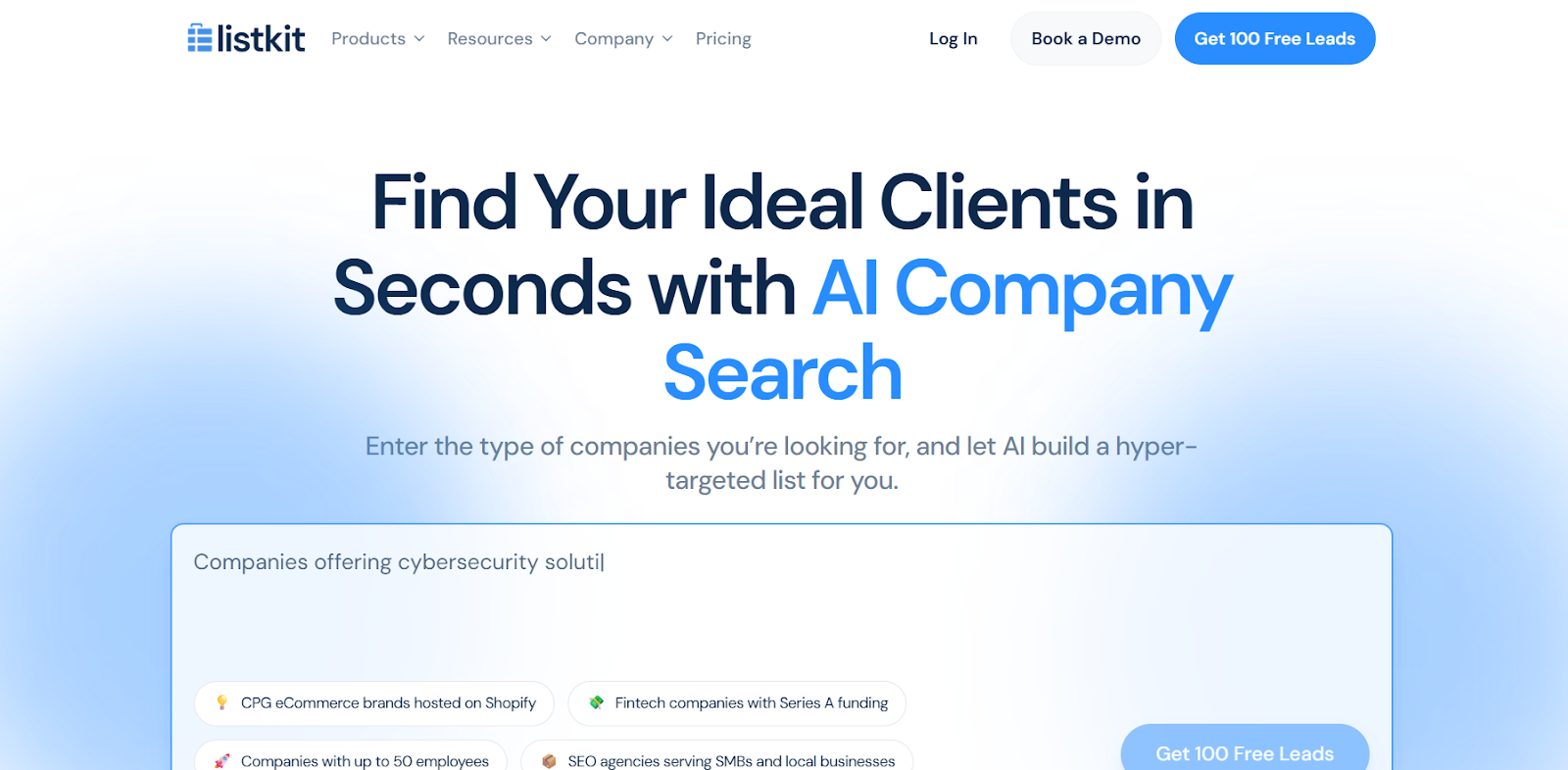
This image shows the ListKit homepage
ListKit is an AI lead generation tool that helps you find verified B2B contacts without using filters or spreadsheets.
You can simply type what you want, and its AI Company Search instantly builds that list for you.
The AI searches inside ListKit’s own database of 731 million verified contacts and 21 billion daily buying signals.
It matches your request using job titles, industries, company size, location, funding, and tech stack.
Before showing results, every contact goes through Triple Verification to make sure each email is valid and safe to use.
You can then export the list or sync it directly with your CRM or outreach tool.
How Does ListKit Work?
ListKit works like a full AI search engine for B2B leads.
Here’s exactly how it finds and prepares verified contacts:
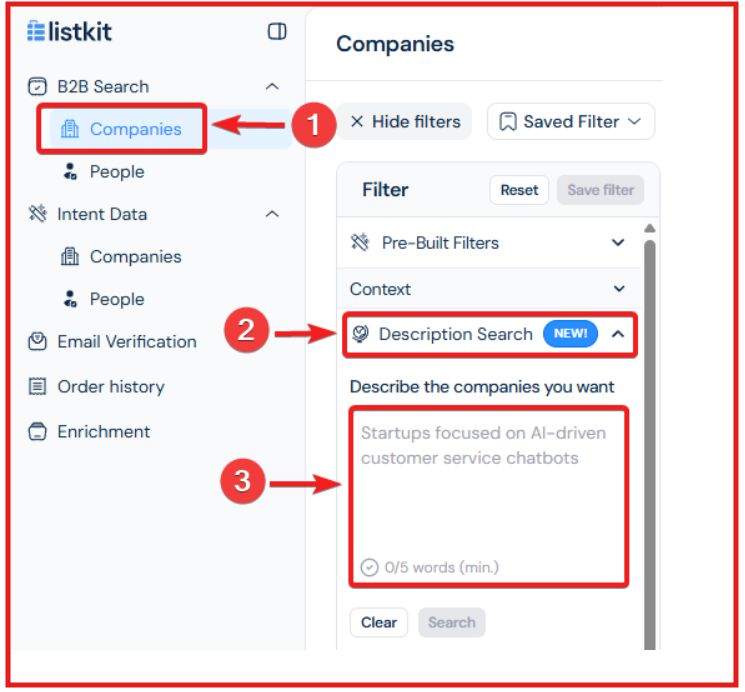
Step 1: You start by typing what kind of companies you want, for example, “CPG eCommerce brands on Shopify” or “fintech startups with Series A funding.”
This image shows the Search for your ideal audience with ListKit
The AI Company Search reads your prompt and scans through ListKit’s database to match companies that fit your description.
Step 2: The system looks through a verified B2B database of over 731 million profiles and 21 billion daily buying signals.
It checks for real companies and decision-makers using data like job titles, company size, funding round, tech stack, and keywords.
Step 3: You can adjust your search using predefined filters, such as industry, job title, or location, or keep prompting the AI to refine results until the list looks right.
Step 4: You can enable Intent Data or Data Stream to see which companies are showing buying intent in real time.
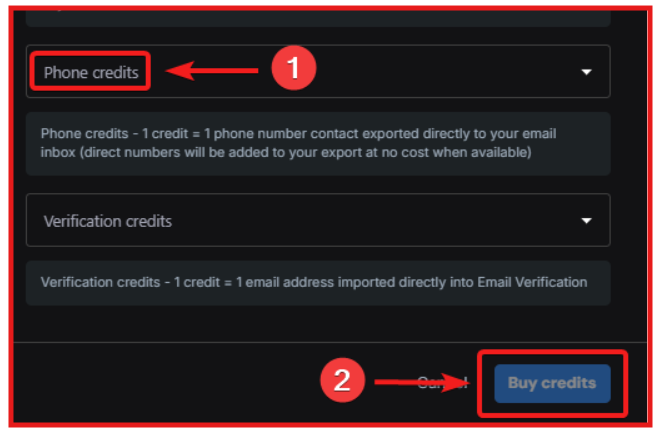
If you prefer calling, you can buy phone number credits to get verified direct dials of decision-makers.
This image shows the Buy Liskit phone number credits
Step 5: Once your list is ready, you can upload a CSV file or import contacts directly from HubSpot.
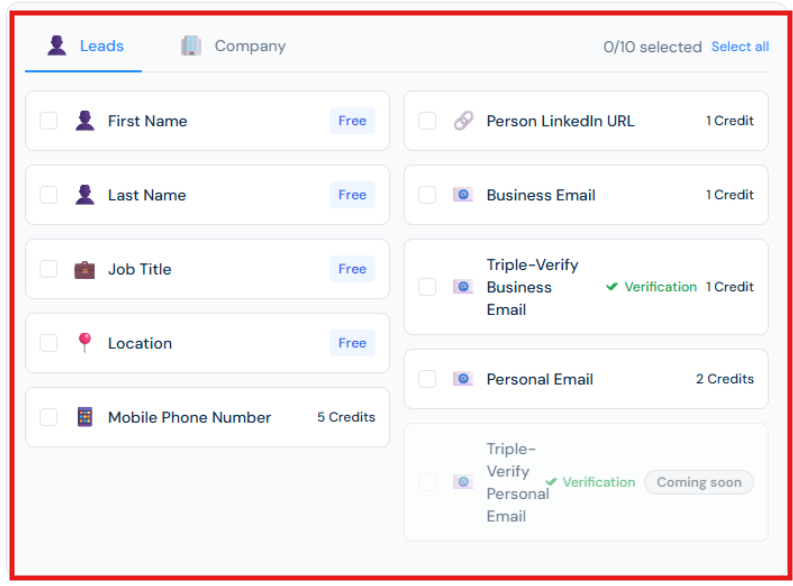
ListKit then lets you select which fields you want to enrich before starting the process.
This image shows the ListKit lead enrichment choice
Once you choose the fields, click Continue, and ListKit automatically finds and fills in all missing details using multiple verified data providers.
Step 6: After enrichment and verification, you can export your list as a CSV file or connect it directly to CRMs and outreach tools like HubSpot, SmartLead, or Salesforce using Zapier or Make.
Step 7: If you want to start sending campaigns safely, ListKit offers an optional Done-For-You cold email setup where they handle domains, DNS, inbox warm-up, and deliverability testing for you.
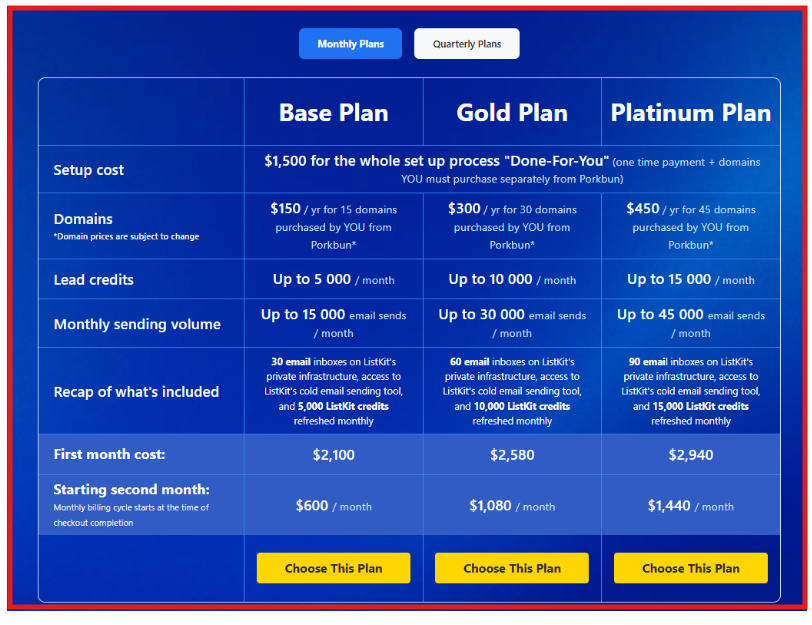
This image shows the ListKit optional Done- For- You cold email setup plan
This helps your emails land in inboxes without you needing to manage the tech side.
ListKit Features That Are Actually Useful
Feature
What It Actually Does
AI Company Search
Lets you describe target companies in plain English. The AI scans ListKit’s database of 731M+ contacts and builds the list instantly.
Triple-Verification Engine
Checks each email three times for syntax, domain, mailbox existence, plus a proprietary layer. Delivers 98 percent deliverability without extra tools.
Intent Data
Uses 21B+ daily buying signals to show which companies are researching, hiring, or expanding in your niche.
Data Stream
Refreshes your lead lists daily with new data and intent topics so you always work with current prospects.
Data Visualization Dashboard
Shows visual charts for industries, roles, locations, and other profiling data before you export.
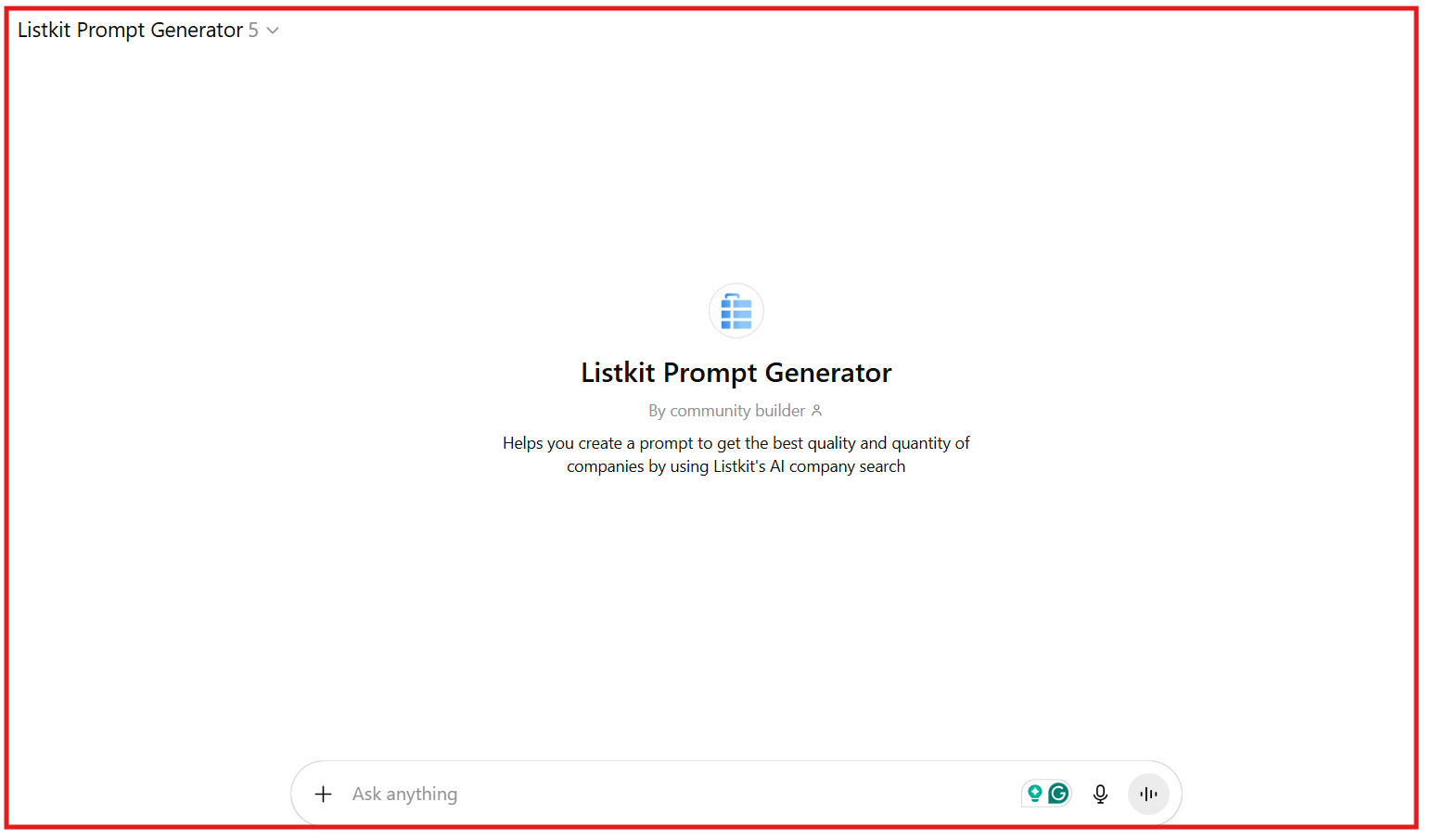
AI Prompt Builder (Custom GPT)
Creates optimized search prompts from any company URL to improve AI search results.
Phone Number Data
Offers verified mobile numbers and direct dials. Credits start at $79 per month for 500 numbers and scale upward.
CRM & Outreach Integrations
Connects with HubSpot, Salesforce, SmartLead, and Pipedrive through Zapier or Make.
Done-For-You Cold Email Setup
A paid add-on where ListKit sets up domains, DNS (SPF, DKIM, DMARC), inbox warm-up, and deliverability monitoring.
Customer Support & Onboarding
Includes a free 30-minute onboarding call, help-center chat with about a two-hour response time, and ongoing prospecting training.
ListKit Pricing
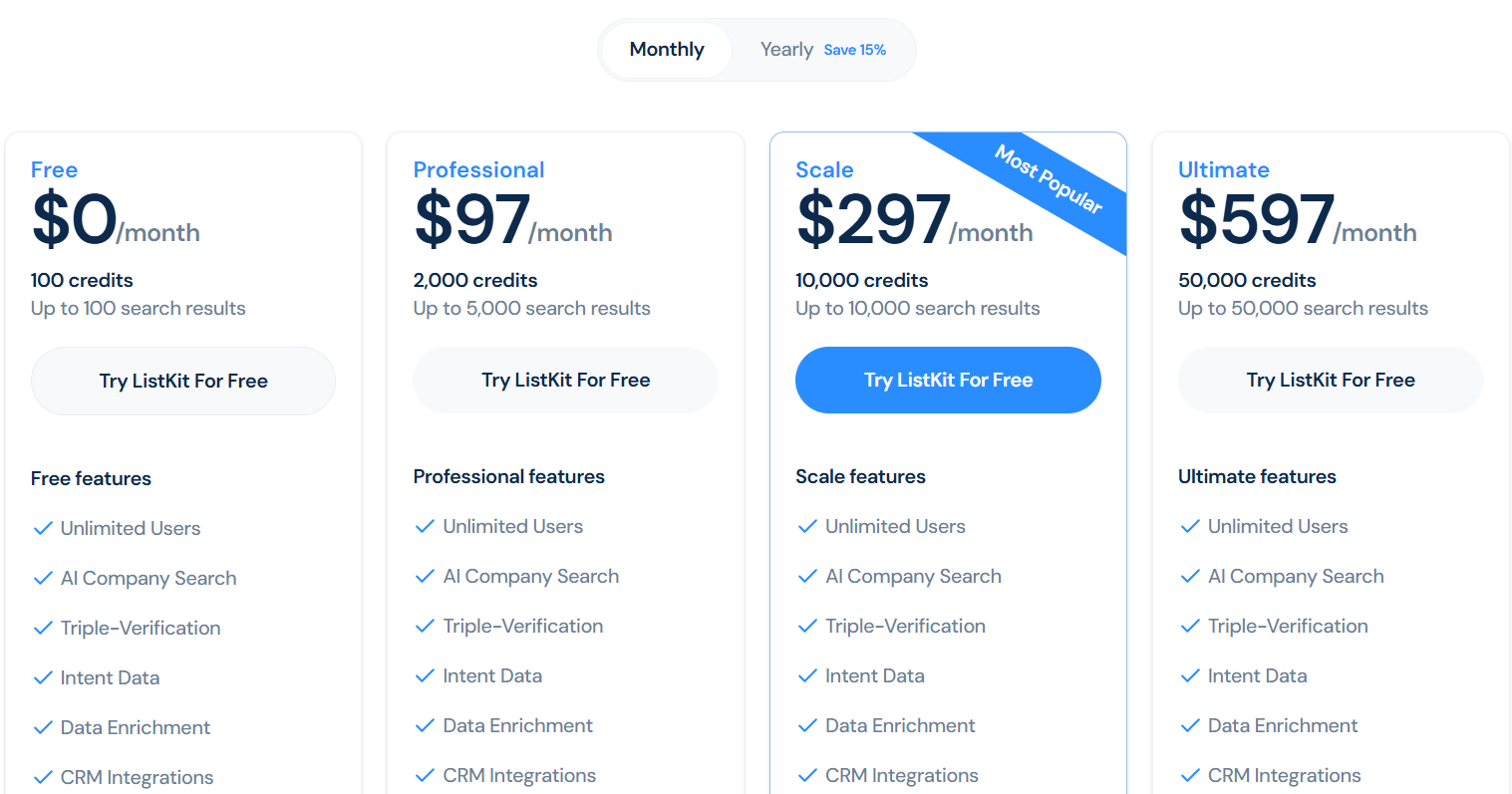
This image shows the ListKIt pricing
ListKit works on a credit-based model.
You can start for free and upgrade when you need more credits or features.
Every plan includes AI Company Search, Triple Verification, Data Enrichment, and CRM Integrations.
Plan
Price / Month
Credits / Month
Search Limit
Main Features
Free
$0
100
100
Core features, unlimited users, and data enrichment.
Professional
$97
2,000
5,000
Adds Intent Data and Priority Support.
Scale (Most Popular)
$297
10,000
10,000
Higher credit limits and faster processing speed.
Ultimate
$597
50,000
50,000
API access, bulk exports, and faster enrichment.
Enterprise
Custom
Custom
Custom
Tailored onboarding, integrations, and volume.
Quick Facts:
You only pay for data points that are actually enriched.
All plans allow unlimited users, no per-seat charges.
This is not part of the main pricing plans, it’s an add-on service for teams that want a ready-to-use cold email system without doing any setup.
ListKit’s team handles everything for you: domain configuration, inbox creation, deliverability optimization, lead building, and campaign setup.
Plan
Domains (Purchased by You)
Lead Credits / Month
Email Inboxes
Monthly Send Limit
Ongoing Cost
First-Month Cost (with setup)
Base
15 domains ($150 per year via Porkbun)
Up to 5,000
30
15,000 emails
$600 per month
$2,100
Gold
30 domains ($300 per year via Porkbun)
Up to 10,000
60
30,000 emails
$1,080 per month
$2,580
Platinum
45 domains ($450 per year via Porkbun)
Up to 15,000
90
45,000 emails
$1,440 per month
$2,940
Setup Fee
—
—
—
—
One-time
$1,500
What’s Included:
Full technical setup (domains, SPF, DKIM, DMARC).
Inbox configuration with deliverability optimization.
Verified lead list refreshed monthly.
Custom 3-step email sequence with follow-ups.
Campaign automation, tracking, and handover.
SOPs and training for scaling.
After setup, the system is yours to manage, ListKit doesn’t run the campaigns, but you get a fully built and automated infrastructure ready to send immediately.
Top Pros of ListKit
The AI Company Search makes prospecting effortless because you can describe your ideal clients in plain English, and the system instantly builds a matching list.
The Triple-Verification engine ensures high inbox delivery by verifying each email through three layers, syntax, mailbox existence, and advanced validation, giving around 98 percent deliverability without using extra tools.
The Data Stream feature keeps your lists fresh since it automatically refreshes new leads every day and adds companies showing recent buying intent.
The Data Visualization Dashboard helps refine your targeting by turning your search results into visual charts that highlight the top industries, job titles, and countries in your list.
ListKit’s AI Prompt Builder saves time in writing search queries because it uses a custom GPT model that generates optimized prompts from any company URL to help you find the right leads faster.
Top Cons of ListKit
The platform doesn’t send emails or handle outreach directly, so users still need another cold email tool or to pay for ListKit’s Done-For-You setup if they want a complete outreach system.
Some CRM connections depend on Zapier or Make, so setting up integrations may require extra tools and manual configuration.
The pricing for enterprise plans isn’t publicly listed, which makes it harder for big teams to estimate costs before booking a demo.
There are no built-in LinkedIn or social outreach features, so teams that rely on multi-channel prospecting will need other tools for that part of their workflow.
What Users Like About ListKit?
Many users said the contacts they got were accurate, reliable, and often better than what they’d received from other tools.
This image shows the ListKit G2 review about its lead quality
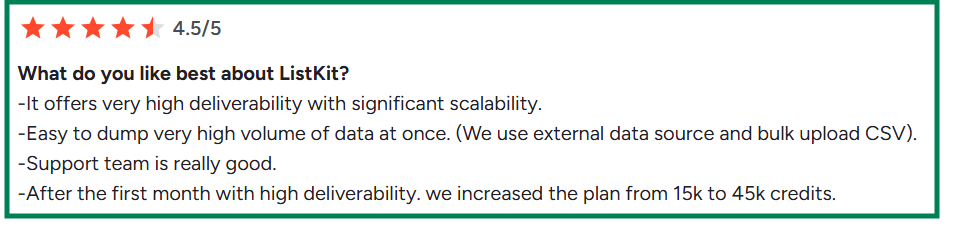
Several users report that deliverability improves each week and that ListKit helps them close deals faster with clean, targeted lists.
This image shows the ListKit G2 review about its deliverability
Users love that every contact is verified three times, saving them from bounces and fake data.
This image shows the ListKit G2 review about its triple verified data
Users appreciated that ListKit’s buying intent data helped them reach prospects already interested in their services, which led to better conversion rates.
What Users Dislike About ListKit?
Some users said that while results are strong, the cost of plans or DFY add-ons can be expensive for small businesses.
This image shows the ListKit G2 review about its expensive pricing
Users noted they’d like more granular targeting, like company lookalike options or filters for revenue and tech stack.
This image shows the ListKit G2 review about missing lookalike feature
A few users wished ListKit had its own built-in email sending platform instead of needing to connect an external one.
Is ListKit the Right Fit for You?
ListKit is best for people who want ready-to-use, verified B2B leads and don’t want to handle the technical setup themselves.
You’ll find ListKit a good fit if:
You want clean, triple-verified contacts that are ready to send without worrying about bounces.
You like having setup done for you, including domains, inboxes, and cold email sequences.
You prefer a simple, clean dashboard where you can build and export lead lists fast.
It may not be right for you if:
You want to handle large-scale outreach or automation from inside the same tool.
You need advanced filters or niche data segments beyond basic targeting options.
You’re on a tight budget and prefer low-cost, high-volume databases.
You expect an instant setup without onboarding — ListKit takes time to configure properly.
In short, ListKit fits founders, agencies, and small sales teams who want verified leads, high deliverability, and real human help getting started, not another do-it-yourself data tool.
Best ListKit Alternative for Cheaper Pricing → Leadsforge
If you like what ListKit offers but find the pricing steep, Leadsforge gives you the same verified data and enrichment features, at less than half the price.
Where ListKit starts at $97/month for 2,000 credits and goes up to $597/month for 50,000 credits, Leadsforge gives you 2,000 export credits for just $49/month, with no setup cost and credits that never expire.
This image shows the Leadsforge chat based interface for list building
Leadsforgeworks like a chat-based search engine for B2B leads.
You simply describe your ideal customer, and it finds verified emails, LinkedIn profiles, and phone numbers from over 500M+ contacts.
You also get unique features that make it more powerful than ListKit:
Lookalike Search: You can find companies similar to your best customers.
This image shows the Leadsforge lookalike feature
Competitor Followers: It instantly get a list of people following your competitors’ company pages.
Waterfall Enrichment: You can automatically fills missing data from multiple verified sources.
1-Click CRM Export: Send your leads directly to HubSpot, Salesforce, or Salesforge.
ListKit vs Leadsforge: Quick Comparison
If you want a cheaper, faster, and easier way to get verified leads, Leadsforge is the better choice.
You’ll pay less, get more flexibility, and build lists in seconds.
Is ListKit Worth It?
ListKit is a great tool if you care about verified data, intent insights, and easy CRM integrations. It’s simple to use and gives you high-quality leads that are already triple-verified.
But the pricing can be heavy, especially for smaller teams.
The plans start at $97/month, and you only get 2,000 credits at that price.
In comparison, Leadsforge gives you the same 2,000 verified credits for just $49/month, and unsed credits rollover to the next month.
If you want similar data quality and features at a much lower cost, Leadsforge is the smarter choice.
You get verified emails, LinkedIn profiles, phone numbers, and intent data, all inside a clean, chat-based interface that takes seconds to use.