If you’re searching for Leadspicker reviews, you’re likely trying to see if it works for lead generation and outreach.
Leadspicker helps you find leads, enrich data, and contact them on LinkedIn and email.
We tested Leadspicker for 30 days with real outreach tasks to see what worked and what didn’t.
In this review, you’ll learn what Leadspicker does, who it’s best for, its strengths, its limits, and when to pick an alternative.
By the end, you’ll know if Leadspicker is the right tool for your agency or sales team.
Leadspicker Review: TL;DR
Leadspicker is an AI-powered lead generation and outreach platform built for agencies, SDR teams, SaaS companies, and founders.
It helps you discover leads, enrich data, hunt emails, track intent signals, automate LinkedIn and email sequences, and manage replies in one place.
You can run LinkedIn and email outreach together, including connection requests, DMs, InMails, and emails, with all replies shown in a unified inbox.
Data enrichment tools include Magic Columns, email finding, LinkedIn activity tracking, icebreakers, company insights, and AI personalization.
Automation Robots let you build lead lists, scrape job portals, and trigger outreach from real-time signals like job posts, profile updates, or social activity.
Pricing starts at $199/month, with plans available for Solo Explorer, Growth, Scale, and Enterprise. The plans also include a free trial with no credit card required.
Multiple LinkedIn and email accounts can be connected, and higher plans support white-labeling, API access, CRM integrations, and multi-seat setups.
What Is Leadspicker?
This image shows the Leadspicker homepage
Leadspicker is an AI-powered lead generation and outreach platform that helps agencies, sales teams, and founders find leads, enrich data, and send messages on LinkedIn and email.
Instead of using separate tools for scraping, enrichment, LinkedIn outreach, email outreach, and signals tracking,
Leadspicker combines everything into one platform.
Leadspicker does not offer a public B2B database like other tools. Instead, it helps you discover leads from LinkedIn, job portals, and intent signals such as job posts, social activity, and profile changes.
You can use Leadspicker to collect leads, enrich them with job titles, emails, company info, and icebreakers, and then add them directly into LinkedIn and email outreach sequences.
Leadspicker also supports safe LinkedIn messaging, because most actions are automated through Leadspicker’s own infrastructure, not directly from your personal LinkedIn account.
How Leadspicker Works?
Leadspicker combines lead sourcing, enrichment, and outreach into one system.
It collects signals from the web, enriches the leads with important data, and then sends messages through LinkedIn and email.
Here is how it works step by step:
Leadspicker detects buying signals such as job posts, profile changes, social posts, and hiring activity on LinkedIn and job portals.
You collect or import leads from LinkedIn, spreadsheets, or job portals directly into the platform.
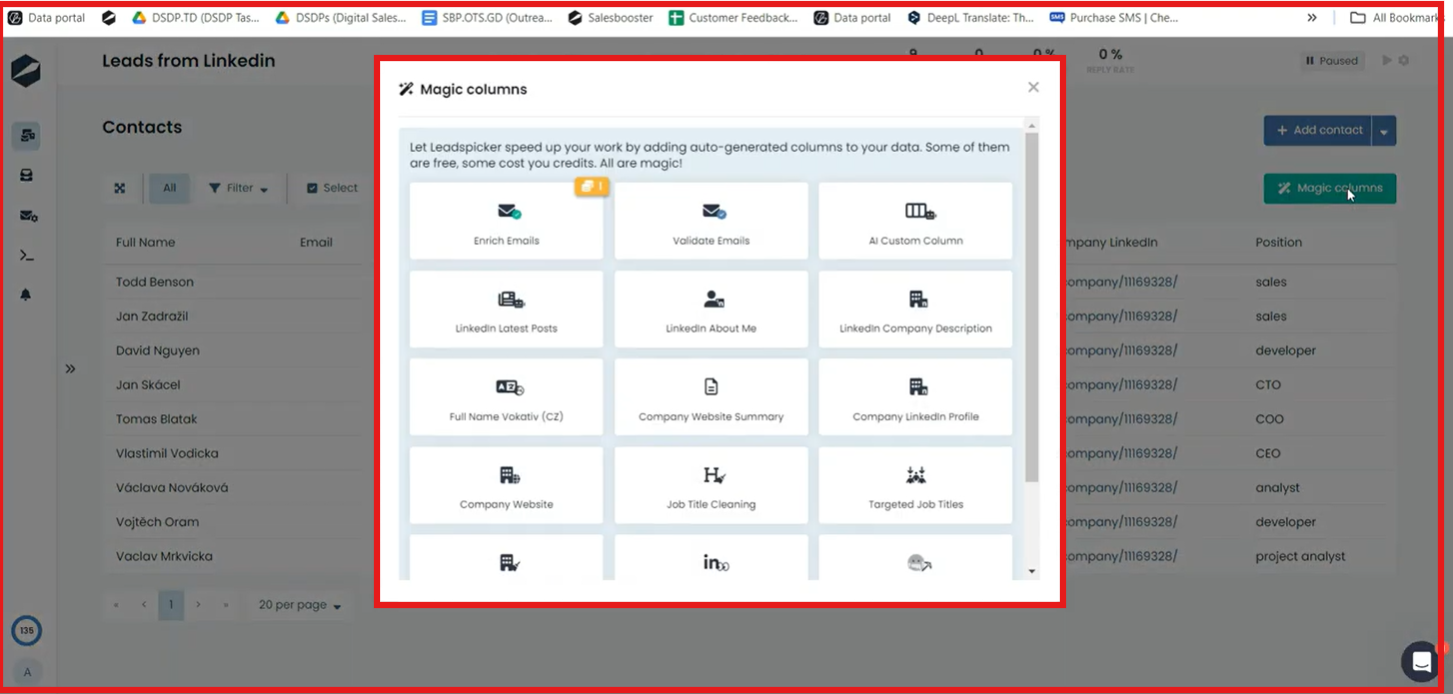
Magic Columns enrich your leads with job titles, emails, company data, LinkedIn activity, icebreakers, and personalization fields.
This image shows the Magic Columns by Leadspicker
Robots build lead lists automatically by scraping job boards, tracking profiles, or generating niche audiences with no manual work.
You create multichannel campaigns that send connection requests, LinkedIn DMs, InMails, and emails in one journey.
Replies from both channels show in one unified inbox, making it easy to manage conversations across your team.
Leadspicker runs actions safely because most LinkedIn automation is handled through Leadspicker’s own infrastructure, not your browser.
You can connect multiple email ans LinkedIn accounts to scale outreach for teams, agencies, or multiple clients.
Top Features of Leadspicker
Leadspicker gives you tools to find leads, enrich data, and run outreach across LinkedIn and email.
The goal is to help teams automate more steps, catch buying signals, and send the right message at the right time.
Here are the top features of Leadspicker:
Feature
What It Does
Signal-Based Lead Engine
Turns job posts, profile changes, and social activity into warm leads.
Magic Columns (Enrichment)
Adds job titles, emails, LinkedIn activity, icebreakers, and company data to your leads.
Automation Robots
Scrapes job portals, monitors LinkedIn, and builds lead lists automatically without manual work.
LinkedIn + Email Outreach
Sends connection requests, InMails, DMs, and emails in one unified journey.
Chrome Extension
Captures leads from LinkedIn and job portals in one click with enrichment.
Team & Multi-Account Support
Connects multiple LinkedIn and email accounts for agencies and sales teams.
AI Email Builder
Generates outreach messages using GPT to speed up personalization.
Email Finder & Validator
Finds missing emails and checks if they are valid before sending.
GDPR-Compliant Processing
Handles personal data safely and supports unsubscribe and deletion requests.
Leadspicker Pricing
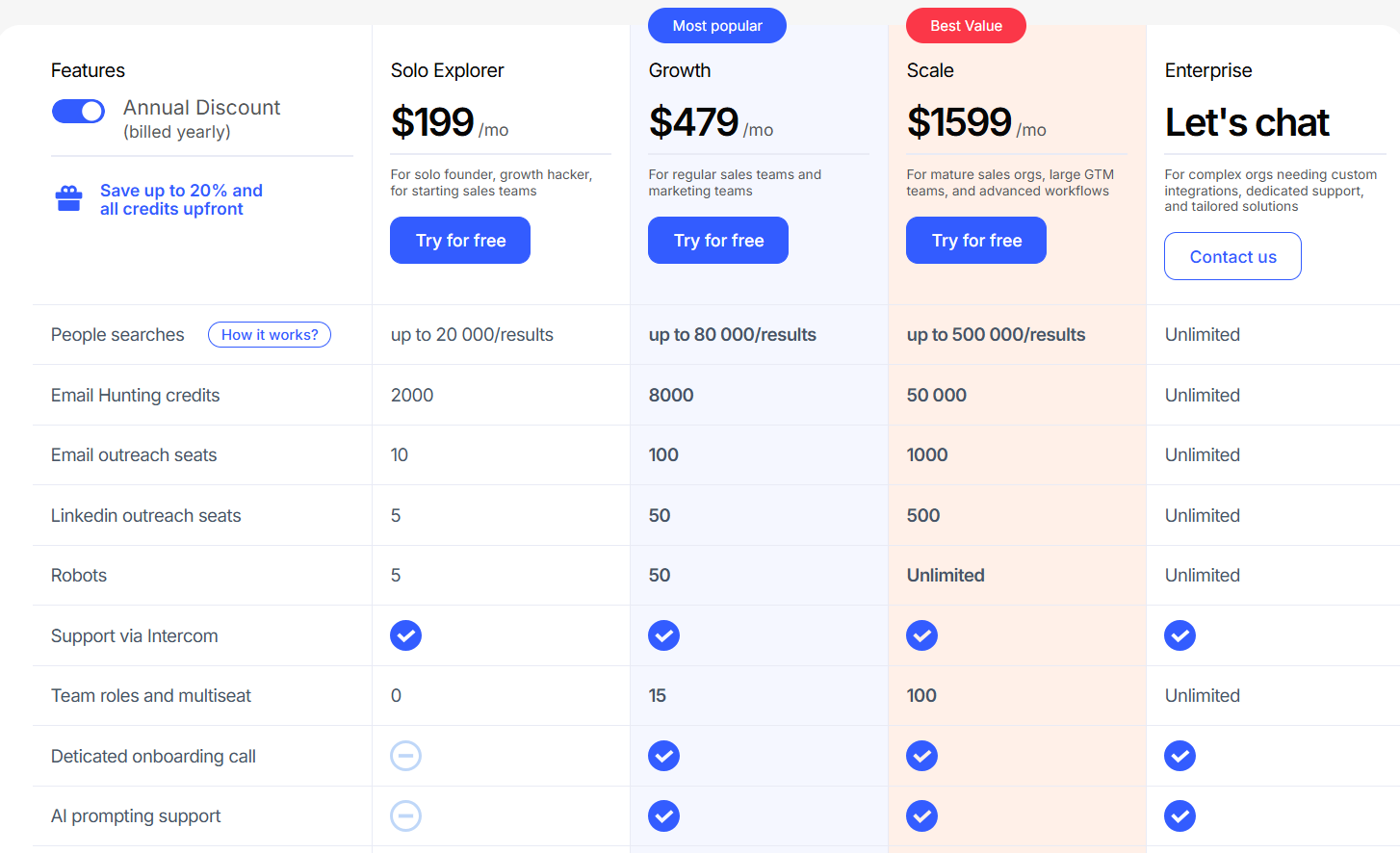
This image shows the Leadspicker pricing
Leadspicker offers simple pricing for solo founders, sales teams, and large GTM organizations.
Pricing mainly depends on how many leads you want to search, enrich, and contact, and how many outreach seats you need across LinkedIn and email.
There are four main plans: Solo Explorer, Growth, Scale, and Enterprise.
I. Solo Explorer - $249/month
Solo Explorer is for solo founders, growth hackers, and early-stage sales teams. It includes:
Up to 20,000 people searches
2,000 email hunting credits
10 email outreach seats
5 LinkedIn outreach seats
5 robots (automation agents)
Basic support via Intercom
This plan is mainly for small teams testing outbound and validating ICPs before scaling.
II. Growth - $599/month
Growth is for regular sales and marketing teams that want bigger lead lists and more automation. It includes:
Up to 80,000 people searches
8,000 email hunting credits
100 email outreach seats
50 LinkedIn outreach seats
50 robots
Team roles (15)
Dedicated onboarding call
AI prompting support
API access & Webhooks
Integrations + Signal notifications
This plan is ideal for companies actively scaling outbound on LinkedIn + email.
III. Scale - $1,999/month
Scale is for mature sales organizations with large GTM workflows and high outbound volume. It includes:
Up to 500,000 people searches
50,000 email hunting credits
1,000 email outreach seats
500 LinkedIn outreach seats
Unlimited robots
Team roles (100)
Dedicated Slack support
Dedicated account manager
Custom API integration
White-labeling
This plan fits agencies and enterprise teams managing many users and clients.
IV. Enterprise - Custom Pricing
Enterprise is for complex organizations that need custom integrations and support. It includes:
Unlimited usage
Custom API work
Dedicated onboarding
White-label solution
VIP support
Pricing is available through sales.
Additional Pricing Notes:
Leadspicker offers a free trial with no credit card required.
Annual billing provides up to 20% discount and upfront credits.
Supports multi-account connections for both LinkedIn and email.
Email hunting is credit-based, while outreach seats scale with plans.
Pros & Cons of Leadspicker
Pros
Cons
Safe LinkedIn automation using Leadspicker’s own infrastructure, reducing account risk.
No built-in B2B contact database like Apollo or Seamless.
Uses intent signals such as job posts, profile changes, and social activity to find high-intent leads.
Pricing is high for solo SDRs and small teams.
Unified email and LinkedIn outreach inside a single campaign.
Email hunting credits are limited on lower plans.
Chrome Extension makes scraping LinkedIn and job portals simple.
Not ideal for email-only outreach use cases.
Multi-account support for LinkedIn and email profiles.
White-label and custom integrations are only available at higher tiers.
GDPR-compliant with unsubscribe and data deletion options.
Onboarding and setup may require learning time.
Is Leadspicker the Right Fit for You?
Leadspicker is made for teams that want to find leads, enrich data, and run LinkedIn and email outreach in one tool.
But depending on your setup, it may or may not be the best match.
I. Leadspicker is a strong fit if you:
Want LinkedIn and email outreach in a single sequence
Need intent signals from job posts, profile changes, or social activity
Want safer LinkedIn automation through Leadspicker’s own infrastructure
Need robots to scrape job portals and build lead lists automatically
Run outreach for clients and need multi-seat, team roles, or white-label
II. Leadspicker may not be the best fit if you:
Need a built-in B2B contact database for prospecting
Only need simple email outreach without LinkedIn
Do not care about intent signals or enrichment
Want a low-cost tool for solo SDR use
Do not want to manage mailbox setup or email credits
Best Leadspicker Alternative for Lead Discovery – Leadsforge
If your main struggle with Leadspicker is finding enough fresh leads, then Leadsforge is the alternative worth looking at.
This image shows the Leadsforge homepage
Leadsforge is a B2B lead search engine that lets you get verified emails, LinkedIn profiles, and phone numbers from a 500M+ contact database, just by describing your ideal customer in plain English.
With Leadspicker, a lot of your lead flow depends on signals, job postings, profile changes, robots, and scraping, which is great for timing outreach, but not ideal for generating large, fresh lead lists fast.
Leadsforge solves that problem in a different way:
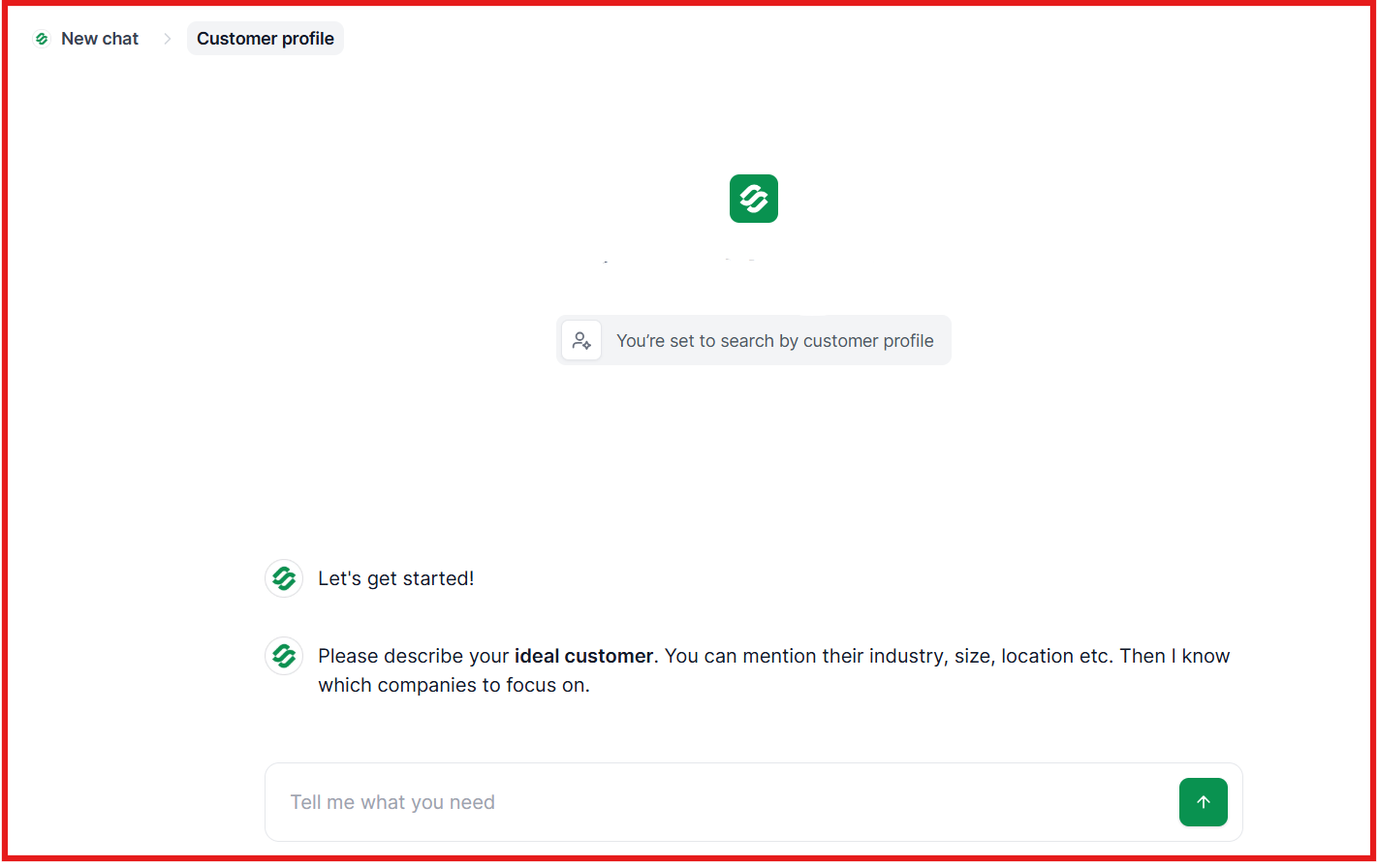
You can type prompts like, “Find SaaS CMOs in Canada” or “HR managers in fintech companies in the UK”
This image shows the Type your ideal customer on Leadsforge
Leadsforge returns verified contacts with email + LinkedIn + phone
You can also pull lookalikes and competitor followers
Data gets enriched using a waterfall method, not single-source scraping
You can export to CSV or push directly into Salesforge for outreach
Pricing is also simpler. Leadsforge starts at $49/month, credits never expire, and there’s no seat-based pricing, which removes friction for small teams.
Leadspicker uses seats + credits + robots, which makes more sense for agencies running multi-account outreach, not for companies that just need verified contacts quickly.
Leadspicker vs Leadsforge: Quick Comparison
Category
Leadspicker
Leadsforge
Core Purpose
Outreach automation (LinkedIn + Email)
Lead discovery and enrichment
How It Finds Leads
Robots and signals (job posts, profiles, social activity)
If you mainly want LinkedIn automation, signals, and agency-focused outreach, then Leadspicker is a great choice.
But if your main goal is to discover new leads quickly, enrich them with verified emails, LinkedIn profiles, and phone numbers, and use simple chat-based ICP prompts, then Leadsforge is a better option.
Is Leadspicker Worth It?
Leadspicker is a good tool if you want one platform to automate LinkedIn and email outreach.
It helps you trigger messages based on signals, manage multiple accounts, and run campaigns from one place.
It is a solid choice for sales teams and agencies that already have lead lists and want to scale outreach with less manual work.
But if your main problem is finding enough fresh leads, or you want an easier way to get verified emails, LinkedIn profiles, and phone numbers without scraping or robots, then you may need another tool.
That’s why Leadsforge is a strong alternative.
It lets you describe your ICP in chat, get verified contacts instantly, enrich emails/LinkedIn/phones, and export leads without worrying about credits expiring.